
A lead list grows fast, and not every entry in it needs your attention at the same time. Leads that are still moving through your pipeline matter every day. Leads that have already been won or lost, on the other hand, are done — but they don’t disappear from the list, and over time they start crowding out the ones you actually need to act on. To fix that, SocioLedger has split the Lead module into two clear tabs: Active and Inactive.
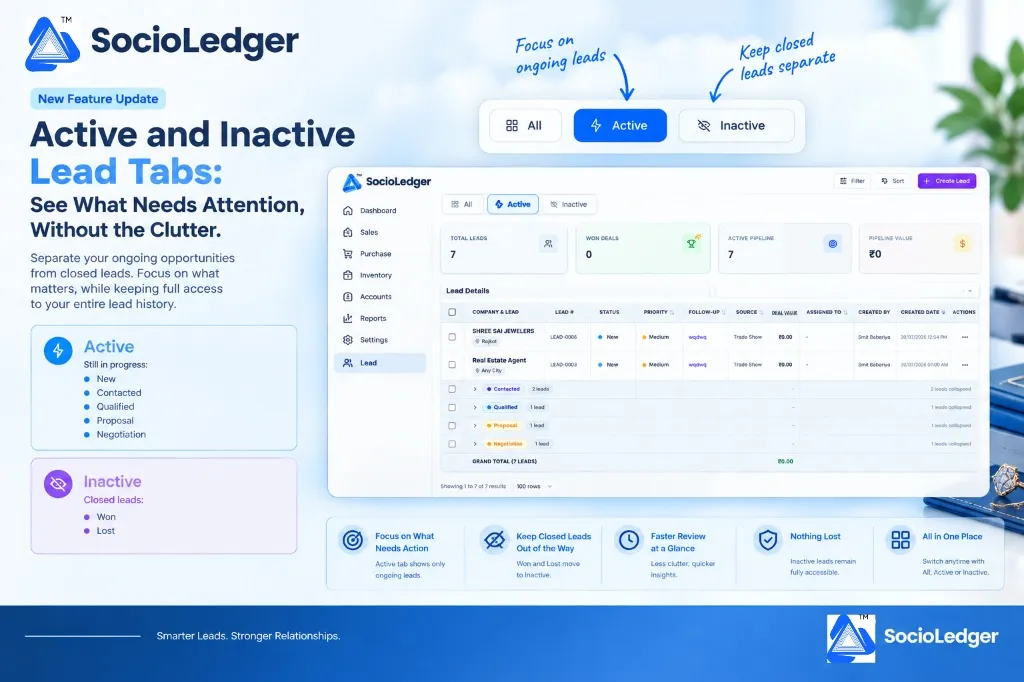
Table of contents
Open Table of contents
Why lead pipeline clutter slows down jewelry sales teams
In bustling jewelry trading hubs like Zaveri Bazaar, Surat, Rajkot, and Karol Bagh, jewelry sales teams capture inquiries from diverse channels every single week. Between retail showroom walk-ins, B2B wholesale counter visits, festival exhibitions, and digital marketing inquiries, your pipeline accumulates hundreds of prospective buyers.
However, treating all leads as a single continuous list creates operational friction:
- Active opportunities get lost in the noise: When showroom staff open their CRM queue, open leads needing immediate quotes or callbacks sit side-by-side with deals closed months ago.
- Wasted time during daily reviews: Sales managers spending their morning huddles assessing pipeline health must manually filter out won clients and closed-out inquiries.
- Slower follow-up velocity: Counter executives get overwhelmed by long tables, increasing the risk that a warm bridal inquiry or wholesale quotation goes cold.
- Reluctance to log historical outcomes: When closing a lead leaves it sitting in the main view indefinitely, teams often delay updating deal stages properly.
Your lead management system should give you immediate clarity on what needs action right now, without losing a single record from your historical archives.
+-----------------------------------------------------------------------------+
|                     SocioLedger Lead Module View Modes                      |
+-----------------------------------------------------------------------------+
|                                                                             |
|   ┌───────────────┐        ┌─────────────────┐        ┌─────────────────┐   |
|   │    [ All ]    │        │  [⚡ Active ]   │        │  [ 🚫 Inactive] │   |
|   │ (Full Record) │        │ (In Motion CRM) │        │(Closed History) │   |
|   └───────┬───────┘        └────────┬────────┘        └────────┬────────┘   |
|           │                         │                          │            |
|           ├─ All Stages             ├─ New                     ├─ Won       |
|           │                         ├─ Contacted               └─ Lost      |
|           │                         ├─ Qualified                            |
|           │                         ├─ Proposal                             |
|           │                         └─ Negotiation                          |
+-----------------------------------------------------------------------------+
What’s new in the Lead module
The Lead module now features dedicated Active and Inactive tabs located directly alongside the traditional All view:
- Active — covers leads that are still in motion: New, Contacted, Qualified, Proposal, and Negotiation.
- Inactive — covers leads that have reached a final outcome: Won and Lost.
- All — still gives you the complete, unfiltered list whenever you need the full picture across your entire organization.
All existing lead statuses and pipeline capabilities are still fully covered — nothing has been removed or altered. This update simply groups them logically, so you can focus on what’s ongoing without inactive leads sitting in the way.
Status breakdown: Active vs. Inactive
Every jewelry sales conversation moves through distinct stages before reaching a conclusion. Here is how SocioLedger organizes each status stage between the two tabs.
1. Active tab: deals currently in motion
The Active tab brings together all open opportunities that still require action, communication, or follow-up:
- New: Fresh inquiries from walk-ins, phone calls, or digital campaigns that need first contact.
- Contacted: Prospects where an initial discussion has taken place or a catalog has been shared.
- Qualified: High-intent prospects whose design preferences, gold purity requirements, and budget parameters have been verified.
- Proposal: Inquiries currently reviewing custom jewelry estimates, making charge calculations, or CAD rendering approvals.
- Negotiation: High-value deals in final pricing discussions, bullion rate-fix alignments, or payment term reviews.
2. Inactive tab: closed outcomes and archives
Once an inquiry reaches its final decision, it transitions smoothly into the Inactive tab:
- Won: Successfully converted clients whose quotes have turned into booked orders, sales invoices, or custom manufacturing job cards.
- Lost: Inquiries that opted out, postponed purchases, or selected alternative designs, preserved with full context for future seasonal remarketing.
Why this matters for jewelry businesses
Organizing your sales pipeline into clear operational views delivers tangible improvements to your daily showroom and wholesale workflows.
1. Focus on what’s actually pending
The Active tab shows only leads that still require follow-up, quotation revisions, or pipeline progression. Your sales staff can start their day knowing that every row visible on their screen represents an open opportunity requiring attention.
2. Keep closed leads out of your way
Won and Lost leads automatically move to Inactive. They no longer crowd the daily workspace or inflate active queue counts, keeping the interface clean, lightweight, and focused.
3. Faster review at a glance
With fewer, more relevant leads shown by default, spotting delayed follow-ups and high-priority deals becomes much faster during busy showroom hours. Key pipeline summary cards — such as Active Pipeline count and Total Deal Value — reflect immediate opportunities at a glance.
4. Nothing lost or deleted
Inactive leads remain fully accessible at any moment. Their entire communication history, attached notes, customer contact details, and follow-up logs are preserved in your database. When a past client returns for a new festival season, their complete profile is ready to review.
5. Granular stage grouping inside each tab
Within each tab, leads remain grouped by status stage. Inside the Active tab, you can expand or collapse New, Contacted, Qualified, Proposal, and Negotiation sections individually, keeping your deal values and pipeline subtotals clearly organized.
Tab comparison at a glance
| Dimension | Active Tab | Inactive Tab | All Tab |
|---|---|---|---|
| Primary Purpose | Daily follow-up and active pipeline execution | Historical review and closed deal analysis | Complete 360° sales audit and global search |
| Included Statuses | New, Contacted, Qualified, Proposal, Negotiation | Won, Lost | All statuses combined |
| Daily Visibility | Only open, actionable deals | Concluded deals only | Full unsegmented list |
| Pipeline Value Metrics | Total active deal value currently in play | Realized revenue and lost opportunity totals | Lifetime pipeline aggregate value |
| Status Grouping | Collapsible by active stages with subtotals | Collapsible by Won and Lost with subtotals | Collapsible by all stages |
| Setup Required | Automatic — zero configuration needed | Automatic — zero configuration needed | Default standard view |
How to use the new tabs in SocioLedger
Using the new tabbed views requires no extra setup or complex configuration:
- Open the Lead module — Navigate to the Lead section from your main left navigation sidebar.
- Choose your view — At the top of your lead screen, select between the Active, Inactive, or All tabs.
- Review grouped stages — Click to expand or collapse specific stage groups (such as Proposal or Negotiation) to see individual prospect rows and subtotal values.
- Advance lead statuses — As you update a lead from Negotiation to Won or Lost, SocioLedger automatically transitions the lead from Active to Inactive in real time.
- Switch to All anytime — Whenever you need a comprehensive overview of every lead ever recorded, simply click All for the complete dataset.
A clearer view of your jewelry sales pipeline
Not every lead deserves equal attention every day. By separating ongoing opportunities from closed ones, the Active and Inactive tabs make it easier for jewelry store owners, wholesale managers, and counter teams to stay focused on the leads that still need work — while keeping full history and access to everything that’s already been decided.
Whether you are coordinating showroom walk-ins with our exhibition lead management tools or managing follow-ups alongside task management with reviewer boards, SocioLedger gives your team the clarity needed to close deals faster.
Want another way to organize your leads? Tell us — contact our team and we’ll look into it.