
SocioLedger’s new AI ornament image generation feature produces photorealistic model images for your jewelry pieces in seconds, giving jewelers three flexible ways to start — pick an item design, select a tag, or upload an ornament photo directly. Showing a client how a necklace drape sits along the collarbone or how an intricate earring hangs in natural light has always required a dedicated photoshoot. Now, retail showrooms and wholesale design houses can generate studio-grade on-model imagery without pulling inventory off the sales floor.
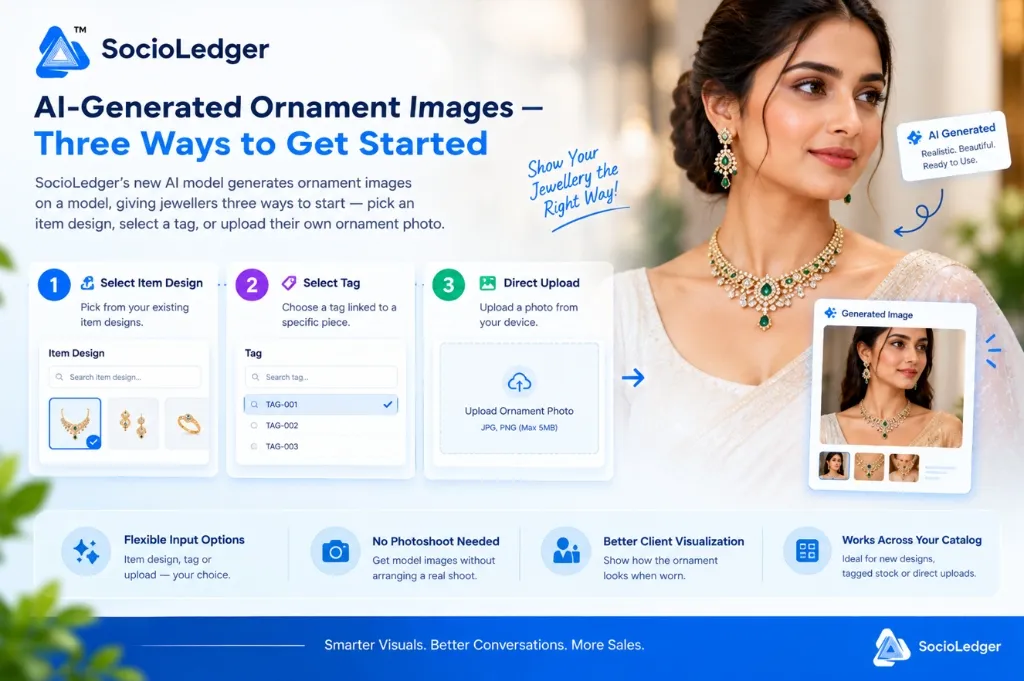
Table of contents
Open Table of contents
- Why realistic model visualization closes jewelry sales faster
- The bottlenecks and high costs of traditional jewelry photoshoots
- Three flexible ways to generate AI model images in SocioLedger
- Step-by-step: how the AI generation workflow works
- Traditional studio photoshoot vs. SocioLedger AI ornament generation
- Where to leverage AI model images across your jewelry business
- Smarter visuals for modern jewelry sales
Why realistic model visualization closes jewelry sales faster
In jewelry retail hubs like Zaveri Bazaar, Karol Bagh, or Surat, customer buying decisions hinge heavily on visual perception. When clients browse high-value bridal chokers, Polki sets, or lightweight daily wear, a flat product photo on a white tray rarely tells the complete story.
Customers want to see proportions:
- How does the necklace curve across the neckline?
- Does the drop earring reach the shoulder or sit higher?
- How do the gemstone colors and gold polish reflect against skin tones?
When sales executives can only present static flat-lay photos on a counter tablet or send unpolished WhatsApp snaps, customers hesitate. A worn ornament communicates scale, elegance, and lifestyle appeal instantly, removing doubt and accelerating buying decisions during consultations.
Arranging full-scale photo sessions for every single SKU, however, is neither practical nor cost-effective for fast-moving inventory.
The bottlenecks and high costs of traditional jewelry photoshoots
Traditional model photography presents major operational hurdles for jewelry businesses:
1. High production expenses and studio overhead
Booking professional models, professional photographers, hair and makeup artists, and studio lighting setups creates significant recurring costs. For independent jewelers and mid-sized wholesalers managing hundreds of seasonal designs, shooting every piece eats into operating margins.
2. Vault security risks during transit
Packing high-value gold sets, certified solitaires, and uncut diamond chokers to transport them to an external photography studio introduces substantial transit risk. Arranging armed escorts, secure transport, and temporary insurance coverage adds layers of complexity and cost.
3. Blocked showroom stock and inventory lag
Every hour an ornament spends packed inside a photography crate is an hour it cannot be showcased to walk-in buyers on your showroom floor. During peak festive rushes like Dhanteras or wedding seasons, locking up inventory for photoshoots causes missed sales opportunities.
4. Inability to showcase fresh or untagged designs
When a design team finalizes a CAD render or a master workshop crafts a single prototype, jewelers often want to gauge buyer interest before producing bulk inventory. Without physical finished stock on hand, arranging a photoshoot is impossible.
Software should eliminate these friction points, empowering jewelers to showcase their collections immediately.
Three flexible ways to generate AI model images in SocioLedger
SocioLedger solves these challenges by embedding generative AI model image generation directly into your jewelry management workflow.
Rather than forcing you into a single rigid intake path, SocioLedger provides three practical entry points:
┌────────────────────────────────────────────────────────────────────────┐
│             SocioLedger AI Ornament Image Generation                   │
├───────────────────┬────────────────────┬───────────────────────────────┤
│ 1. Item Design    │ 2. Inventory Tag   │ 3. Direct Photo Upload        │
│ Pick from master  │ Choose an active   │ Snap or upload an ornament    │
│ design catalog    │ stock tag code     │ photo from your device        │
└─────────┬─────────┴─────────┬──────────┴───────────────┬───────────────┘
          │                   │                          │
          └───────────────────┼──────────────────────────┘
                              ▼
        ┌──────────────────────────────────────────┐
        │ Instant Photorealistic AI Model Render  │
        │ • Natural drape, skin tone, & lighting   │
        │ • Studio-grade presentation ready to use │
        └──────────────────────────────────────────┘
1. Select an item design
Pick directly from your existing master design library in SocioLedger. The AI pulls the design parameters and reference imagery already stored in your catalog, rendering a realistic model wearing the piece. This is ideal for pitching custom designs, catalog concepts, or pre-order collections before mass manufacturing begins.
2. Select a tag
Choose an active tag linked to a specific physical piece in your stock. The AI retrieves the linked product visuals and specifications associated with that tag to generate on-model imagery. It pairs naturally with our camera scan tag barcode lookup and save and create tag workflows, allowing staff to create promotional model visuals right after tagging fresh inventory.
3. Direct photo upload
Snap a quick picture of any ornament on your counter using your smartphone or upload an existing image from your device. The AI automatically isolates the jewelry piece, cleans background noise, and fits it seamlessly onto a lifelike model with natural posture and studio-grade lighting.
Whichever route fits your immediate scenario, the outcome is uniform: an eye-catching, photorealistic image showing your ornament as it appears when worn.
Step-by-step: how the AI generation workflow works
Generating an on-model showcase image takes only a few clicks within SocioLedger:
- Choose your input method — Open the AI image generation tool and select whether you want to start from an Item Design, an Inventory Tag, or a Direct Upload.
- Provide the ornament — Select the design from your catalog dropdown, enter or scan your tag number, or drag and drop a photo (JPG or PNG) from your device.
- Generate the model image — Click generate and let the AI model process the piece. The engine accurately renders realistic drapes, earlobe positioning, proportions, and lighting.
- Deploy across your sales channels — Download the high-resolution output or attach it directly to your digital catalog for customer consultations, WhatsApp pitches, and social promotions.
The entire process takes under a minute, enabling showroom staff and marketing teams to produce professional visual assets on demand.
Traditional studio photoshoot vs. SocioLedger AI ornament generation
Here is how AI-powered model image generation compares to conventional commercial photography:
| Operational Dimension | Traditional Studio Photoshoot | SocioLedger AI Ornament Generation |
|---|---|---|
| Generation Speed | 3 to 7 days for shoot & post-processing | Under 60 seconds per piece |
| Cost per Asset | High model, photographer, & studio fees | Built directly into your software workflow |
| Inventory Security | High risk moving valuable stock off-site | Zero risk — stock stays in your vault |
| Input Flexibility | Requires physical finished pieces on set | Works via item designs, tags, or raw photos |
| Pre-Production Pitching | Not possible without sample manufacturing | Instant renders from catalog designs |
| Integration with ERP | Manual file renaming and catalog uploading | Direct link to inventory tags & design SKUs |
Using flexible AI generation allows jewelers to maintain marketing velocity while keeping valuable stock secure in their showrooms.
Where to leverage AI model images across your jewelry business
High-impact visual assets enhance customer interactions across multiple touchpoints:
- Showroom Counter Consultations: When a client asks to see alternative necklace designs or matching earring sets from your back vault, present high-resolution on-model renders on counter tablets rather than describing them verbally.
- WhatsApp & Digital Catalogs: Share realistic on-model photos directly through WhatsApp conversations or your online jewelry stock catalog to help remote clients visualize piece proportions clearly.
- B2B Wholesale & Trade Fairs: Pitch upcoming seasonal collections at trade events like IIJS or GJS using model imagery generated directly from master design files, collecting buyer commitments before casting physical stock.
- Social Media Marketing: Keep your social media feeds active with fresh bridal, festive, and daily-wear styling shots without spending hours in editing software.
Connecting visual generation to your core jewelry inventory management gives your team a competitive edge in every customer conversation.
Smarter visuals for modern jewelry sales
Not every ornament comes with a professional studio photo, and fast-paced jewelry businesses rarely have the time or budget to arrange one for every SKU. By providing three versatile paths to generate model imagery — from catalog designs, tagged inventory, or instant photo uploads — SocioLedger makes it easy to showcase every piece the way buyers actually want to see it.
Want to explore another way to generate, customize, or showcase your jewelry ornaments? Tell us — contact our team and let us know how we can tailor our visual tools to your daily workflow.