
SocioLedger now adds a direct Save & Create Tag button across both Wholesale and Retail modules, allowing jewelry businesses to save item specifications and generate inventory tags in a single click. Creating tags is a fundamental, high-frequency task in daily jewelry operations — from tagging newly received diamond rings and gold necklaces at wholesale counters to cataloging custom bridal sets in retail showrooms. Previously, operators had to fill out a detailed form, click save, and only then take another follow-up action to actually generate the physical tag. By eliminating that intermediate step, SocioLedger streamlines tag creation into one continuous, friction-free action.
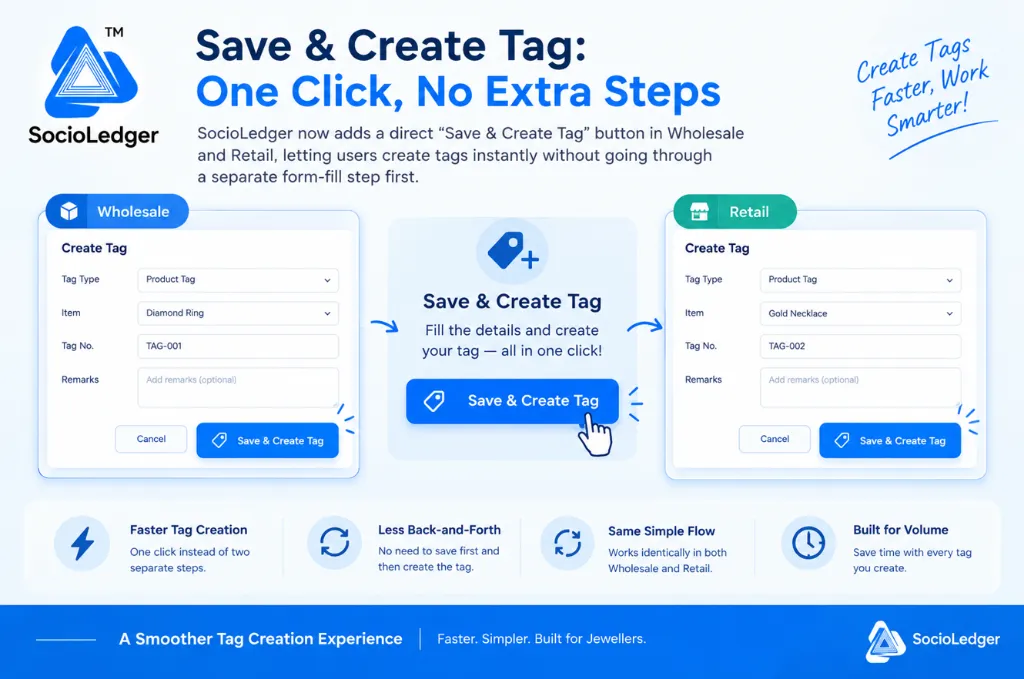
Table of contents
Open Table of contents
- The friction of two-step tag creation in daily jewelry operations
- The hidden operational costs of disjointed tagging workflows
- What’s new: 1-click Save & Create Tag in Wholesale and Retail
- Key benefits for growing jewelry businesses
- How it works: creating tags in a single go
- Traditional two-step tagging vs. 1-click Save & Create Tag
- Seamless integration with full tag lifecycle management
- Small changes that compound into massive workflow speedups
The friction of two-step tag creation in daily jewelry operations
Tagging jewelry pieces is one of the most repetitive administrative tasks in the entire industry. In busy jewelry trading hubs like Zaveri Bazaar, Surat, Karol Bagh, and Manek Chowk, intake desks handle hundreds of items every single day. Whether you are receiving finished batches from casting workshops, processing wholesale consignments, or preparing showroom trays for festive seasons, every single piece requires an accurate tag.
Traditionally, ERP software splits this process into two disconnected stages:
- Form submission: The operator fills in item parameters such as item category, gross weight, net weight, stone weight, purity, and remarks, then clicks save.
- Tag generation: Once the record is saved, the operator has to locate a separate button or secondary menu action just to generate the actual tag and assign its inventory barcode.
While this two-step sequence works, it forces staff to pause and perform an unnecessary extra action on every single piece. When an operator tags 200 rings, chains, or bangles in a single morning, clicking through two separate steps for every item creates tedious friction and slows down stock intake.
Software should speed up inventory processing, not slow it down with redundant confirmation steps.
The hidden operational costs of disjointed tagging workflows
Forcing staff to navigate a multi-step tag generation process introduces subtle bottlenecks and administrative overhead across your jewelry business.
1. Accumulated delays during high-volume stock intake
During seasonal rushes like Dhanteras, Akshaya Tritiya, wedding seasons, or post-exhibition inventory restocks, tagging speed directly dictates how quickly items reach display counters. Losing 5 to 10 seconds per item across a batch of 500 pieces adds up to hours of wasted counter time over a week.
2. Disrupted workflow rhythm and operator fatigue
Data entry operators and counter staff work best when they can maintain a steady, continuous rhythm: weigh the piece, enter the specifications, create the tag, and move to the next item. Having to hunt for a secondary action after every save breaks concentration and increases mental fatigue during long tagging sessions.
3. Inconsistencies across wholesale and retail desks
Jewelry businesses that operate both wholesale trading desks and retail showrooms often face workflow fragmentation. When wholesale and retail teams use different button placements or inconsistent tagging procedures, cross-department staff rotation becomes confusing and prone to procedural mistakes.
4. Risk of orphaned or untagged inventory records
When tag creation requires a follow-up click after saving, incoming counter distractions or phone calls can interrupt the process midway. An operator might save the item details but get pulled away before triggering the tag creation step, leaving inventory records saved in the system without an active physical tag.
Unifying data entry and tag generation into a single action eliminates these risks completely.
What’s new: 1-click Save & Create Tag in Wholesale and Retail
SocioLedger introduces a dedicated Save & Create Tag button directly on the tag creation form in both the Wholesale and Retail modules.
Instead of separating the data entry save from the tag generation trigger, one single click now handles both operations simultaneously:
- Saves all item details: Writes product specifications, metal weights, stone details, purities, and custom remarks directly to your database.
- Creates the tag instantly: Generates the official tag record with its assigned tag number, barcode, and inventory tracking identifiers in the exact same moment.
Whether you are tagging a diamond ring in Wholesale or a gold necklace in Retail, the flow is unified, predictable, and remarkably fast.
Key benefits for growing jewelry businesses
The new 1-click tag creation delivers immediate operational advantages:
- Faster tag creation — One click replaces two separate steps, moving you from entering details to having a finished tag instantly.
- Less back-and-forth — No need to save first and then search for a follow-up action to complete the process.
- Same simple flow, both places — The interface and workflow work identically in both Wholesale and Retail, ensuring a consistent experience across all departments.
- Built for volume — For operators creating tags repeatedly throughout the day, removing one step on every piece compounds into substantial daily time savings.
How it works: creating tags in a single go
Using the new Save & Create Tag button requires no special configuration. It is built directly into your everyday tag creation forms.
Here is how the streamlined process works:
- Fill in the tag details — Select the Tag Type (such as Product Tag), choose the Item (e.g., Diamond Ring or Gold Necklace), verify the Tag Number, and add any optional remarks.
- Click Save & Create Tag — Click the primary blue Save & Create Tag button instead of executing separate save and create actions.
- Done and ready to use — The tag is immediately saved and generated in one go, ready for printing, barcode scanning, or instant showroom placement.
The entire interaction takes a fraction of a second, keeping your intake desk moving at top speed.
Traditional two-step tagging vs. 1-click Save & Create Tag
Here is how the new unified flow compares to traditional ERP tagging methods:
| Workflow Dimension | Traditional Two-Step Process | 1-Click Save & Create Tag in SocioLedger |
|---|---|---|
| Action Count | 2 separate clicks per item (Save, then Create) | 1 unified click (Save & Create Tag) |
| Intake Speed | 8–12 seconds per piece | 2–3 seconds per piece |
| Workflow Rhythm | Interrupted by secondary button searches | Continuous, unbroken data entry flow |
| Department Consistency | Disparate buttons across Wholesale & Retail | 100% identical flow across all modules |
| Volume Suitability | Tedious during large intake batches | Optimized for high-volume daily tagging |
| Risk of Untagged Items | High if interrupted after first save | Zero — record and tag are created together |
Removing intermediate steps transforms a routine chore into a fast, fluid experience.
Seamless integration with full tag lifecycle management
Faster tag creation works hand-in-hand with SocioLedger’s complete jewelry inventory ecosystem:
- Complete Traceability: Every tag created with the new button links directly to jewelry tag history ERP traceability, providing a complete audit trail from initial intake through showroom transfers and final billing.
- Accidental Deletion Protection: Safeguard your newly created tags with a configurable tag delete confirmation setting to prevent accidental removals during busy counter shifts.
- Wholesale Barcode Efficiency: Accelerate supplier intake even further using wholesaler tag barcode on purchase workflows.
- Access Control: Maintain tight inventory security through role-based access control, ensuring only authorized staff members can create or modify inventory tags.
Every improvement in SocioLedger connects smoothly with your broader store operations.
Small changes that compound into massive workflow speedups
Not every software improvement needs to be an overwhelming overhaul. Often, the most impactful upgrades come from identifying routine, high-frequency actions and removing unnecessary friction.
The Save & Create Tag button is designed with that exact philosophy: eliminating an unnecessary step so that jewelers and counter staff can work faster, avoid repetitive clicks, and keep showroom operations moving smoothly.
Have another two-step action in your daily workflow that should be a single click? Tell us — contact our team and let us know how we can make your jewelry operations even faster.