
Jewelers with more than one branch move stock between locations all the time — a piece requested by a client at another outlet, rebalancing inventory across branches, or simply consolidating stock where it is needed most. Tracking exactly what left one branch and what arrived at another, without losing accountability along the way, has always needed careful manual record-keeping. SocioLedger’s new Branch Transfer feature brings this process directly into the platform, with physical tags serving as the single source of truth at every step.
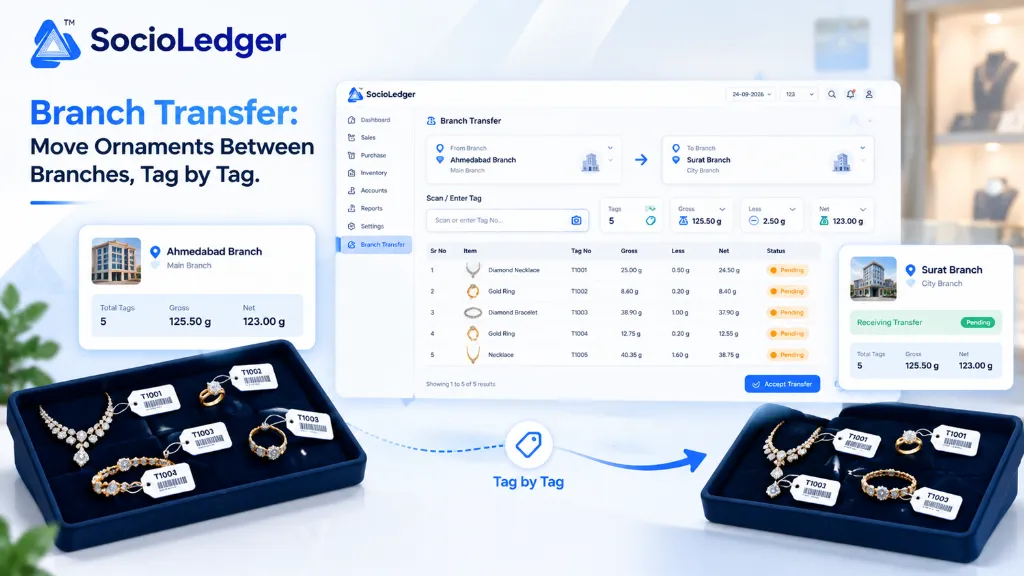
Table of contents
Open Table of contents
- Why multi-branch stock transfers create inventory blind spots
- What’s new in SocioLedger Branch Transfer
- Why this matters for multi-branch jewelry businesses
- How it works: step-by-step transfer workflow
- Traditional branch movement vs. SocioLedger Branch Transfer
- Where to find Branch Transfer in SocioLedger
- Part of SocioLedger’s complete jewelry inventory ecosystem
- Multi-branch stock, managed without the guesswork
Why multi-branch stock transfers create inventory blind spots
Managing multiple jewelry showrooms across different cities or retail high streets — such as moving pieces between Ahmedabad, Surat, Mumbai, or Rajkot — requires constant inventory rebalancing. A bridal customer in one showroom might request an uncut diamond choker currently sitting in another city branch, or a store manager might need to shift lightweight daily-wear gold bangles to meet festive demand during Dhanteras and wedding seasons.
Traditionally, inter-branch jewelry movement has been managed through disconnected manual routines:
- Manual challans and paper registers: Dispatches are written down on physical slips or WhatsApp chats, leaving no real-time audit trail in the central ERP system.
- Premature stock deductions: Traditional systems either deduct stock the moment a transfer is typed out or require complicated double-entry adjustments that risk duplicate counts.
- Accidental movement of sold or reserved items: Without tag-level validation, staff might mistakenly pack a piece that was already billed or reserved for another client order.
- Missing weight and item verification: Receiving staff often receive a package without an instant breakdown of gross, net, and less weights, making it tedious to tally what actually arrived inside the dispatch box.
- Disputed transit accountability: When ornaments go missing or discrepancies occur during courier transit, it is difficult to determine whether an error happened at the dispatch branch or the receiving counter.
Multi-branch stock movement should never depend on guesswork or messy spreadsheets. Every single piece should be scanned, verified, and officially acknowledged by both sending and receiving locations.
+-----------------------------------------------------------------------------+
|               SocioLedger Tag-by-Tag Branch Transfer Flow                   |
+-----------------------------------------------------------------------------+
|                                                                             |
|   [ Source Branch ]                 [ In-Transit ]        [ Destination ]   |
|   (e.g., Ahmedabad)                                       (e.g., Surat)     |
|                                                                             |
|   ┌─────────────────────────┐                             ┌─────────────┐   |
|   │ Select From & To Branch │                             │             │   |
|   └───────────┬─────────────┘                             │             │   |
|               │                                           │             │   |
|               ▼                                           │             │   |
|   ┌─────────────────────────┐                             │             │   |
|   │ Scan Non-Sold Tags Only │                             │             │   |
|   │ (T1001, T1002, T1003...)│                             │             │   |
|   └───────────┬─────────────┘                             │             │   |
|               │                                           │             │   |
|               ▼                                           │             │   |
|   ┌─────────────────────────┐                             │             │   |
|   │ Live Tally Verification │                             │             │   |
|   │ (Tags, Gross, Less, Net)│                             │             │   |
|   └───────────┬─────────────┘                             │             │   |
|               │                                           │             │   |
|               ▼                                           │             │   |
|   ┌─────────────────────────┐        ┌────────────────┐   │             │   |
|   │ Save Transfer (Pending) │ ─────> │ Status: PENDING│ ─>│ Review &    │   |
|   └─────────────────────────┘        └────────────────┘   │ Accept      │   |
|                                                           └──────┬──────┘   |
|                                                                  │          |
|                                                                  ▼          |
|                                                           ┌─────────────┐   |
|                                                           │ Stock Moves │   |
|                                                           │ to Branch   │   |
|                                                           └─────────────┘   |
+-----------------------------------------------------------------------------+
What’s new in SocioLedger Branch Transfer
SocioLedger introduces a dedicated Branch Transfer module that lets jewelry businesses send tagged items between branches in a structured, verifiable workflow:
- Select From and To Branch: Choose precisely which showroom or warehouse the stock is departing from and which outlet it is traveling to.
- Scan or enter tag numbers: Only tags currently marked as non-sold in the source branch can be scanned, preventing errors and ensuring only available inventory is dispatched.
- Review live scan totals: As you scan tags, the platform calculates running totals for Tag Count, Gross Weight, Less Weight, and Net Weight in real time.
- Save with Pending status: Once saved, the transfer record sits safely in a
Pendingstate, alerting the destination branch without prematurely altering their live stock counts. - Receiving branch accepts: The destination branch inspects the physical pieces against the transfer manifest and clicks
Accept Transfer, officially completing the transfer into their local inventory. - Bi-directional flexibility: Any branch in your business network can initiate a transfer to any other branch, making sending and receiving stock equally straightforward.
Why this matters for multi-branch jewelry businesses
Operating multiple branches requires strict stock control across showroom floors, vaults, and transit routes. The new Branch Transfer capability delivers immediate operational safeguards.
1. Full tag-level accountability
Every tag included in a transfer is recorded, scanned, and tied to a unique transfer record. You have an indelible audit trail showing who initiated the transfer, which specific tags were packed, when the dispatch occurred, and who accepted the shipment at the destination counter.
2. No accidental transfers of sold stock
A common headache in multi-branch retail is trying to transfer a piece that has already been invoiced or set aside for customer delivery. SocioLedger enforces strict validation at the moment of scanning: only active, non-sold tags located in the selected source branch are accepted. If a tag belongs to another branch or has already been marked as sold, the system prevents it from being added.
3. Clear running totals during packing
As counter associates scan tags into the transfer sheet, SocioLedger dynamically tallies Gross Weight, Less Weight (stone and enamel deductions), and Net Metal Weight. Packing staff can instantly compare the digital summary against physical scale readings before sealing the shipment box.
+-----------------------------------------------------------------------------+
|                     Live Transfer Weight Metrics                            |
+-----------------------------------------------------------------------------+
|  [ Tags: 5 ]  |  [ Gross: 125.50 g ]  |  [ Less: 2.50 g ]  | [ Net: 123.00 g ]
+-----------------------------------------------------------------------------+
|  1. Diamond Necklace (T1001) ── Gross: 25.00 g | Less: 0.50 g | Net: 24.50 g
|  2. Gold Ring        (T1002) ── Gross:  8.60 g | Less: 0.20 g | Net:  8.40 g
|  3. Diamond Bracelet (T1003) ── Gross: 38.90 g | Less: 1.00 g | Net: 37.90 g
|  4. Gold Ring        (T1004) ── Gross: 12.75 g | Less: 0.20 g | Net: 12.55 g
|  5. Necklace         (T1005) ── Gross: 40.35 g | Less: 1.60 g | Net: 38.75 g
+-----------------------------------------------------------------------------+
4. Two-sided confirmation and handshake
A transfer stays in the Pending state while in transit. Stock does not magically transfer into the destination store’s balance sheet until the receiving branch physically verifies the parcel and clicks Accept Transfer. This two-sided handshake eliminates inventory discrepancies between branches.
5. Works both ways across your entire network
Whether you are transferring ornaments from your central manufacturing hub in Surat to a flagship retail showroom in Ahmedabad, or returning unsold designs back from a mall counter to your main vault, the workflow is identical. Any authorized branch can send to any other branch across your network.
How it works: step-by-step transfer workflow
Moving inventory between branches takes just a few quick steps in SocioLedger:
- Create a new Branch Transfer: Open the Branch Transfer section and select your From Branch (source) and To Branch (destination).
- Scan or type tag numbers: Scan physical barcodes with your barcode scanner, point your device camera using camera tag scan, or type tag numbers manually. The system automatically populates item name, tag number, gross weight, less weight, and net weight.
- Add optional parcel details: Enter narration notes, box piece counts, or total box parcel weights to accompany the dispatch record.
- Save the transfer: Click save to create the transfer record. It immediately appears in the platform with a clear Pending status badge.
- Receiving branch reviews and accepts: When the package arrives at the destination outlet, staff open the pending transfer record, verify the ornaments against the list, and click Accept Transfer. The tags are instantly updated to the new branch’s active stock ledger.
Traditional branch movement vs. SocioLedger Branch Transfer
Here is how SocioLedger compares to traditional manual or spreadsheet-based stock transfers:
| Feature & Operational Factor | Traditional Manual / Paper Transfer | SocioLedger Tag-by-Tag Branch Transfer |
|---|---|---|
| Data Entry | Handwritten slips or manual Excel | Rapid tag barcode / camera scanning |
| Sold Tag Protection | Prone to accidental dispatch | Blocked automatically by system |
| Weight Tally | Manual calculation on desk notepad | Instant real-time Gross, Less, and Net |
| Transit Status | Blind spot until phone confirmation | Transparent Pending state indicator |
| Stock Transfer Timing | Immediate or manual adjustment | Two-sided acceptance handshake |
| Audit Trail | Fragmented across paper receipts | Centralized, tag-wise historical log |
Where to find Branch Transfer in SocioLedger
Branch Transfer is accessible as its own dedicated section in the SocioLedger main navigation menu.
The main dashboard lists all ongoing and historical transfers between your branches, complete with date stamps, source and destination outlets, tag counts, total metal weights, and status indicators (Pending or Accepted). You can initiate a new transfer at any moment, track shipments currently in transit, or review past dispatches for complete accounting reconciliation.
Part of SocioLedger’s complete jewelry inventory ecosystem
Branch Transfer connects directly with SocioLedger’s comprehensive jewelry management tools:
- Quick Tagging: Generate new barcodes instantly at intake with the 1-click Save & Create Tag button.
- Optical Scanning: Scan tags rapidly across counters using our native camera barcode scanner.
- Lifecycle Tracking: Trace every transfer, purchase, and sale event with complete jewelry tag history ERP traceability.
- Daily Stock Tally: Perform fast, discrepancy-free evening audits using stock tally daily verification.
- Exhibition Transfers: Manage mobile inventory during industry trade fairs with offline stock tally for exhibitions.
Multi-branch stock, managed without the guesswork
Moving ornaments between branches shouldn’t mean losing track of exactly what went where. With tag-level scanning, running weight totals, and a clear pending-to-accepted flow, Branch Transfer gives jewelers with multiple locations a reliable, accountable way to manage stock movement across their entire business.
Managing stock across branches in another way we haven’t covered? Tell us — contact our team and we’ll look into it.