
SocioLedger now allows jewelry businesses to copy an existing team member to set up new staff in seconds. Jewelry showrooms and wholesale trading desks frequently hire multiple people into identical positions — whether onboarding a second sales executive for the bridal counter, adding a billing operator for festive rush hours, or bringing on an apprentice karigar coordinator. Instead of configuring dozens of permission toggles and warehouse access rules from scratch, store managers can clone an existing profile and activate new accounts almost instantly.
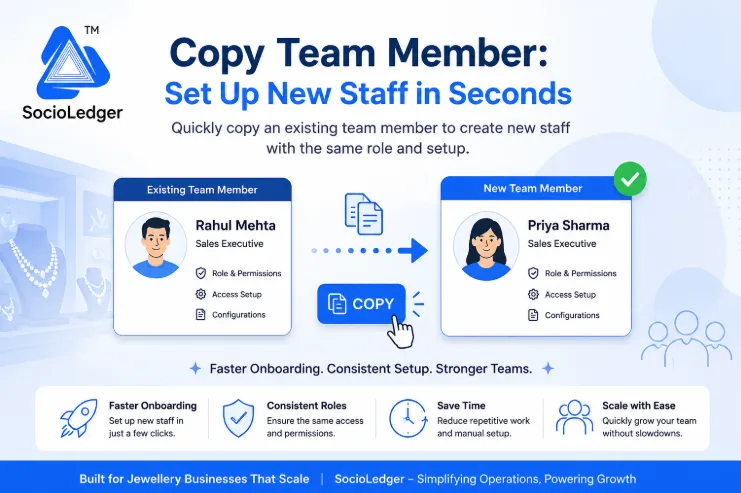
Table of contents
Open Table of contents
- Why repetitive staff setup slows down growing jewelry businesses
- The risks and bottlenecks of manual user provisioning
- How Copy Team Member works in SocioLedger
- Manual user setup vs. 1-click team member copying
- Scaling your jewelry team with consistency and security
- Built for jewelry businesses that scale
Why repetitive staff setup slows down growing jewelry businesses
Teams grow in predictable patterns. When a jewelry showroom expands or prepares for seasonal rushes like Dhanteras, Akshaya Tritiya, or wedding seasons, owners rarely create brand-new operational roles. Instead, they hire more people to perform existing duties.
In active jewelry hubs like Zaveri Bazaar, Karol Bagh, or Surat, onboarding new counter staff traditionally requires navigating deep software settings. Store administrators must manually select the appropriate branch, assign ledger visibility, configure discount ceilings, toggle inventory viewing rights, and set up invoice printing rules.
When you have to repeat this manual configuration field-by-field for every new hire, setting up user accounts becomes an unnecessary chore. A process that should take thirty seconds ends up taking fifteen minutes of tedious data entry.
Software should speed up team expansion, not slow it down with repetitive administrative work.
The risks and bottlenecks of manual user provisioning
Setting up team member permissions from scratch for every new employee introduces operational drag and security vulnerabilities into your business.
1. Inadvertent permission errors and security leaks
A modern jewelry ERP manages sensitive operational boundaries — from vault balances and wholesale purchase prices to customer contact lists and maximum discount limits. When managers manually configure each toggle for a new employee, it is easy to miss a critical restriction or accidentally grant access to confidential financial ledgers.
2. Inconsistent privileges across identical roles
Two salespeople working at the same counter should have identical software permissions. When profiles are built by hand on different days, subtle discrepancies emerge. One salesperson might have access to custom order status overrides while another does not, causing confusion on the sales floor during busy showroom hours.
3. Administrative bottlenecks during seasonal hiring
During peak exhibition periods like IIJS or festive shopping months, jewelry retailers often bring on temporary floor executives and billing assistants. Forcing store owners or IT managers to spend hours manually provisioning accounts creates friction right when the focus should be on inventory and customer service.
4. Delayed day-one productivity for new hires
When onboarding requires complex profile setup, new team members often spend their first day waiting for credentials and access permissions to be sorted out. This delay frustrates new hires and keeps them from contributing to showroom operations immediately.
Replicating an existing, proven role setup eliminates these bottlenecks completely.
How Copy Team Member works in SocioLedger
SocioLedger introduces a dedicated Copy Team Member action directly inside the User Management module, giving store managers an instant shortcut to replicate any existing profile.
Instead of starting with a blank user form and selecting dozens of access rights one by one, you start from a profile that is already configured, tested, and working in your daily operations.
Here is how the workflow works:
- Pick an existing team member — Open your team member list in SocioLedger and locate the person whose role and access permissions you want to duplicate.
- Click the Copy option — Select the copy action next to their profile to generate a pre-configured user template with all role settings, branch permissions, and module rights pre-populated.
- Adjust unique personal details — Enter the new team member’s name, email address, mobile number, and login credentials.
- Save and activate — Save the record. The new team member is immediately ready to log in with the exact permissions required for their job.
The entire process takes under thirty seconds, allowing store managers to delegate access with total confidence.
Manual user setup vs. 1-click team member copying
Copying team member profiles transforms how jewelry businesses manage staff onboarding across single and multi-branch operations:
| Setup Dimension | Manual User Provisioning | Copy Team Member in SocioLedger |
|---|---|---|
| Setup Speed | 10–15 minutes per staff member | Under 30 seconds per staff member |
| Permission Accuracy | Prone to human oversight and missed toggles | 100% identical match to verified profile |
| Role Consistency | Varies across different configuration dates | Uniform access across all peers in the role |
| Seasonal Scaling | Creates administrative delays during rush periods | Rapidly scales temporary or exhibition staff |
| Security Alignment | Risk of accidental access to private ledgers | Inherits strict, pre-tested security boundaries |
Using a pre-configured template ensures that your security standards remain consistent no matter how quickly your team grows.
Scaling your jewelry team with consistency and security
Speeding up user onboarding does not mean cutting corners on data security. In fact, copying existing profiles significantly strengthens your internal controls.
When you clone an existing role, the new profile inherits all the safeguards configured under your role-based access control policies. If your existing floor salesperson is restricted from viewing wholesale buy prices, capital gold accounts, or export reports, the new hire will automatically receive those exact same protections.
Once onboarded, managers can immediately assign showroom responsibilities and track operational workflows using task management across sales, inventory, and order fulfillment teams.
Whether you run a standalone retail showroom or coordinate teams across multiple wholesale branches, role replication ensures your system remains organized, secure, and ready to scale.
Built for jewelry businesses that scale
Adding people to your business shouldn’t be slowed down by repetitive administrative steps — especially when the role already exists. The Copy Team Member feature is a focused addition with a clear goal: helping jewelers onboard staff in seconds while keeping security and role definitions strictly consistent.
Have another daily workflow or setup step you wish was faster? Tell us — contact our team and let us know how we can make your operations smoother.