
SocioLedger now introduces a direct shortcut from Payment Receipt to Rate Cut, eliminating repetitive navigation and duplicate data entry for busy jewelry accountants and showroom teams. In daily jewelry retail and bullion trading operations, recording a payment or receipt is frequently just the first half of a settlement. The very next step is booking a rate cut against that exact transaction — same ledger, same type, and same trading context. Instead of saving, exiting the screen, opening Rate Cut, and re-selecting the customer ledger and payment type from scratch, the new shortcut saves the entry and lands you directly on Rate Cut with all matching details pre-selected.
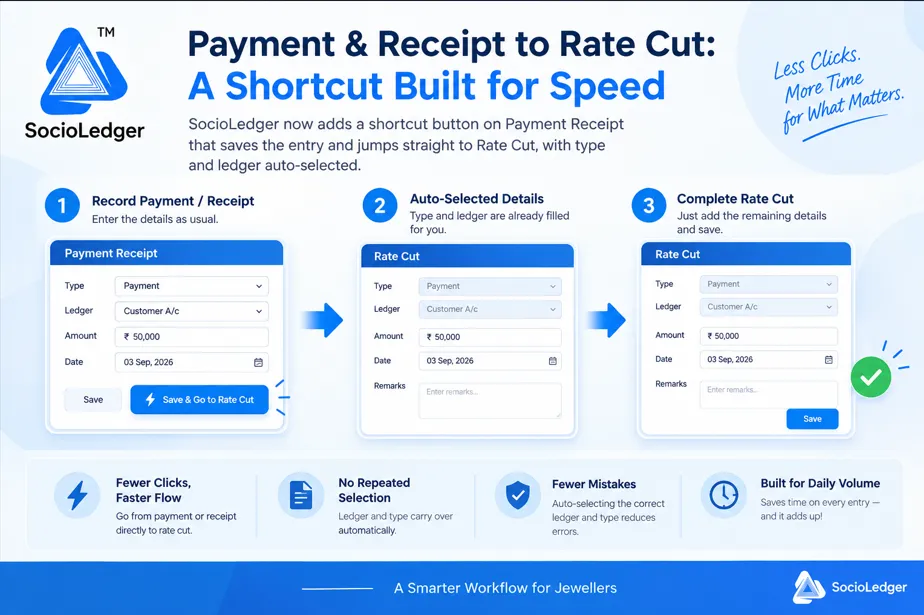
Table of contents
Open Table of contents
- The friction of two-step settlements in daily jewelry accounting
- The hidden costs of module hopping and duplicate data entry
- How the Payment Receipt to Rate Cut shortcut works
- Traditional multi-step entry vs. SocioLedger 1-click shortcut
- Why workflow speed matters for modern jewelers
- A small button, a real time-saver
The friction of two-step settlements in daily jewelry accounting
In active jewelry trading hubs like Zaveri Bazaar, Karol Bagh, or Manek Chowk, settling customer accounts is a fast-paced, high-frequency process. When a customer or wholesale counterparty settles an outstanding balance or places an advance deposit, the transaction rarely stops at recording currency. Because gold and silver prices fluctuate constantly throughout the trading day, payments are almost immediately paired with a rate cut to fix the metal price.
Traditionally, completing this sequence in accounting software requires multiple disjointed steps. An operator first enters the Payment Receipt module, selects the party, enters the payment amount, and saves the voucher.
Then, the operator has to leave the Payment Receipt screen, open the navigation menu, select the Rate Cut module, create a new rate cut entry, search for the same ledger account, and pick the matching transaction type before finally entering the gold rate and metal weight.
When you repeat this multi-step dance dozens of times a day during busy festive periods or volatile market hours, those extra clicks add up to significant wasted time and mental fatigue.
Software should remove friction from repetitive counter tasks, not create unnecessary detours.
The hidden costs of module hopping and duplicate data entry
Navigating between separate modules for tightly linked accounting actions introduces friction and operational risk into your daily showroom workflows.
1. Wasted seconds on high-volume counters
When trading floors and billing counters handle hundreds of customer interactions daily, every extra click slows down the queue. Forcing operators to close one screen and open another to complete a single customer settlement creates unnecessary lag at the cash desk.
2. Accidental ledger selection mistakes
During busy showroom hours, search dropdowns contain hundreds of similar customer and vendor names. Manually searching and re-selecting the ledger on a fresh Rate Cut screen opens the door to human error — such as accidentally applying a rate cut against the wrong account or picking an incorrect transaction type.
3. Disrupted transaction continuity
When an operator saves a payment receipt and has to manually set up a rate cut, the natural flow of the transaction is interrupted. If an incoming phone call or counter distraction happens between the two screens, uncompleted rate cuts can be delayed or overlooked entirely.
4. Delayed end-of-day gold reconciliations
When rate cuts are delayed or misallocated due to cumbersome navigation, matching cash balances against fine metal obligations becomes complicated. This slows down evening account balancing and complicates your jewelry accounting bhav filter reconciliations.
Connecting linked transactions into a unified action keeps your books synchronized in real time.
How the Payment Receipt to Rate Cut shortcut works
SocioLedger introduces a dedicated Save & Go to Rate Cut shortcut button directly on the Payment Receipt screen, streamlining the entire two-step process into one seamless flow.
Instead of saving and navigating away, you trigger the save and transition to the rate cut in a single click.
Here is how the workflow operates:
- Record the payment or receipt — Open Payment Receipt as usual, choose the transaction type (Payment or Receipt), select the customer or vendor ledger, and enter the transaction amount and date.
- Click the shortcut button — Instead of pressing the standard Save button, click Save & Go to Rate Cut. The system instantly commits your payment receipt voucher to the database.
- Land on Rate Cut with pre-selected details — SocioLedger immediately opens the Rate Cut screen with the transaction type and ledger account already filled in, exactly matching the voucher you just saved.
- Complete the rate cut — Enter the agreed metal rate, fine gold weight, and any optional remarks, then click save.
The entire handoff happens instantaneously, keeping your accounting accurate and your counter moving at full speed.
Traditional multi-step entry vs. SocioLedger 1-click shortcut
Connecting payment receipt vouchers directly to rate cut entries eliminates manual repetition and protects data integrity:
| Workflow Step | Traditional Multi-Step Process | SocioLedger 1-Click Shortcut |
|---|---|---|
| Voucher Saving | Save voucher and return to menu | Saves voucher and jumps directly to Rate Cut |
| Module Navigation | Requires opening menu and locating Rate Cut | Instantaneous automatic transition |
| Ledger Selection | Must manually search and select customer again | Auto-selected from payment receipt record |
| Type Matching | Operator must remember and set matching type | Pre-filled to prevent mismatched accounting |
| Total Settlement Time | 45–60 seconds per customer entry | Under 15 seconds per customer entry |
| Error Vulnerability | High risk of wrong ledger or forgotten rate cut | 100% matched ledger with zero selection mistakes |
Automating the handover between related accounting modules guarantees speed without sacrificing bookkeeping precision.
Why workflow speed matters for modern jewelers
Fast counter operations directly improve customer satisfaction and back-office efficiency. When retail customers or wholesale buyers settle their dues, they expect quick, transparent billing without waiting for staff to fight with complex software screens.
By pairing payment receipt vouchers directly with rate cuts, store managers maintain exact metal-to-cash parity on every transaction. This streamlined handoff works hand-in-hand with role-based access control to ensure counter staff can execute fast transactions within strictly controlled financial guardrails.
Whether you run a standalone retail showroom or a busy bullion trading desk, reducing repetitive clicks lets your team focus on what matters most — serving customers and driving sales.
A small button, a real time-saver
This shortcut exists for one clear reason — jewelers move fast, and your ERP should keep up with your daily pace. By connecting Payment Receipt directly to Rate Cut and carrying over the details that do not need to be re-entered, this update trims out a repetitive bottleneck from a workflow jewelers use every single day.
Have another two-step process in your daily operations that could be simplified into one click? Tell us — contact our team and let us know what workflow we should streamline next.