
Your ledger history, customer and supplier records, and inventory data represent years of business — and that data shouldn’t feel locked into a single account with no way out. Whether you need a safe backup, want to move your data to a new account, or simply want peace of mind that your records are portable, that flexibility is now built directly into the platform. SocioLedger’s new Data Management feature gives jewelry businesses full control over their records with password-protected, encrypted .led exports and seamless one-click restore capabilities.
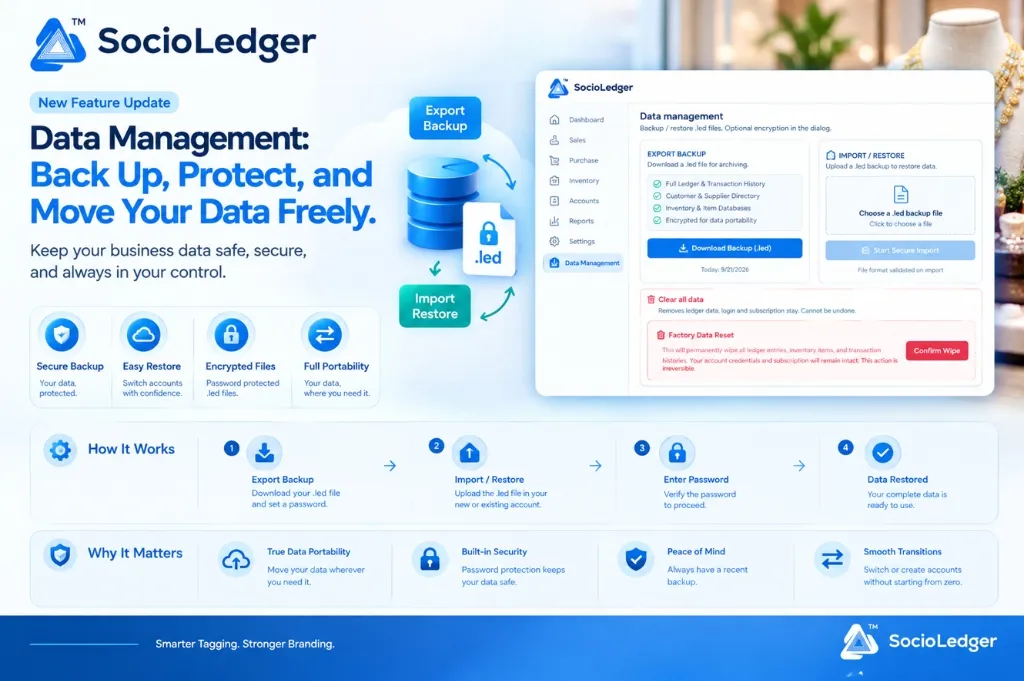
Table of contents
Open Table of contents
- Why data portability and independent backups matter for jewelers
- What’s new in SocioLedger Data Management
- Export Backup: One-click encrypted .led downloads
- Import / Restore: Seamless data recovery and account transfers
- How It Works: The 4-step backup and restore flow
- Why This Matters: 4 key operational advantages
- Where to find Data Management in SocioLedger
- Your data, under your control
Why data portability and independent backups matter for jewelers
In major jewelry retail and manufacturing hubs like Zaveri Bazaar, Karol Bagh, CG Road, Surat, and Rajkot, a jewelry ERP stores the lifeblood of the enterprise. Every fine gold rate cut, diamond parcel valuation, karigar metal ledger, customer GST invoice, and barcode tag represents hard-earned business equity.
Historically, business owners have faced severe data lock-in when using traditional software:
- Vendor lock-in: Data is stored in proprietary, inaccessible server formats where extracting your own records requires technical support tickets or hefty export fees.
- Vulnerability to account disruption: If you need to reset an account, reconfigure branches, or spin up a new sister entity, you often have to start from zero and re-enter thousands of ledger accounts and inventory items by hand.
- Unsecured local spreadsheets: When traditional systems do allow exports, they dump sensitive client lists and pricing structures into unencrypted CSV files that anyone with a USB drive can copy.
- Lack of offline archives: Showroom owners rarely possess a dated, standalone snapshot of their complete database stored safely outside live cloud infrastructure.
Business data should move as freely and securely as your physical inventory. You should always have direct, unhindered ownership over your records without depending on third-party intervention.
+-----------------------------------------------------------------------------+
|              SocioLedger Data Management Architecture                       |
+-----------------------------------------------------------------------------+
|  [ Live ERP System ]                                                        |
|  ├── Full Ledger & Transaction History                                      |
|  ├── Customer & Supplier Directory                                          |
|  └── Inventory & Item Databases                                             |
|                                                                             |
|         │ (1-Click Export + Password)           ▲ (Upload + Authenticate)   |
|         ▼                                       │                           |
|  ┌─────────────────────────┐          ┌─────────────────────────┐           |
|  │  Encrypted .led Backup  │ ───────> │  Account Restore / Move │           |
|  │  (Password Protected)   │          │  (Merged & Conflict-Free│           |
|  └─────────────────────────┘          └─────────────────────────┘           |
+-----------------------------------------------------------------------------+
What’s new in SocioLedger Data Management
SocioLedger introduces a dedicated Data Management section located inside your account settings. This module provides a complete backup and restore suite designed specifically for jewelry workflows:
- Export Backup: Download your entire system database in one click as a password-protected, encrypted
.ledarchive. - Import / Restore: Upload an existing
.ledfile into any account to restore full ledgers, inventory, and contacts instantly. - Factory Reset Safeguards: Built-in options to clear ledger records while keeping your login credentials and active subscription intact.
Both export and import tools sit side by side in a clean, intuitive dashboard that requires zero technical or database expertise to operate.
Export Backup: One-click encrypted .led downloads
With a single click, you can package and download your entire workspace into a secure .led file format.
+-----------------------------------------------------------------------------+
|                           EXPORT BACKUP INTERFACE                           |
+-----------------------------------------------------------------------------+
|  Download a .led file for archiving.                                        |
|                                                                             |
|  [✓] Full Ledger & Transaction History                                      |
|  [✓] Customer & Supplier Directory                                          |
|  [✓] Inventory & Item Databases                                             |
|  [✓] Encrypted for data portability                                         |
|                                                                             |
|  [ Download Backup (.led) ]                                                 |
+-----------------------------------------------------------------------------+
Your .led export includes every critical operational dataset:
1. Full ledger and transaction history
Every purchase voucher, sales invoice, bullion payment, customer receipt, journal voucher, and daily rate cut is packaged in full detail, preserving exact financial balances and historical timestamps.
2. Customer and supplier directory
Your entire address book — including retail clients, wholesale buyers, bullion dealers, casting houses, and karigars — exports with contact details, GSTIN numbers, opening balances, and credit limits intact.
3. Inventory and item databases
All active ornament tags, loose gemstone parcels, bullion bars, item categories, purity masters, and custom labor configurations export cleanly with all metadata preserved.
Built-in cryptographic password protection
When you initiate a backup download, SocioLedger prompts you to set a custom encryption password. The exported .led file is encrypted before it leaves your browser. Even if the backup file is accidentally emailed to the wrong person, copied onto a flash drive, or stored in cloud storage, nobody can inspect or restore the data without your exact password.
Import / Restore: Seamless data recovery and account transfers
On the receiving end, restoring your business records is just as straightforward. Whether you are transitioning to a newly created account, setting up a separate testing workspace, or restoring data after a system reset, the Import tool handles the heavy lifting automatically.
+-----------------------------------------------------------------------------+
|                          IMPORT / RESTORE INTERFACE                         |
+-----------------------------------------------------------------------------+
|  Upload a .led backup to restore data.                                      |
|                                                                             |
|  ┌───────────────────────────────────────────────────────────────────────┐  |
|  │                        Choose a .led backup file                      │  |
|  │                         Click to choose a file                        │  |
|  └───────────────────────────────────────────────────────────────────────┘  |
|                                                                             |
|  [ Start Secure Import ]                       File format validated        |
+-----------------------------------------------------------------------------+
Intelligent conflict resolution and safety rules
Importing data into an active account requires precision so that existing information is never corrupted:
- Smart record merging: Existing master records and ledger entities are merged where possible to prevent duplicate entries.
- Organization boundaries: Entries tied to other organizations or unlinked branches are automatically skipped, ensuring that restoring data never overwrites or mingles information that doesn’t belong to the workspace.
- Pre-import password verification: The system validates your decryption password and checks file format integrity before writing any record to the database.
Once authenticated, your full dataset — ledgers, transactions, customer directories, supplier records, and inventory catalogs — appears directly in the new account, ready for daily operations.
How It Works: The 4-step backup and restore flow
Moving and securing your business data follows a transparent 4-step sequence:
+-----------------------------------------------------------------------------+
|                      The 4-Step Data Management Flow                        |
+-----------------------------------------------------------------------------+
|  ┌──────────────┐    ┌──────────────┐    ┌──────────────┐    ┌─────────────┐|
|  │   1. Export  │    │   2. Import  │    │   3. Enter   │    │   4. Data   │|
|  │    Backup    │ ──>│   / Restore  │ ──>│   Password   │ ──>│   Restored  │|
|  │ (Set .led pw)│    │ (Upload file)│    │(Verify & auth)│   │ (Ready-to-go│|
|  └──────────────┘    └──────────────┘    └──────────────┘    └─────────────┘|
+-----------------------------------------------------------------------------+
1. Export Backup
Navigate to Data Management inside account settings and click Download Backup (.led). When prompted, enter a secure password. The system encrypts your dataset and downloads the .led file directly to your device.
2. Import / Restore
Log into the destination account where you want to transfer or restore the records. Go to Data Management, locate the Import / Restore panel, and select your saved .led backup file.
3. Enter Password
Enter the exact password you specified during export. SocioLedger verifies the encryption key and validates file integrity to ensure zero data corruption.
4. Data Restored
Once authenticated, your entire data ecosystem — transaction ledgers, item tags, contact books, and balances — loads into the account immediately, ready for immediate counter sales and billing.
Why This Matters: 4 key operational advantages
Data Management delivers critical security and operational freedoms for modern jewelry enterprises:
1. True data portability
Your business data is never trapped in a single account or tied to proprietary software constraints. You can package your records and move them wherever your business goes.
2. Built-in security
Standard spreadsheet exports leave sensitive financial records exposed to prying eyes. With .led password protection, only individuals with the authorized password can access or restore your business records.
3. Peace of mind with offline backups
Maintain dated offline archives on your local hard drive or secure vault. If you ever experience operational issues, you have an immutable, point-in-time copy of your entire jewelry business outside live cloud systems.
4. Smooth account transitions
Opening a new showroom branch, spinning off a wholesale desk, or restructuring account logins no longer requires days of manual data re-entry. Simply export, restore, and start operating without missing a beat.
| Operational Dimension | Traditional ERP Systems | SocioLedger Data Management (.led) |
|---|---|---|
| Portability | Proprietary formats; vendor locked-in | Standalone, portable encrypted .led files |
| File Security | Plain unencrypted CSV or Excel exports | Password-protected, encrypted archive format |
| Restoration Speed | Days of manual formatting and data entry | Instant 1-click restore with automated merging |
| Account Transitions | Start from scratch on fresh accounts | Move complete historical context in minutes |
| Conflict Safety | High risk of accidental overwrites | Smart record merging and org-boundary preservation |
| Operational Control | Requires IT support or vendor approval | 100% self-serve directly within account settings |
Where to find Data Management in SocioLedger
Data Management is available directly inside your account settings.
To back up or restore your data:
- Click on Settings in the left navigation sidebar.
- Select Data Management from the settings menu.
- Use the Export Backup card to generate a password-protected
.ledfile for offline archiving or account transfers. - Use the Import / Restore card to upload a
.ledbackup file and unpack records into your workspace. - If you ever need a clean slate, use the Clear all data / Factory Data Reset option to wipe ledger records while keeping your login credentials and active subscription untouched.
Data Management works hand in hand with SocioLedger’s built-in security and administrative features — including role-based access control, ERP activity logs and audit trails, user-owned ERP databases, and jewelry inventory management.
Your data, under your control
Business data should move as freely as the business itself does. With encrypted, password-protected backups and a straightforward restore process, Data Management gives jewelers real control over where their data lives and how it’s protected — without depending on anyone else to make that happen.
Have another data need we haven’t covered? Tell us — contact our team and we’ll look into it.