
SocioLedger now lets you search ledgers by specific fields like name, city, or phone number — making it effortless to pinpoint the right account even when your directory runs into hundreds of entries. As a jewelry business expands across retail showrooms, wholesale counters, and manufacturing workshops, your ledger list multiplies rapidly. Clients, suppliers, karigars, hallmarking centers, and sales agents all populate your master books. Scrolling through dense lists or wrestling with generic search boxes when you only remember a partial city or phone number slows down daily operations. Field-wise ledger search cuts through the clutter so you can locate accounts instantly using whatever detail you have on hand.
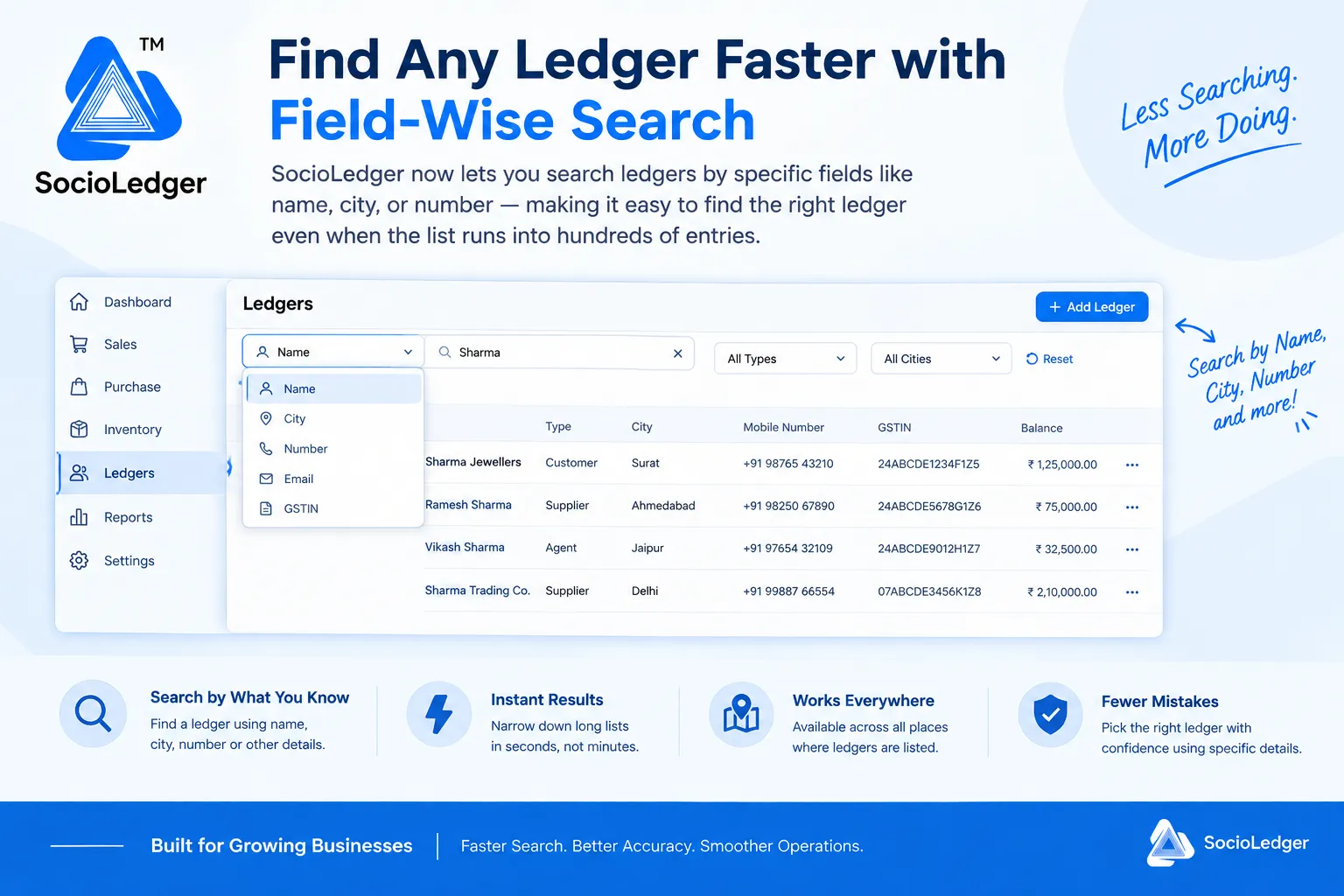
Table of contents
Open Table of contents
- The challenge of finding ledgers in growing jewelry businesses
- The hidden costs of generic search in high-volume operations
- How field-wise search works in SocioLedger
- Generic search vs. SocioLedger field-wise ledger search
- Available everywhere ledgers appear across the platform
- Built for growing ledger lists
The challenge of finding ledgers in growing jewelry businesses
As your jewelry enterprise scales, so does your master directory. In bustling jewelry trading hubs like Zaveri Bazaar, Karol Bagh, Surat, and Manek Chowk, an active business easily manages hundreds or even thousands of active accounts. Over months and years of operations, your directory fills with retail buyers, wholesale clients, bullion dealers, job-work karigars, casting contractors, and gemstone brokers.
In traditional software, all these ledgers show up in massive, unwieldy lists. When an operator needs to book a payment, issue gold, or raise a sales invoice, finding a specific party often turns into an annoying guessing game.
In the daily rush of showroom and wholesale operations, you do not always recall a party’s formal business name. You might only remember:
- The city or market they operate from (e.g., Surat, Ahmedabad, Jaipur, or Rajkot)
- The mobile number or WhatsApp contact they just called from
- A GSTIN mentioned on an incoming tax invoice
- A contact person or partner’s name rather than the registered firm title
When forced to type into a single generic search bar, queries return either zero results because of minor spelling variations, or dozens of unrelated records that share common keywords. Scrolling through endless rows to find one specific record wastes valuable counter time and frustrates your team.
Locating the right account should take two seconds, not two minutes of manual scrolling.
The hidden costs of generic search in high-volume operations
Relying on a single unguided search box across hundreds of ledger entries introduces real friction and operational risk into your business.
1. Wasted seconds at busy billing and trading desks
During peak shopping festivals like Dhanteras and Akshaya Tritiya, or during volatile trading hours when bullion rates fluctuate by the minute, counter efficiency is everything. When billing staff and counter operators spend extra time searching for customer profiles, queues back up and customer service suffers.
2. High risk of picking the wrong account
Jewelry directories frequently contain parties with similar or identical names — such as multiple clients sharing a family name like Sharma Jewellers, Ramesh Sharma, or Sharma Trading Co. When an operator searches broadly by keyword, it is easy to accidentally select the wrong party. Posting payments, rate cuts, or metal issues to the wrong ledger causes balance discrepancies that take hours to untangle during evening reconciliations.
3. Inefficiency when handling remote or incoming inquiries
When a customer or supplier calls your sales desk to check outstanding balances or place a fast reorder, they often provide their phone number or city first. If your software only allows searching by exact registered company name, your staff must stop the conversation to ask for alternate details, creating unnecessary delays.
4. Frustration with spelling discrepancies
In multi-regional jewelry markets, name spellings often vary across operators and documents — such as Vikas versus Vikash, or Choksi versus Choksi & Sons. A generic search engine often fails to match slight spelling variations, leaving staff convinced a record is missing when it was simply spelled differently during initial entry.
Field-specific filtering eliminates the guesswork by letting you search directly against the exact attribute you know.
How field-wise search works in SocioLedger
SocioLedger replaces the single generic search box with an intelligent Field-Wise Search dropdown, giving your team targeted filtering across key ledger attributes.
Instead of typing a keyword and hoping the system matches the right field, you choose exactly which detail to query against:
- Name — Search directly by registered firm name, customer name, or vendor title.
- City — Filter your entire ledger base instantly by geographic location (e.g., Surat, Delhi, Ahmedabad, Jaipur).
- Number — Look up ledgers directly using a 10-digit mobile number, office landline, or WhatsApp contact.
- Email — Locate corporate accounts, B2B wholesale buyers, or suppliers via their email addresses.
- GSTIN — Find any registered tax entity instantly by matching their Goods and Services Tax Identification Number.
- And other key ledger attributes — Narrow down accounts by ledger category, account type, or specific custom identifiers.
Step-by-step: finding a ledger in seconds
Using field-wise search is intuitive and requires zero setup:
- Open any ledger list — Navigate to the Ledgers directory or open any module where ledgers appear (Sales, Purchase, Payment Receipt, Rate Cut, or Orders).
- Select your search field — Click the field dropdown on the left of the search bar and select the attribute you want to search by (e.g., City, Number, or GSTIN).
- Type your search query — Enter the specific value you have on hand, such as a city name like
Surator a phone number prefix. - Get instant, precise matches — SocioLedger filters the ledger list in real time, displaying only the exact records matching your chosen field.
Combined with secondary filters for Account Types (Customer, Supplier, Agent, Karigar) and Cities, you can narrow down thousands of entries to the single account you need in under three seconds.
Generic search vs. SocioLedger field-wise ledger search
Field-wise filtering transforms how your team interacts with master customer and vendor directories:
| Capability | Generic Single-Field Search | SocioLedger Field-Wise Search |
|---|---|---|
| Search Mechanism | One generic text box matching all columns indiscriminately | Dedicated dropdown to target specific attributes (Name, City, Number, GSTIN) |
| Search by Phone Number | Often matches partial numbers inside notes, addresses, or pin codes | Directly queries mobile and telephone records for clean, exact matches |
| Search by City | Fails if city name appears in company descriptions or addresses of multiple parties | Instantly isolates all parties registered in that specific market or town |
| Handling Similar Names | Returns dozens of ambiguous records with overlapping names | Allows instant disambiguation by confirming city or phone number upfront |
| Search Speed | Requires extensive scrolling and manual visual checking | Delivers instant, narrowed results in under 2 seconds |
| Accidental Ledger Mismatch | High risk of posting vouchers to similar-sounding accounts | Near-zero selection mistakes due to precise attribute confirmation |
Targeted search workflows protect your accounting integrity while keeping counter transactions moving smoothly.
Available everywhere ledgers appear across the platform
Field-wise search is not limited to a single administrative settings page. It is built natively into every screen where you interact with ledgers across the SocioLedger ecosystem:
- Master Ledgers Directory — Review account balances, KYC details, and contact information across your entire client base.
- Sales & Billing Counters — Select the right retail or wholesale buyer instantly at point of sale, perfectly aligned with GST billing for jewelry businesses.
- Payment & Receipt Vouchers — Locate payment counterparties rapidly and pair them with the Payment Receipt to Rate Cut shortcut.
- Rate Cut & Bullion Booking — Pull up metal trading accounts and fix daily rates without hesitation.
- Job Work & Karigar Allocation — Track issue-receipt vouchers by searching specific workshop craftsmen by phone number or location.
- Ledger Dashboards & Reports — Access detailed transaction histories through our smart ledger dashboard.
Wherever your team works, the ability to search by what you know remains consistent and lightning-fast.
Built for growing ledger lists
As your jewelry business grows from a single counter to multiple retail showrooms or an expansive wholesale operation, your ledger list should never become an obstacle to daily productivity.
Field-wise search ensures that whether you manage 50 ledgers or 5,000, locating the exact account you need remains as quick and reliable on day one thousand as it was on day one.
Searching for something else that is hard to filter in your daily workflow? Tell us — contact our team and we will look into it.