
The best improvements to a platform come from the people who use it every day on active showroom floors and back-office accounting desks. If something isn’t working as expected, if you have a question about a complex transaction, or if there is a specific feature you wish existed to speed up your counter workflow, you need a direct line to the product team. SocioLedger’s new Feedback section puts that conversation directly inside your jewelry ERP, letting you report bugs, ask questions, suggest feature ideas, and attach screenshots without stepping away from your daily work.
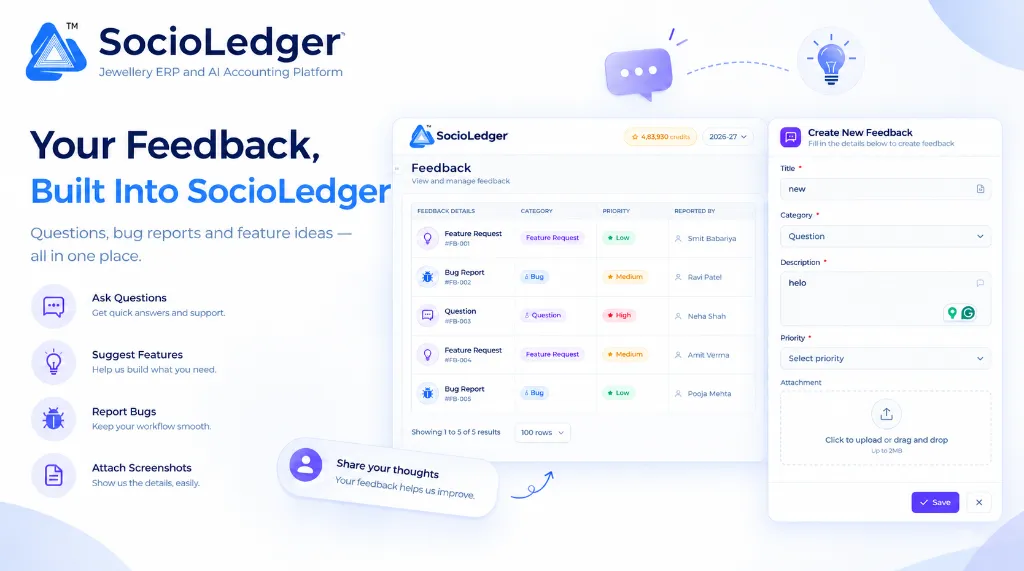
Table of contents
Open Table of contents
- Why fragmented support channels fail busy jewelry businesses
- What’s new: The built-in Feedback section in SocioLedger
- Understanding the feedback form: Structure and fields
- Why this matters for jewelry businesses
- How it works: Step-by-step submission guide
- Feedback triage matrix: Choosing categories and priorities
- Where to find the Feedback section in SocioLedger
- Built with your input: Shaping the future of jewelry ERP
Why fragmented support channels fail busy jewelry businesses
In bustling jewelry trading hubs like Zaveri Bazaar, Surat, Karol Bagh, and Rajkot, store managers, billing executives, and karigar coordinators rarely have spare time. During festive rushes like Dhanteras or peak wedding seasons, counter staff process dozens of customer inquiries, verify bullion rates, print barcode tags, and generate GST invoices in rapid succession.
When a team member encounters an issue or thinks of a better way to handle an everyday task, traditional communication channels quickly break down:
- Stepping out of the workflow: Reporting an issue usually requires minimizing the ERP, opening WhatsApp, or placing an unscheduled phone call, pulling staff away from customer-facing counters.
- Context lost in translation: Explaining a complex jewelry transaction over a phone call — such as a fine gold issue-receipt variance or voucher rate calculation — often leads to miscommunication.
- Lost screenshots and messages: When employees send screenshots to individual sales reps or support numbers, those images easily get buried beneath personal chats and supplier messages.
- Zero visibility for the store owner: Showroom owners and branch administrators cannot easily track what issues their staff have reported, whether an inquiry was answered, or if a bug has already been flagged.
Software should make communication effortless. Instead of juggling external chat windows and phone calls, your team needs a clean, integrated way to report issues the moment they happen.
+-----------------------------------------------------------------------------+
|              Traditional Disjointed Support Communication                   |
+-----------------------------------------------------------------------------+
|                                                                             |
|   [ Issue on Showroom Counter ]                                             |
|                 │                                                           |
|                 ├───────────────► Phone Call ──────► Details lost in memory |
|                 │                                                           |
|                 └───────────────► Personal Chat ───► Buried under messages  |
|                                                                             |
|   Result: No visual context, zero ticket visibility, delayed resolutions    |
|                                                                             |
+-----------------------------------------------------------------------------+
|            SocioLedger Unified In-Platform Feedback Architecture            |
+-----------------------------------------------------------------------------+
|                                                                             |
|   [ In-Platform Feedback Section ]                                          |
|                 │                                                           |
|                 ▼                                                           |
|   ┌─────────────────────────────────────────────────────────────────────┐   |
|   │ Structured Feedback Submission:                                     │   |
|   │ • Clear Title & Description                                         │   |
|   │ • Dedicated Category: Question | Feature Request | Bug | Other      │   |
|   │ • Operational Priority: Low | Medium | High                         │   |
|   │ • Drag-and-Drop Visual Attachment (Up to 2MB)                       │   |
|   └──────────────────────────────────┬──────────────────────────────────┘   |
|                                      │                                      |
|                                      ▼                                      |
|   ┌─────────────────────────────────────────────────────────────────────┐   |
|   │ Centralized Team Feedback Registry:                                 │   |
|   │ • Unique Reference Tracking (#FB-001, #FB-002, ...)                 │   |
|   │ • Transparent Status, Priority, Category, and Reporter History      │   |
|   │ • Direct Channel to SocioLedger Product & Engineering Teams         │   |
|   └─────────────────────────────────────────────────────────────────────┘   |
|                                                                             |
+-----------------------------------------------------------------------------+
What’s new: The built-in Feedback section in SocioLedger
SocioLedger now features a dedicated Feedback section accessible directly from the main platform menu.
Rather than sending issues into an external black box, the Feedback section functions as a shared communication hub for your jewelry enterprise. It provides an organized, transparent log of all feedback submitted across your team, paired with an intuitive side drawer for creating new entries in seconds.
+-----------------------------------------------------------------------------+
|                  SocioLedger Feedback Hub: Central Registry                 |
+-----------------------------------------------------------------------------+
|                                                                             |
|  Feedback                                              [ + Create Feedback ]|
|  View and manage feedback                                                   |
|                                                                             |
|  ┌──────────────────┬──────────────────┬───────────┬─────────────────────┐  |
|  │ FEEDBACK DETAILS │ CATEGORY         │ PRIORITY  │ REPORTED BY         │  |
|  ├──────────────────┼──────────────────┼───────────┼─────────────────────┤  |
|  │ 💡 #FB-001       │ Feature Request  │ ★ Low     │ Smit Babariya       │  |
|  │ 🪲 #FB-002       │ Bug              │ ★ Medium  │ Ravi Patel          │  |
|  │ 💬 #FB-003       │ Question         │ ★ High    │ Neha Shah           │  |
|  │ 💡 #FB-004       │ Feature Request  │ ★ Medium  │ Amit Verma          │  |
|  │ 🪲 #FB-005       │ Bug              │ ★ Low     │ Pooja Mehta         │  |
|  └──────────────────┴──────────────────┴───────────┴─────────────────────┘  |
|                                                                             |
|  Showing 1 to 5 of 5 results                               [ 100 rows ▼ ]   |
|                                                                             |
+-----------------------------------------------------------------------------+
Once submitted, every entry is saved with its title, category tag, priority status, and reporter name. Whether an accountant in the back office flags a question or a floor manager requests a new barcode format, your entire organization maintains a single source of truth.
Understanding the feedback form: Structure and fields
When you click to create a new submission, SocioLedger opens a streamlined form designed to collect exactly what our engineering and support specialists need to resolve your request quickly.
+-----------------------------------------------------------------------------+
|                    SocioLedger Create New Feedback Drawer                   |
+-----------------------------------------------------------------------------+
|                                                                             |
|  [💬] Create New Feedback                                               [✕] |
|      Fill in the details below to create feedback                           |
|                                                                             |
|  Title *                                                                    |
|  ┌───────────────────────────────────────────────────────────────────────┐  |
|  │ Enter a short summary of your feedback                                │  |
|  └───────────────────────────────────────────────────────────────────────┘  |
|                                                                             |
|  Category *                                                                 |
|  ┌───────────────────────────────────────────────────────────────────┬───┐  |
|  │ Question / Feature Request / Bug / Other                          │ ▼ │  |
|  └───────────────────────────────────────────────────────────────────┴───┘  |
|                                                                             |
|  Description *                                                              |
|  ┌───────────────────────────────────────────────────────────────────────┐  |
|  │ Explain the issue, question, or feature idea in detail                │  |
|  │                                                                       │  |
|  └───────────────────────────────────────────────────────────────────────┘  |
|                                                                             |
|  Priority *                                                                 |
|  ┌───────────────────────────────────────────────────────────────────┬───┐  |
|  │ Select priority (Low / Medium / High)                             │ ▼ │  |
|  └───────────────────────────────────────────────────────────────────┴───┘  |
|                                                                             |
|  Attachment                                                                 |
|  ┌───────────────────────────────────────────────────────────────────────┐  |
|  │                                  [ ⇪ ]                                │  |
|  │                   Click to upload or drag and drop                    │  |
|  │                               Up to 2MB                               │  |
|  └───────────────────────────────────────────────────────────────────────┘  |
|                                                                             |
|                                                        [ Save ]      [ ✕ ]  |
|                                                                             |
+-----------------------------------------------------------------------------+
Every submission collects five key pieces of information:
1. Title
A brief, specific summary of what your feedback covers. Examples include “Barcode scan delay on 1-column labels” or “Add purity filter to fine gold stock report”. A clear title ensures your team and our developers immediately understand the core topic.
2. Category
Categorizing feedback from the start helps route it directly to the right specialist:
- Question: Clarifications regarding calculations, configuration settings, or how a specific module functions.
- Feature Request: Ideas for new capabilities, layout improvements, or custom workflows tailored to your jewelry operations.
- Bug: Unexpected behaviors, interface glitches, or calculation errors that need immediate investigation.
- Other: General thoughts, operational feedback, or administrative inquiries.
3. Description
A dedicated text area to explain your question, describe the exact steps that caused an error, or explain why a requested feature would save your team time.
4. Priority
Assign an operational urgency level to your submission:
- Low: Non-urgent suggestions or questions that do not impact daily store operations.
- Medium: Useful improvements or minor inconveniences with an easy workaround.
- High: Urgent issues or critical inquiries affecting active sales, billing counters, or stock audits.
5. Attachment
A built-in file upload area allowing you to drag and drop or click to upload files up to 2MB. Uploading a screenshot of an error dialog, a photo of a printed barcode label, or a sample voucher layout gives our team complete visual context.
Why this matters for jewelry businesses
Having a native feedback mechanism built into your daily jewelry ERP brings practical operational advantages to both retail showrooms and wholesale offices.
Report problems where they happen
When an issue crops up during busy showroom hours, stopping to switch windows or compose an email causes immediate disruption. With the Feedback section, you can document the problem instantly from within the platform, while all the operational details are fresh in your mind.
Show, don’t just tell
Describing a layout glitch or tag discrepancy with text alone is often difficult. By allowing staff to drag and drop a screenshot up to 2MB, our technical team sees the exact screen, voucher fields, and error state you are looking at, cutting diagnosis time in half.
The right category from the start
Separating bugs, feature ideas, and general questions ensures every request goes straight to the right hands. Technical bugs alert engineering, while feature requests go directly into product planning discussions.
Your voice shapes the product
SocioLedger is built specifically for jewelry professionals. High-impact features — such as flexible voucher tagging, WhatsApp automation, and rapid ledger locks — are shaped directly by feedback from retail showrooms, bullion dealers, and workshop managers. Submitting your ideas ensures future updates solve your real-world problems.
A clear, permanent team record
Because all submitted feedback appears in a shared table with reference IDs, categories, priorities, and reporter names, nothing slips through the cracks. Store managers can easily review what issues team members have logged, preventing duplicate tickets and missed follow-ups.
How it works: Step-by-step submission guide
Submitting feedback in SocioLedger requires only a few clicks:
- Open the Feedback section: Click on Feedback in the SocioLedger sidebar navigation.
- Click Create Feedback: Select the + Create Feedback button in the top corner of the screen.
- Add a Title and Category: Type a concise title and choose the category that fits your note: Question, Feature Request, Bug, or Other.
- Write your description: Detail what happened, what you expected, or what feature would help your workflow.
- Set the priority and attach files: Pick a priority level (Low, Medium, or High) and drag in an image or screenshot up to 2MB.
- Click Save: Hit Save to submit your entry. It will immediately appear in your organization’s feedback list.
Feedback triage matrix: Choosing categories and priorities
To get the quickest possible resolution, use this reference table when logging new feedback:
| Category | Example Scenario in Jewelry ERP | Recommended Priority | What to Attach |
|---|---|---|---|
| Bug | Barcode printer cuts off weight field on 2-inch tags | High | Photo of misaligned printed tag (≤ 2MB) |
| Bug | Modal hangs when saving wholesale purchase voucher | High | Screenshot of browser console or error modal |
| Question | How to configure multi-metal ledger settlement rates | Medium | Screenshot of your current ledger settings |
| Question | Clarification on GST rounding for hallmarked silver | Low | Screenshot of invoice calculation preview |
| Feature Request | Add one-click export for karigar issue-receipt balances | Medium | Mockup or spreadsheet format example |
| Feature Request | Allow custom shortcut key for customer contact lookup | Low | Description of suggested shortcut keys |
| Other | Request additional user training for new billing staff | Medium | List of staff members and modules |
Where to find the Feedback section in SocioLedger
The Feedback section is located directly in the main platform navigation menu:
Sidebar → Feedback
From this single screen, you can browse existing submissions from your team, inspect categories and priority ratings, and launch the creation drawer to submit new entries anytime.
Built with your input: Shaping the future of jewelry ERP
A software platform built for jewelers should be shaped by the people who run jewelry businesses every day. Whether you encounter a technical bug, have a question about accounting rules, or want to suggest an improvement that saves your counter staff fifteen minutes during peak retail hours, the Feedback section ensures your voice is heard.
Log your ideas and issues directly from your workspace, complete with screenshots and full context.
Prefer to talk to someone directly? Contact our team and we’ll be happy to help.