
Your business data belongs to you. That means you should be in control of it at every stage, including the day you decide you no longer want it on the platform. A good platform makes that decision easy to understand, never hides what it involves, and never makes you feel trapped. That is the core philosophy behind the Danger Zone in SocioLedger Account Settings — giving jewelry business owners complete transparency and total control over their account lifecycle.
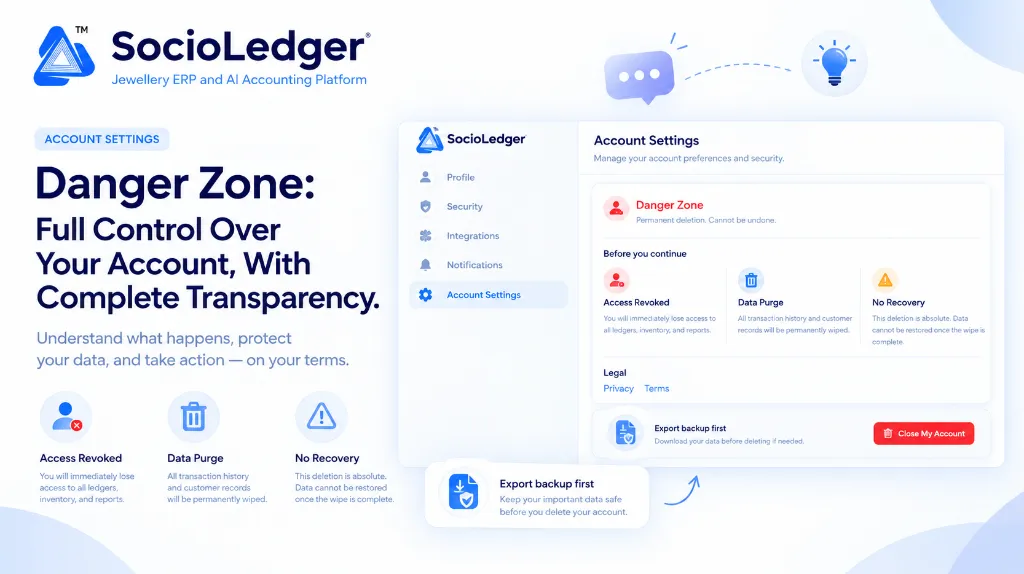
Table of contents
Open Table of contents
- Why true data ownership requires an honest exit path
- What is the Danger Zone in SocioLedger?
- What the page tells you upfront: Complete consequence disclosure
- Back up first, then decide: The Data Management safety net
- Why complete transparency matters for your business
- Before you continue: Pre-closure verification checklist
- Where to find the Danger Zone in SocioLedger
- Honest by design: Earning trust through transparency
Why true data ownership requires an honest exit path
In major jewelry retail and manufacturing hubs like Zaveri Bazaar, Karol Bagh, Surat, and Rajkot, trust is the currency of every transaction. Showroom owners, bullion dealers, and workshop managers guard their accounting books closely. Over years of active operation, your software accumulates confidential records: fine gold ledgers, karigar issue-receipt balances, customer purchase histories, supplier credit terms, and GST filing archives.
Yet across the enterprise software landscape, closing an account is often filled with friction and deceptive design:
- Hidden cancellation pathways: Many cloud systems deliberately bury account closure links behind multiple nested menus or omit self-service deletion entirely.
- Forced retention calls: Platforms frequently require users to schedule high-pressure retention calls with account managers just to request an account shutdown.
- Ambiguous data handling: Legacy providers rarely disclose what happens to customer records after an account expires, leaving business owners uncertain whether their proprietary data is wiped or retained indefinitely.
- Data hostage tactics: Some software vendors lock customer records behind exorbitant export fees, forcing businesses to forfeit years of accounting history if they decide to switch systems.
Software should earn your trust every single day through performance and reliability — never by holding your business records hostage. A platform that genuinely respects your business makes departing just as straightforward, honest, and dignified as onboarding.
+-----------------------------------------------------------------------------+
|              Legacy Software Lock-in vs. SocioLedger Transparent Exit       |
+-----------------------------------------------------------------------------+
|                                                                             |
|   [ Traditional Vendor Lock-In ]                                            |
|   ├── Hidden Deletion Buttons & Dark Patterns                               |
|   ├── Mandatory Sales Retention Calls & Delays                              |
|   └── Unclear Data Retention Policies (Records Linger on Servers)           |
|                                                                             |
|   Result: Administrative friction, lost control, zero data confidence       |
|                                                                             |
+-----------------------------------------------------------------------------+
|   [ SocioLedger Danger Zone Architecture ]                                  |
|   ├── Dedicated Account Settings Section (Danger Zone)                      |
|   ├── Proactive Data Backup Warning (Export .led First)                     |
|   ├── Plain-Language Consequence Disclosure (Access, Purge, No Recovery)   |
|   └── Irreversible, Absolute Database Wipe (Complete Data Independence)     |
|                                                                             |
|   Result: Full transparency, total owner autonomy, zero hidden surprises    |
|                                                                             |
+-----------------------------------------------------------------------------+
What is the Danger Zone in SocioLedger?
The Danger Zone is the dedicated section inside SocioLedger Account Settings where account owners can permanently close their organization account. Because deleting an account is final and irreversible, the page is engineered to lay out every consequence plainly before you proceed, ensuring there are no surprises or ambiguities.
It is not a feature most jewelry businesses will ever need during normal operations. It exists so that account owners who do need it — such as during business restructuring, corporate entity consolidation, or after completing sandbox evaluations — have an honest, direct path forward.
More importantly, it provides visible proof to every user of how strictly SocioLedger treats data custody and account ownership. Knowing you can close your account on your own terms provides peace of mind from day one.
What the page tells you upfront: Complete consequence disclosure
Before you can trigger account closure, the Danger Zone clearly outlines three critical consequences in plain language:
+─────────────────────────────────────────────────────────────────────────────+
|                          Before You Continue                                |
+───────────────────────┬─────────────────────────────┬───────────────────────+
|   👤 Access Revoked   |   🗑 Data Purge             |   ⚠ No Recovery       |
|   You will lose       |   All transaction history   |   This deletion is    |
|   access to ledgers,  |   and customer records      |   absolute. Data      |
|   inventory, and      |   will be permanently       |   cannot be restored  |
|   reports instantly.  |   wiped.                    |   once complete.      |
+───────────────────────┴─────────────────────────────┴───────────────────────+
1. Access Revoked
The moment account deletion is finalized, access is immediately revoked across all user profiles linked to the organization. Showroom sales staff, billing operators, and administrative accountants can no longer log in. Active sessions are terminated, and access to all ledgers, inventory catalogs, barcode tags, and operational reports ceases immediately.
2. Data Purge
Account closure triggers a complete purge of your organization’s data across production databases. All transaction vouchers, metal rates, karigar issue-receipt records, supplier directories, and customer histories are permanently deleted. No orphaned ledger entries or customer phone records remain in our production storage.
3. No Recovery
The deletion process is absolute. Once the wipe is completed, the records cannot be recovered or restored by our technical engineering team. Because SocioLedger does not retain lingering shadow copies of purged accounts, permanent means permanent.
Direct links to our official Privacy policy and Terms are displayed right on the card, giving you immediate access to our complete legal and data governance commitments.
Back up first, then decide: The Data Management safety net
Right above the account closure confirmation button, the Danger Zone displays a clear safety reminder:
Export backup first — Download your data before deleting if needed. Keep your important data safe before you delete your account.
Closing your account does not have to mean forfeiting your accounting history. SocioLedger integrates seamlessly with our native Data Management engine, allowing account owners to export an offline archive of their entire organization with a single click.
+─────────────────────────────────────────────────────────────────────────────+
|                    SocioLedger Data Management Export                       |
+─────────────────────────────────────────────────────────────────────────────+
|                                                                             |
|   [ Account Settings ] ──► [ Data Management ]                              |
|                                    │                                        |
|                                    ▼                                        |
|   ┌─────────────────────────────────────────────────────────────────────┐   |
|   │ Full System Export:                                                 │   |
|   │ • Full Ledger & Transaction History (Cash, Bank, Metal, Journal)   │   |
|   │ • Customer & Supplier Directory (Contacts, GSTINs, Balances)        │   |
|   │ • Inventory & Item Databases (Barcodes, Weights, Wastage, Purity)   │   |
|   └────────────────────────────────┬────────────────────────────────────┘   |
|                                    │                                        |
|                                    ▼                                        |
|   [ Encrypted .led Backup File (Password Protected on Your Local Drive) ]   |
|                                                                             |
+─────────────────────────────────────────────────────────────────────────────+
Your downloaded .led backup contains:
- Complete ledger history: Every journal entry, cash receipt, bank deposit, and metal rate cut voucher.
- Client and vendor records: Full directory details, contact numbers, GST numbers, and opening balances.
- Inventory and catalog data: Item designs, barcode records, metal purities, stone weights, and labour masters.
Because the .led archive is encrypted and password-protected, you can store it safely on your local backup drive. If you ever decide to return to SocioLedger in the future, or need to restore historical records into a new company profile, you can upload the .led file and restore your entire database without missing a single entry.
Why complete transparency matters for your business
Providing a self-service Danger Zone with upfront consequence disclosure reflects SocioLedger’s commitment to user empowerment:
| Safeguard Principle | How SocioLedger Implements It | Benefit to Jewelry Business |
|---|---|---|
| You are always in charge | Self-service deletion inside Account Settings with no hidden hurdles | Eliminates vendor lock-in and respects owner autonomy |
| Nothing is hidden | Plain-language disclosures for Access Revoked, Data Purge, and No Recovery | Zero surprises or confusion regarding what deletion entails |
| Pre-deletion safety net | Prominent backup reminders with password-protected .led export | Preserves historical books for GST audits and future restoration |
| Permanent data purge | Complete wiping of production records upon deletion request | Ensures sensitive business secrets and client lists stay private |
| Built for peace of mind | Clear exit architecture available from the first day of onboarding | Establishes genuine trust between platform and business owner |
Before you continue: Pre-closure verification checklist
If you are considering closing your account, follow this practical checklist before taking irreversible action:
- Download an encrypted backup: Navigate to Data Management and generate a password-protected
.ledfile to keep a complete local copy of your financial and stock records. - Consult your accountant and CA: Ensure your chartered accountant has extracted all necessary GSTR-1, GSTR-3B, and annual audit reports for the current financial year.
- Notify branch managers and staff: Confirm with branch heads that no pending deliveries, repair jobs, or karigar settlements remain unaccounted for.
- Review legal policies: Read the linked Privacy and Terms pages to understand data deletion schedules and obligations.
- Talk to our team first: If an unresolved software issue, workflow friction, or missing feature is prompting your departure, let us know first. We would rather fix the problem. You can submit your thoughts through the Feedback section or reach out to our support team directly.
Where to find the Danger Zone in SocioLedger
To prevent accidental clicks by showroom staff or administrative clerks, the Danger Zone is strictly isolated:
Account Settings → Settings (Sidebar) → Account Settings Tab → Danger Zone (Bottom Card)
Only primary account owners with organizational administration rights can access this section. Routine setting panels — including Profile, Security, Integrations, and Notifications — remain distinct, ensuring everyday configuration changes never interfere with account status.
Honest by design: Earning trust through transparency
We hope every jeweler stays with SocioLedger for decades as their showroom operations expand across retail branches and manufacturing workshops. But if you ever decide to step away, you deserve complete information, clear choices, and uncompromised control over your records.
The Danger Zone is designed to guarantee exactly that — plain terms, zero traps, and complete data sovereignty.
Questions about your data or your account? Contact our team and we will be glad to help.