
Not every piece of precious stock arrives with a neatly prepared design catalogue. When a jeweler receives fresh parcels from manufacturing workshops or wholesale suppliers in Zaveri Bazaar, Surat, or Rajkot, those pieces often need to be weighed, tagged, and placed on the showroom tray immediately — even before CAD renderings or formal design master records are prepared. SocioLedger’s new Tag by Item setting gives you the flexibility to create tags in vouchers directly from items instead of requiring an item design, eliminating intake bottlenecks while keeping your inventory organized.
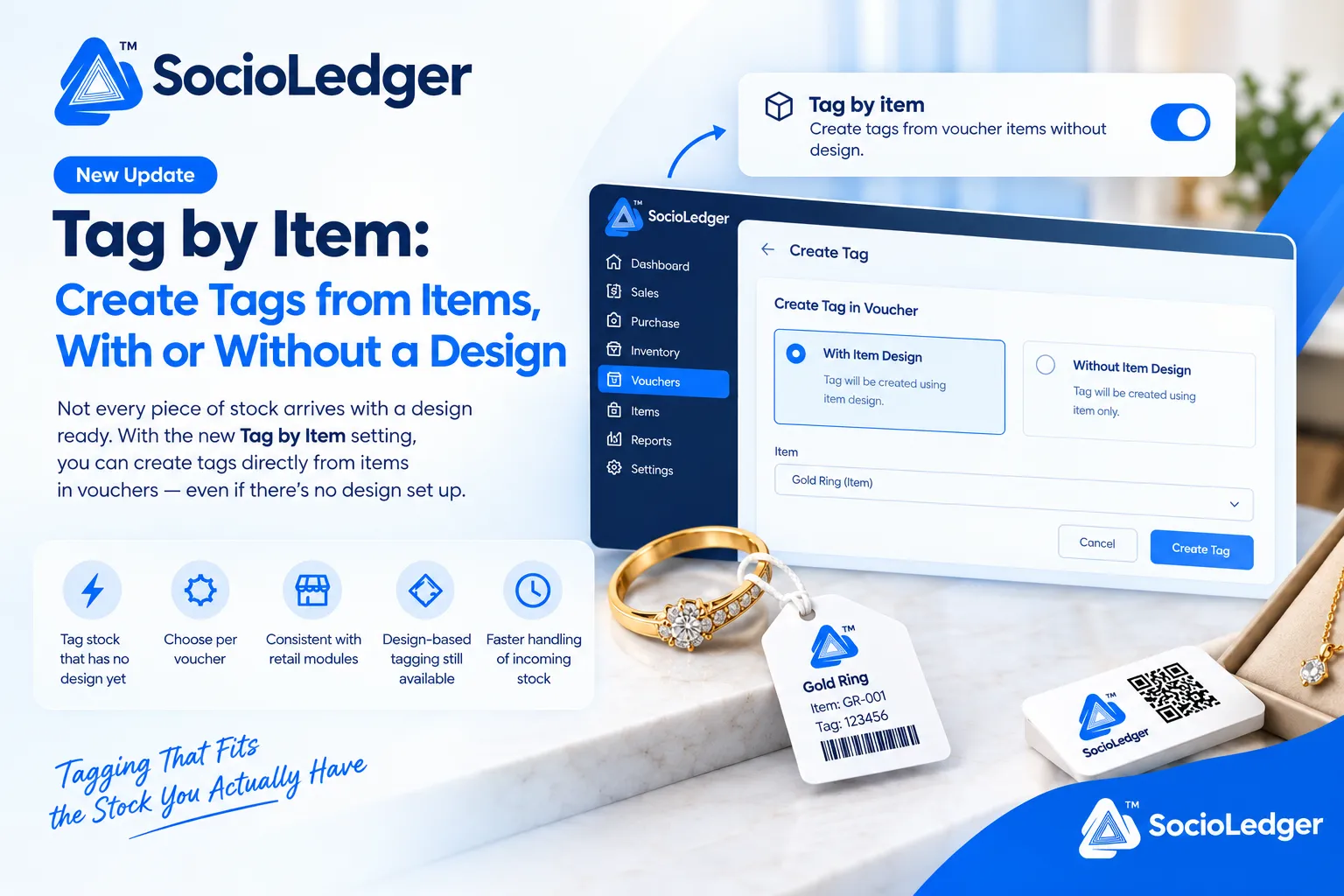
Table of contents
Open Table of contents
- Why design-first tagging creates bottlenecks for incoming stock
- What’s new: The Tag by Item setting in SocioLedger
- Turned off vs. turned on: Understanding the two workflows
- Workflow comparison: Tag by Item turned off vs. turned on
- Bringing consistency between vouchers and retail modules
- Why this matters for jewelry businesses
- How it works: Step-by-step setup guide
- Where to find Tag by Item in SocioLedger
- Part of SocioLedger’s jewelry inventory and tagging ecosystem
- Tagging that fits the stock you actually have
Why design-first tagging creates bottlenecks for incoming stock
In fast-moving jewelry retail and wholesale operations, speed of intake directly impacts sales. When precious ornaments arrive at the back office — whether cast rings from a contract manufacturer or machine-made gold chains from a bullion dealer — the priority is getting those items barcoded, verified, and placed on the shelf for customers to see.
Under traditional jewelry ERP workflows, creating a tag inside a voucher strictly required an associated item design record. While structured design records are essential for cataloguing branded collections, forcing every inward piece through a design prerequisite introduces friction:
- Intake stalls on uncatalogued items: If incoming items do not have pre-registered design codes, staff cannot print barcode tags until someone manually creates the design profile.
- Master data clutter from placeholder designs: To bypass tagging delays, operators often create duplicate or “dummy” item designs (such as
TEMP-RING-01), cluttering the master catalog over time. - Unnecessary complexity for generic jewelry: Plain cast bands, standard gold bangles, and bullion coins do not require intricate design specifications just to generate a piece tag.
- Workflow disconnect with retail counters: Showroom retail modules frequently allow direct item-based tagging, leaving vouchers as an awkward exception with rigid design prerequisites.
Jewelers need the freedom to choose how they tag: strict design linkage when tracking curated designer pieces, and direct item tagging when handling rapid incoming stock.
+-----------------------------------------------------------------------------+
|              SocioLedger Tag by Item: Voucher Tagging Decision Flow          |
+-----------------------------------------------------------------------------+
|                                                                             |
|                      [ Incoming Stock in Voucher ]                          |
|                 (Purchase, Inward, Job Receipt, Stock)                      |
|                                     │                                       |
|                                     ▼                                       |
|                      ┌─────────────────────────────┐                        |
|                      │ Check "Tag by Item" Setting │                        |
|                      └──────────────┬──────────────┘                        |
|                                     │                                       |
|            ┌────────────────────────┴────────────────────────┐              |
|            ▼                                                 ▼              |
|   [ Setting TURNED OFF ]                            [ Setting TURNED ON ]   |
|   (Strict Design-Centric)                           (Flexible Hybrid Mode)  |
|            │                                                 │              |
|            ▼                                                 ▼              |
| ┌─────────────────────────┐                       ┌───────────────────────┐ |
| │ Requires Item Design    │                       │ In-Voucher Choice:    │ |
| │ • Must link design code │                       │ ◉ With Item Design    │ |
| │ • Design record forced  │                       │ ○ Without Item Design │ |
| └──────────┬──────────────┘                       └───────────┬───────────┘ |
|            │                                                  │             |
|            │                               ┌──────────────────┴───────────┐ |
|            │                               ▼                              ▼ |
|            │                      [ With Design ]                [ Item Only ]      |
|            │                               │                              │ |
|            ▼                               │                              │ |
| ┌─────────────────────────┐                │                              │ |
| │ Tag Linked to Design    │◄───────────────┘                              │ |
| └─────────────────────────┘                                               ▼ |
|                                                           ┌───────────────────────┐ |
|                                                           │ Tag Created Directly  │ |
|                                                           │ from Item (No Design) │ |
|                                                           └───────────────────────┘ |
+-----------------------------------------------------------------------------+
What’s new: The Tag by Item setting in SocioLedger
SocioLedger introduces a dedicated configuration toggle in Settings labeled Tag by item, defined with the clear description: “Create tags from voucher items without design.”
This setting controls whether the voucher tagging modal forces every tag to map to a design record or presents operators with an immediate choice.
+-----------------------------------------------------------------------------+
|                  System Settings: Tag by Item Configuration                 |
+-----------------------------------------------------------------------------+
|                                                                             |
|  [📦] Tag by item                                                   [ (•) ] |
|      Create tags from voucher items without design.                 (ON)    |
|                                                                             |
+-----------------------------------------------------------------------------+
When the toggle is enabled, SocioLedger’s voucher tag generation interface reveals an intuitive radio selection allowing team members to pick the tagging mode that matches the stock in their hands.
+-----------------------------------------------------------------------------+
|                 SocioLedger Voucher Tag Modal Interface                     |
+-----------------------------------------------------------------------------+
|                                                                             |
|   ← Create Tag                                                              |
|                                                                             |
|   Create Tag in Voucher                                                     |
|   ┌───────────────────────────────────┐   ┌─────────────────────────────┐   |
|   │ ◉ With Item Design                │   │ ○ Without Item Design       │   |
|   │   Tag will be created using       │   │   Tag will be created using │   |
|   │   item design.                    │   │   item only.                │   |
|   └───────────────────────────────────┘   └─────────────────────────────┘   |
|                                                                             |
|   Item                                                                      |
|   ┌─────────────────────────────────────────────────────────────┬───┐       |
|   │ Gold Ring (Item)                                            │ ▼ │       |
|   └─────────────────────────────────────────────────────────────┴───┘       |
|                                                                             |
|                                             [ Cancel ]   [ Create Tag ]     |
|                                                                             |
+-----------------------------------------------------------------------------+
Turned off vs. turned on: Understanding the two workflows
The Tag by Item toggle lets jewelry business owners tailor voucher behavior to their operating model:
1. Turned off: Strict design-based cataloging
When the setting remains switched off, all tags created from vouchers must be tied to an existing item design. Every generated tag inherits attributes, design codes, and category hierarchies from your design master records.
This setting is ideal for jewelry brands with strict cataloging rules where every single ornament displayed in the showroom must be indexed against a specific designer SKU. Nothing changes for businesses that rely on this workflow — your established procedures remain completely untouched.
2. Turned on: Flexible item-based tagging
When the setting is switched on, you unlock direct item tagging inside vouchers. When generating a tag, the voucher modal provides two explicit options:
- With Item Design: Tag will be created using an item design. Use this whenever the stock piece belongs to an established design portfolio.
- Without Item Design: Tag will be created using the item only. Use this whenever stock arrives uncatalogued or represents generic inventory that does not require a design profile.
This gives your team the agility to handle whatever parcel lands on the counter without being locked into a rigid administrative loop.
Workflow comparison: Tag by Item turned off vs. turned on
The table below summarizes how voucher tagging behaves under each configuration:
| Operational Dimension | Setting Turned Off (Design-Centric) | Setting Turned On (Flexible Hybrid) |
|---|---|---|
| Voucher Tag Prerequisite | Requires an existing item design record | Works with item only or with item design |
| Modal Tagging Choice | Standard design-linked tag creation | Choose: “With Item Design” / “Without Design” |
| Speed for Uncatalogued Stock | Slower — design must be created first | Instant — tag created directly from item |
| Master Catalog Health | Risk of placeholder dummy design records | Clean — dummy records are never required |
| Retail Module Alignment | Different — vouchers require designs | Aligned — consistent with retail modules |
| Design Integrity Option | Always enforced across all vouchers | Preserved whenever “With Item Design” is picked |
| Ideal Use Case | Exclusive designer and high-jewelry ateliers | Mixed retail, wholesale, and rapid trade |
Bringing consistency between vouchers and retail modules
A major advantage of the Tag by Item setting is operational uniformity across the SocioLedger platform.
In SocioLedger’s retail modules, tags are already generated directly from items rather than requiring an item design first. Counter sales teams can quickly tag customer trade-ins, unbranded silver ornaments, or loose gemstone pieces without creating CAD catalogues.
However, prior to this update, vouchers operated under a design-mandatory constraint. This meant back-office clerks receiving stock through purchase vouchers or inward vouchers had to follow a different rulebook than front-desk staff.
By enabling Tag by Item, vouchers and retail modules speak the exact same language. Whether an ornament enters inventory through a wholesale purchase voucher or a showroom intake counter, your staff follows one cohesive, item-centric standard.
Why this matters for jewelry businesses
Switching on Tag by Item delivers practical operational advantages across purchasing, inventory, and showroom management.
1. Tag stock that has no design yet
When urgent shipments arrive during busy periods like Dhanteras, Akshaya Tritiya, or the wedding season, speed is paramount. Counter staff can barcode incoming gold jewelry and put it into display trays immediately, without waiting for the cataloging team to photograph pieces or assign design numbers.
2. Flexible per-voucher decision making
You are not forced into an all-or-nothing trade-off. With the setting enabled, your team decides on a case-by-case basis. If a parcel contains bespoke diamond necklaces with complete design sheets, select With Item Design. If the next parcel contains 50 plain gold bands, select Without Item Design.
3. Eliminate artificial dummy designs
When software forces design linkage, employees inevitably create junk design entries like TEMP-CHAIN-01 or MISC-EARRING just to bypass the screen. Over time, these placeholder records corrupt search filters and reporting metrics. Tagging directly by item keeps your design master clean and accurate.
4. Design-based tagging remains completely intact
Enabling this setting does not disable design-driven tracking. Jewelers who want to maintain detailed design records can continue doing so effortlessly. The feature simply removes an artificial obstacle when a design is not needed.
5. Faster handling of incoming stock
Fewer screen transitions and setup steps stand between opening a parcel and placing goods on the showroom floor. Faster tagging reduces administrative overhead, prevents counter bottlenecks, and accelerates inventory turnover.
How it works: Step-by-step setup guide
Enabling and using Tag by Item in SocioLedger takes only a few simple steps:
- Open Settings: Log in to SocioLedger and navigate to Settings from the main sidebar.
- Locate Tag by Item: Scroll to find the Tag by item toggle under your store preferences.
- Choose your preference:
- Leave it switched off if you want all voucher tags strictly tied to item designs.
- Switch it on if you want the flexibility to tag voucher items without a design.
- Open a Voucher: Navigate to any voucher containing items (such as a Purchase Voucher or Stock Inward).
- Initiate Tag Creation: Click to create a tag. With the setting enabled, select either With Item Design or Without Item Design.
- Save and Print: Select your item, enter tag weight and purity specifications, and save. The tag is created immediately based on your selection.
Where to find Tag by Item in SocioLedger
The Tag by Item toggle is located directly inside Settings under your general configuration options:
Settings → Tag by item
Once toggled on, the dual-option selector automatically appears across all voucher tag generation windows throughout the platform.
Part of SocioLedger’s jewelry inventory and tagging ecosystem
The Tag by Item setting integrates seamlessly with SocioLedger’s comprehensive jewelry inventory management toolkit:
- Label Printing Control: Customize tag dimensions and layouts using tag print sizes and barcode formats.
- Speed Up Voucher Creation: Generate tags in a single click with the save and create tag shortcut.
- Wholesale Receiving: Print tags directly during purchase with wholesaler tag barcode on purchase.
- Catalog Management: Import comprehensive design collections quickly with bulk importing item designs.
- Barcode Verification: Scan display tags effortlessly using camera scanning tag barcodes.
- Showroom Tray Audits: Conduct swift end-of-day tray counts with daily stock tally verification.
Tagging that fits the stock you actually have
Some stock is fully designed, photographed, and catalogued in advance. Other stock is received as fast-moving commodity jewelry that needs immediate barcoding and shelf placement.
With Tag by Item, jewelers no longer have to compromise between rigorous design tracking and operational speed. You can tag both kinds of stock in the way that makes practical sense for your showroom — keeping detailed design associations where they matter, and tagging directly from items when speed comes first.
Want more control over how tags and vouchers are created in your jewelry business? Tell us — contact our team and we will look into it.