
Loans are a standard part of running a jewelry business — whether lending capital to a trusted trade associate, borrowing from a bullion supplier, or advancing fine gold and silver on credit. When arrangements are tracked on paper diaries or casual WhatsApp messages, managing terms, interest rates, and payout schedules becomes disorganized and risky. SocioLedger’s new Loan module brings complete visibility to every loan transaction, directly linking party ledgers with cash, bank, and fine metal accounts.
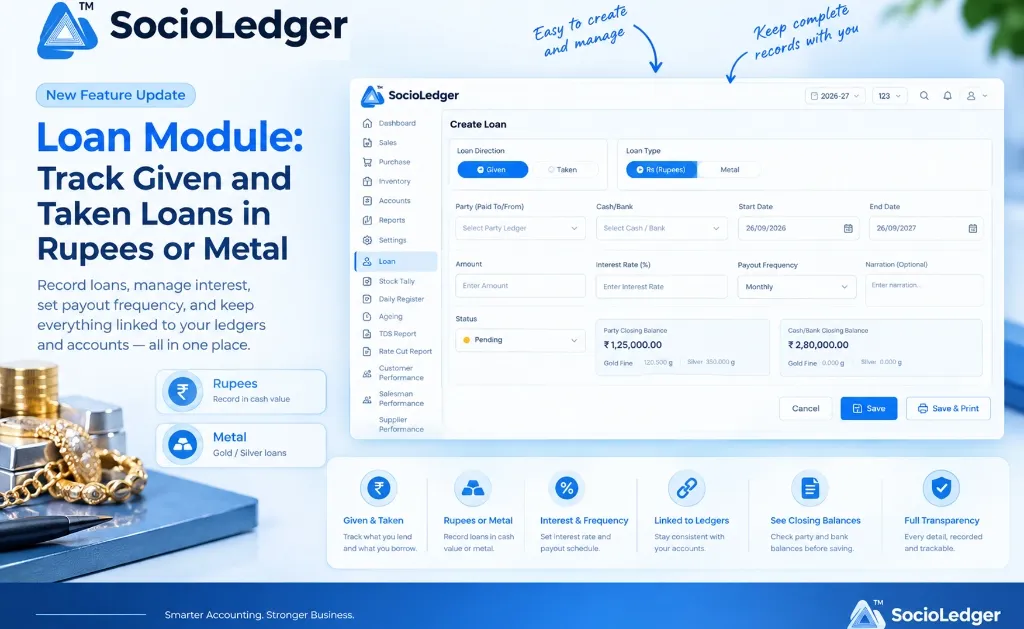
Table of contents
Open Table of contents
- Why informal loan tracking creates blind spots in the jewelry trade
- What’s new in the SocioLedger Loan module
- See closing balances before you save
- Why upfront loan management matters for jewelers
- How it works: step-by-step loan recording
- Traditional loan tracking vs. SocioLedger Loan module
- Where to find the Loan module in SocioLedger
- Part of SocioLedger’s integrated jewelry accounting ecosystem
- Loans recorded clearly, on both sides
Why informal loan tracking creates blind spots in the jewelry trade
In busy jewelry trading hubs like Zaveri Bazaar, Karol Bagh, and Surat, financing arrangements happen daily across counters and wholesale offices. A showroom owner might extend a short-term cash loan to a trusted supplier, borrow operational funds from a lender, or exchange fine gold bars with a neighboring jeweler to fulfill a sudden manufacturing demand.
Traditionally, these financial arrangements are handled through informal methods:
- Notebook entries and diaries: Loan terms, payout schedules, and interest calculations are scribbled in physical books that can be misplaced or disputed.
- Disconnected spreadsheets: Separate sheets track borrowings and lendings, completely separated from daily sales, purchase ledgers, and bank balances.
- Metal vs. cash confusion: When gold or silver fine metal is lent or borrowed instead of cash, tracking weight obligations alongside rupee valuations creates accounting headaches.
- Ambiguous interest schedules: Without a structured payout frequency, calculating accumulated interest or tracking monthly payments leads to friction between parties.
- No live balance visibility: When creating a loan, operators often enter numbers without knowing the party’s current outstanding balance or the available cash in the drawer.
A jewelry business needs a single, structured system where both money and precious metal loans are recorded with full clarity from day one.
+-----------------------------------------------------------------------------+
|                     SocioLedger Unified Loan Architecture                   |
+-----------------------------------------------------------------------------+
|                                                                             |
|      [ Loan Direction ]                       [ Loan Type ]                 |
|      ┌───────────────┐                        ┌────────────────┐            |
|      │  Given / Taken│                        │  Rs (Rupees)   │            |
|      └───────┬───────┘                        │  Metal (Au/Ag) │            |
|              │                                └───────┬────────┘            |
|              ▼                                        ▼                     |
|      ┌─────────────────────────────────────────────────────────┐            |
|      │                   Loan Creation Core                    │            |
|      │  • Party Ledger (Paid To / From)                        │            |
|      │  • Cash / Bank Account                                  │            |
|      │  • Start & End Dates | Amount / Weight                  │            |
|      │  • Interest Rate (%) & Payout Frequency                 │            |
|      └───────────────────────────┬─────────────────────────────┘            |
|                                  │                                          |
|                                  ▼                                          |
|      ┌─────────────────────────────────────────────────────────┐            |
|      │            Pre-Save Live Balance Verification           │            |
|      │  Party Closing Balance     │ Cash/Bank Closing Balance  │            |
|      │  [ Rs | Gold Fine | Silver]│ [ Rs | Gold Fine | Silver] │            |
|      └───────────────────────────┬─────────────────────────────┘            |
|                                  │                                          |
|                                  ▼                                          |
|      ┌─────────────────────────────────────────────────────────┐            |
|      │       Instant Posting to Ledgers & Print Documentation  │            |
|      └─────────────────────────────────────────────────────────┘            |
+-----------------------------------------------------------------------------+
What’s new in the SocioLedger Loan module
The new Loan module in SocioLedger gives jewelers a purpose-built workspace to record, manage, and monitor loans with all terms clearly defined upfront:
- Loan Direction: Choose Given for funds or metal extended to another party, or Taken for loans received from a supplier or financier.
- Loan Type: Select Rs (Rupees) for monetary transactions or Metal for gold and silver weight-based arrangements.
- Party (Paid To/From): Link the loan directly to any customer, supplier, artisan, or financier ledger in your chart of accounts.
- Cash/Bank Selection: Specify the exact physical cash drawer or bank account the funds or settlement move through.
- Start Date and End Date: Set the exact active tenure of the loan agreement.
- Amount and Metal Value: Enter the principal financial value or metal weight.
- Interest Rate (%) & Payout Frequency: Record the agreed interest percentage and set payout cycles, such as monthly or quarterly.
- Narration & Remarks: Add custom notes or contractual terms for complete audit context.
- Status & Documentation: Track the current status (such as
Pendingor active) and use Save & Print for instant physical vouchers.
See closing balances before you save
Entering a loan without knowing where your accounts stand is a recipe for bookkeeping errors. SocioLedger solves this by displaying live, real-time closing balances directly inside the loan creation form before you hit save.
+-----------------------------------------------------------------------------+
|                   Live Balance Inspection at Data Entry                     |
+-----------------------------------------------------------------------------+
|                                                                             |
|   Party Closing Balance              Cash/Bank Closing Balance              |
|   ₹ 1,25,000.00                      ₹ 2,80,000.00                          |
|   Gold Fine: 120.500 g               Gold Fine: 0.000 g                     |
|   Silver: 350.000 g                  Silver: 0.000 g                        |
|                                                                             |
+-----------------------------------------------------------------------------+
As soon as you select a party and a cash or bank account, the system automatically retrieves:
- Rupee Closing Balance: The current financial outstanding on both the party ledger and the selected payment channel.
- Gold Fine Balance: The net gold fine weight currently owed or held by the party.
- Silver Balance: The net silver metal balance linked to the party.
This instant snapshot ensures you verify liquidity and credit limits before committing a new loan to your books.
Why upfront loan management matters for jewelers
Managing loans inside your primary ERP system transforms financial governance across your business operations.
1. Unified coverage for money and metal
Jewelry finance is unique because transactions alternate between currency and precious metals. SocioLedger handles both under a single unified flow. Whether you are lending ₹5,00,000 for showroom renovations or advancing 100 grams of 24K fine gold to a manufacturing partner, the record remains structured and traceable.
2. Given and taken in one consolidated module
You no longer need separate spreadsheets or isolated software modules to track what you owe versus what is owed to you. Both directions live side by side, giving business owners a 360-degree view of net lending positions and overall exposure.
3. Direct integration with your financial ledgers
Because each loan links a specific party ledger with a verified cash or bank account, your balance sheets stay synchronized. There are no duplicate journal entries or missing transactions during monthly audit reconciliations.
4. Terms locked in from day one
Start dates, maturity dates, interest percentages, and payment frequencies are recorded at inception. When settlement time arrives, there is zero ambiguity regarding accumulated interest or agreed payout schedules.
5. Better decisions at the moment of entry
Seeing live party balances and bank balances right on screen prevents over-lending and helps your accounts team spot mismatched balances before saving.
How it works: step-by-step loan recording
Recording a new loan in SocioLedger is fast, intuitive, and error-proof:
- Open Create Loan: Navigate to the Loan section from the sidebar and click create.
- Select Direction and Type: Choose between Given or Taken, and select Rs (Rupees) or Metal.
- Assign Accounts: Select the target party ledger and the corresponding cash or bank account. Review the live closing balances displayed below the fields.
- Define Terms & Tenure: Enter the start date, end date, loan amount, interest rate percentage, and select your payout frequency (such as monthly).
- Add Narration and Save: Enter any relevant contract details, then click Save or Save & Print to generate an immediate hard-copy record.
+-----------------------------------------------------------------------------+
|                          Loan Entry Parameters                              |
+-----------------------------------------------------------------------------+
|  Field                    | Description & Operational Role                  |
+---------------------------+-------------------------------------------------+
|  Loan Direction           | Given (Lent out) or Taken (Borrowed in)         |
|  Loan Type                | Rs (Rupees cash value) or Metal (Gold/Silver)   |
|  Party (Paid To/From)     | Counterparty ledger from your chart of accounts |
|  Cash/Bank                | Account through which liquidity or metal moves  |
|  Start Date & End Date    | Active duration and maturity timeline of loan   |
|  Amount / Weight          | Principal rupee value or physical metal weight  |
|  Interest Rate (%)        | Applicable percentage for interest calculations |
|  Payout Frequency         | Distribution schedule (e.g., Monthly)           |
|  Live Closing Balances    | Real-time Rs, Gold Fine, and Silver balances    |
+-----------------------------------------------------------------------------+
Traditional loan tracking vs. SocioLedger Loan module
Here is how modern loan management in SocioLedger compares to traditional diary and spreadsheet methods:
| Operational Dimension | Informal Notebooks & Spreadsheets | SocioLedger Loan Module |
|---|---|---|
| Tracking Scope | Fragmented across diaries and apps | Centralized dashboard for Given & Taken |
| Metal Support | Difficult weight and karat conversions | Native Gold Fine and Silver tracking |
| Ledger Connection | Disconnected from daily accounts | Direct link to party and cash/bank ledgers |
| Balance Visibility | Blind entry requiring manual ledger lookups | Real-time closing balances shown before save |
| Interest & Payouts | Manual calculations prone to disputes | Clear interest rates and payout frequencies |
| Documentation | Hand-written notes or informal chats | Formal digital records with 1-click printing |
Where to find the Loan module in SocioLedger
The Loan module is available as its own dedicated section in the primary SocioLedger navigation menu.
From the Loan dashboard, store owners and accountants can view all open, pending, and settled loans, filter by party or loan type, and generate instant ledger summaries for financial reviews.
Part of SocioLedger’s integrated jewelry accounting ecosystem
The Loan module connects directly with SocioLedger’s comprehensive suite of accounting and inventory tools:
- Smart Ledgers: Review complete party transaction histories and filtered statements with the smart ledger dashboard.
- Dual-Currency Accounting: Track rupee values alongside fine gold weights seamlessly using bhav filter accounting.
- Quick Rate Cuts: Settle metal obligations and price locks quickly with payment receipt rate cut shortcuts.
- Role-Based Access: Restrict sensitive financing records to authorized owners using role-based access control.
Loans recorded clearly, on both sides
Whether you are lending capital to expand market partnerships or borrowing fine metal to support peak seasonal production, keeping precise records is essential for financial peace of mind. The SocioLedger Loan module gives jewelers a structured, reliable way to record terms, link ledgers, and maintain total clarity across every arrangement.
Have a specific lending or borrowing workflow you’d like to streamline? Tell us — contact our team and let us help you optimize your jewelry business operations.