
Software access, AI-powered features, and payments usually end up scattered — a plan managed in one place, credits tracked somewhere else, and invoices chased down separately across email threads. The new Billing section in SocioLedger brings all of it together, giving jewelers, wholesalers, and manufacturers one unified dashboard to manage subscriptions, monitor payment history, and stay on top of AI usage.
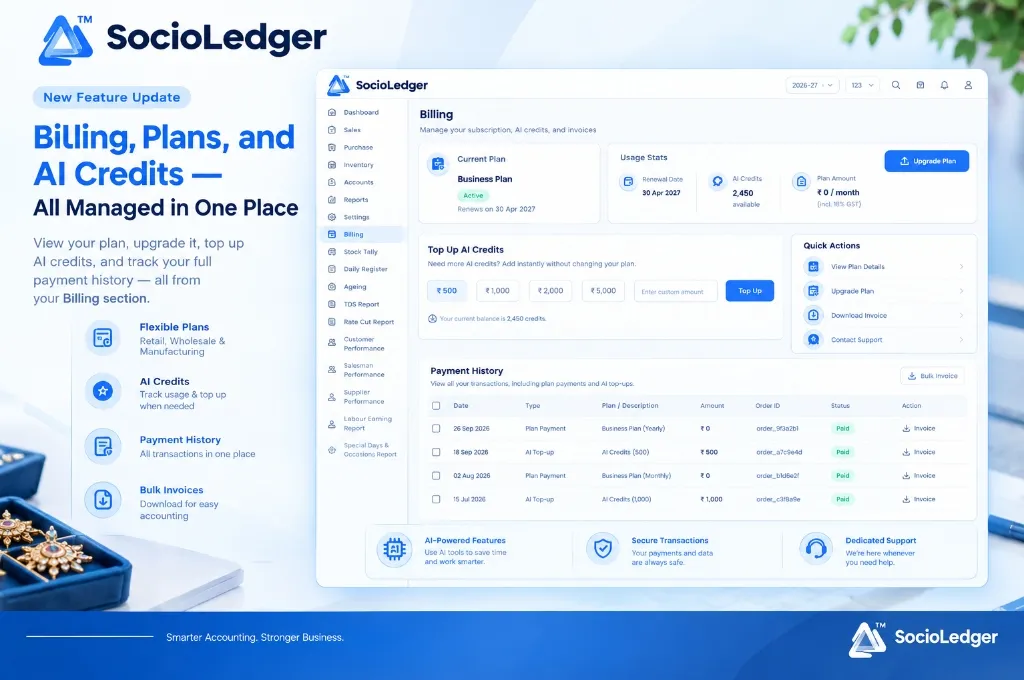
Table of contents
Open Table of contents
- Why fragmented billing creates friction for jewelry businesses
- Plans built around your business type: retail, wholesale, and manufacturing
- What’s in the Billing section
- Why on-demand AI credits matter for modern jewelry operations
- Traditional software billing vs. SocioLedger unified Billing hub
- How to access and manage your billing in SocioLedger
- Connected with SocioLedger’s jewelry business platform
- One place for plans, credits, and payments
Why fragmented billing creates friction for jewelry businesses
Running a modern jewelry business requires multiple operational tools — from showroom point-of-sale and wholesale stock tallying to AI image generation for festive promotions. When financial controls and subscription tools are separated across external portals, business owners face routine administrative headaches:
- Disconnected plan oversight: Not knowing when an annual software license is set to expire until services get interrupted during peak trading hours.
- Surprise AI credit depletion: Running high-volume AI photoshoot campaigns or customer status updates only to find credits exhausted mid-workflow with no quick reload option.
- Scattered tax invoices: Chasing down PDF receipts from multiple emails or third-party payment gateways when accountants need to file monthly GST returns.
- Rigid pricing structures: Being forced into expensive enterprise plans just to access a few extra AI features or modules not relevant to your business model.
A jewelry ERP should simplify administrative overhead, not add to it. SocioLedger’s unified Billing section provides total visibility over active plans, available AI capacity, and historical financial transactions directly within your everyday workspace.
+-----------------------------------------------------------------------------+
|                     SocioLedger Unified Billing Architecture                |
+-----------------------------------------------------------------------------+
|                                                                             |
|   [ Business-Tailored Plans ]                  [ On-Demand AI Credits ]     |
|   • Retail Showroom Plans                      • Preset Packs (₹500-₹5000)  |
|   • Wholesale & B2B Plans                      • Custom Credit Values       |
|   • Manufacturing & Job Work                   • Real-Time Balance Counter  |
|                  │                                           │              |
|                  ▼                                           ▼              |
|   ┌─────────────────────────────────────────────────────────────────────┐   |
|   │                       Unified Billing Hub                           │   |
|   │  • Current Plan Status & Renewal Date                               │   |
|   │  • Usage Stats & Plan Inclusions                                    │   |
|   │  • Instant Self-Serve Plan Upgrades                                 │   |
|   │  • Direct Credit Top-Ups with Instant Activation                    │   |
|   └──────────────────────────────────┬──────────────────────────────────┘   |
|                                      │                                      |
|                                      ▼                                      |
|   ┌─────────────────────────────────────────────────────────────────────┐   |
|   │                     Financial Audit & Invoicing                     │   |
|   │  • Complete Transaction Ledger (Order ID, Narration, Status)        │   |
|   │  • Single-Click GST Invoice Downloads                               │   |
|   │  • Bulk Invoice Export for Accounting Reconciliations               │   |
|   └─────────────────────────────────────────────────────────────────────┘   |
+-----------------------------------------------------------------------------+
Plans built around your business type: retail, wholesale, and manufacturing
Not every jewelry business operates the same way. A retail counter in Mumbai’s Zaveri Bazaar has completely different software requirements than a diamond wholesaler in Surat or a casting unit in Rajkot.
Instead of forcing a one-size-fits-all license, SocioLedger organizes subscription plans by core business type:
- Retail Plans: Designed for retail showrooms with fast POS billing, barcode tag scanning, customer relationship management, and festive WhatsApp marketing.
- Wholesale Plans: Focused on B2B digital catalogs, multi-branch stock transfers, travelling salesman tour registers, and party balance ageing.
- Manufacturing Plans: Built for production houses managing karigar job work, metal issue and receipt records, casting loss calculations, and batch tracking.
Within each business category, multiple tiered plans let you choose the exact modules and capacity your enterprise requires today, with the freedom to upgrade instantly as your branch network or product lines expand.
What’s in the Billing section
The Billing workspace serves as your centralized command center for account health, usage statistics, and financial paperwork.
+-----------------------------------------------------------------------------+
|                          Billing Dashboard Overview                         |
+-----------------------------------------------------------------------------+
|                                                                             |
|  [ Current Plan ]             [ Usage Stats ]              [ Actions ]      |
|  • Business Plan (Active)     • Renewal: 30 Apr 2027       • Upgrade Plan   |
|  • Term: Renews Annually      • AI Credits: 2,450 Available• Bulk Invoice   |
|                               • Plan Amount: ₹ 0 / month                    |
|                                                                             |
+-----------------------------------------------------------------------------+
1. Plan details at a glance
See your active subscription tier immediately upon opening the screen. You can review your plan name, active status badge, and scheduled renewal date so your accounts team can plan renewals well ahead of time.
2. Live usage statistics
Track your primary resource metrics in a clean, summarized card:
- Renewal Date: The exact date your current subscription cycle concludes.
- Available AI Credits: Live balance counter showing remaining AI capacity for image creation and automated messaging.
- Plan Amount: Transparent monthly or yearly fee schedule, clearly indicating applicable GST charges.
3. Direct self-serve plan upgrades
When your showroom adds new counters or your manufacturing floor expands, moving to a higher plan is a direct one-click action from within the Billing interface. There are no manual support tickets, lengthy paperwork, or operational downtime required.
4. Flexible AI credit top-ups
Running low on AI credits in the middle of a major collection launch? The Top Up AI Credits module lets you inject capacity immediately.
Choose from preset denominations (₹500, ₹1,000, ₹2,000, ₹5,000) or enter a custom amount based on your immediate marketing needs. Credits reflect in your balance instantly upon payment completion.
5. Detailed payment history
Every financial exchange on the platform is logged in a transparent payment history ledger:
- Date: Exact timestamp of the transaction.
- Type: Clearly categorized as
Plan PaymentorAI Top-up. - Plan / Description: Itemized breakdown of the purchase (e.g., Business Plan Yearly, AI Credits 500).
- Amount: Net value in Rupees (₹).
- Order ID: Unique transaction reference identifier for accounting records.
- Status: Visual status badge verifying completed settlement.
- Action: Direct button to view and download the official invoice.
6. Bulk invoice downloads for GST accounting
Reconciling software expenses during monthly or annual tax audits takes seconds. Rather than opening every invoice individually, click Bulk Invoice to export all tax-compliant invoices in one archive for your chartered accountant.
Why on-demand AI credits matter for modern jewelry operations
AI-assisted workflows are quickly becoming standard across jewelry retail and manufacturing. In SocioLedger, AI credits power essential operational features:
- AI Photoshoot Image Generation: Creating high-resolution model imagery from raw jewelry photographs without expensive studio setups.
- Automated Design Search: Locating matching ornaments across massive CAD catalogs by uploading customer reference sketches.
- Smart Customer Messaging: Generating personalized festive greetings and promotional status updates tailored to individual customer purchase histories.
+-----------------------------------------------------------------------------+
|                          AI Credit Allocation & Usage                       |
+-----------------------------------------------------------------------------+
|  Operational Feature       | Role in Daily Workflow                         |
+----------------------------+------------------------------------------------+
|  AI Model Photoshoots      | Transform counter photos into catalog imagery  |
|  Visual Design Search      | Match customer reference photos in seconds     |
|  AI Status Generator       | Create social media posts and WhatsApp updates |
|  Customer Insights         | Generate engagement summaries from lead data   |
+-----------------------------------------------------------------------------+
Usage naturally fluctuates throughout the jewelry calendar. A jeweler might consume modest credits during monsoon months, then experience a 10x surge in AI photoshoot generation ahead of Diwali, Dhanteras, or regional wedding exhibitions.
Because top-ups are decoupled from base plans, you don’t need to permanently upgrade your ERP subscription just to handle seasonal marketing spikes. Top up what you need, use credits as you go, and maintain full control over operational expenditure.
Traditional software billing vs. SocioLedger unified Billing hub
| Operational Area | Traditional Fragmented Billing | SocioLedger Unified Billing |
|---|---|---|
| Subscription Visibility | Buried in external client portals | Displayed prominently inside your main ERP menu |
| Business Customization | Generic plans with unused bloated features | Dedicated plans for Retail, Wholesale, and Manufacturing |
| AI Resource Top-Up | Separate AI accounts with individual card charges | Direct integrated credit top-ups with custom amounts |
| Tax Invoicing | Chasing individual receipts via email | 1-click individual and bulk invoice downloads |
| Plan Changes | Lengthy manual sales calls and waiting periods | Instant self-serve upgrades directly from the dashboard |
| Audit Traceability | Disconnected bank statements and receipts | Complete transaction ledger with order IDs and status |
How to access and manage your billing in SocioLedger
Managing your subscription and AI resources takes just a few clicks:
- Navigate to Billing: Open SocioLedger and click Billing in the left primary sidebar.
- Review Plan & Usage: Check your active plan status, renewal date, and available AI credits in the top cards.
- Top Up Credits: To add AI capacity, select a preset amount (₹500, ₹1,000, ₹2,000, ₹5,000) or enter a custom sum, then click Top Up.
- Upgrade Tier: Click Upgrade Plan whenever you need to unlock higher system capacities or additional enterprise modules.
- Download Invoices: Review your payment history ledger and click Download Invoice for specific receipts or Bulk Invoice for complete audit records.
Connected with SocioLedger’s jewelry business platform
The Billing hub is deeply integrated with all core modules across the SocioLedger ecosystem:
- AI Ornament Generation: Power creative catalog shoots using your credits with AI ornament image generation.
- AI Social Marketing: Automate promotional messaging using the AI status generator.
- GST Compliance: Streamline tax preparation alongside bulk invoice download for jewellery GST audit.
- Security & Permissions: Restrict financial and billing screens to authorized directors using role-based access control.
One place for plans, credits, and payments
Whether you operate a bustling retail jewelry showroom, coordinate inter-city wholesale distribution, or oversee high-precision manufacturing workshops, SocioLedger’s Billing section provides clear, transparent control over your software investment. Monitor active licenses, replenish AI credits on your own schedule, and keep tax paperwork organized without leaving your ERP.
Have a billing or plan question we haven’t covered? Tell us — contact our team and we’ll look into it.