
A visual task board is great for tracking day-to-day work right in front of you. But as a jewelry business owner or store manager, you also need to step back and evaluate performance at a macro level: How many operational tasks did the showroom staff complete this month? Which team member is overloaded with custom order follow-ups? Which design approvals are stalled in review? And which critical jobs are already overdue? SocioLedger’s new Task Report answers all of these operational questions in a single, filterable management view.
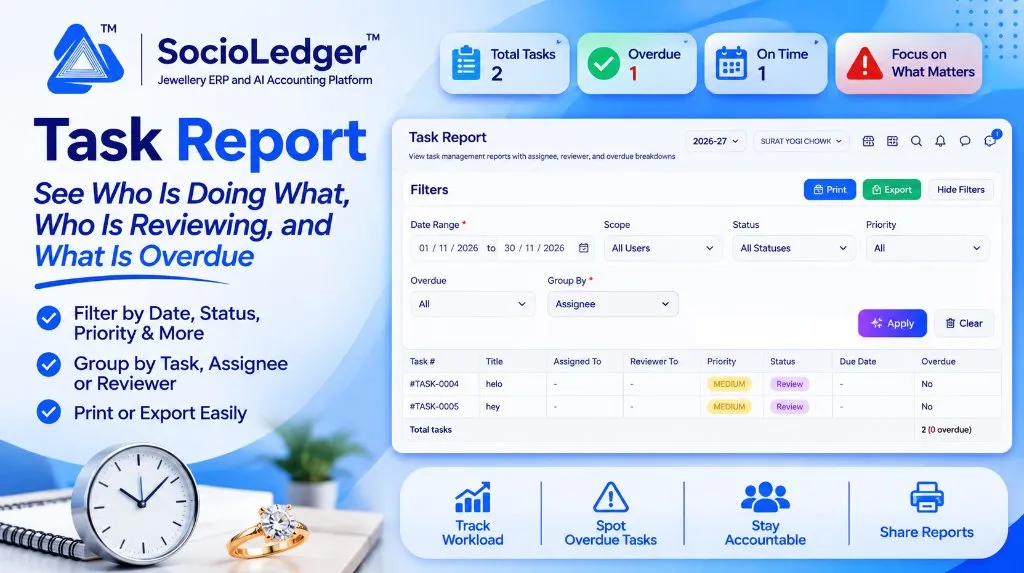
Table of contents
Open Table of contents
- The operational blind spot beyond the daily task board
- What’s new: The Task Report dashboard
- Multi-parameter filters to pinpoint priorities
- Flexible grouping: Analyze workload from three perspectives
- Print and export for reviews and team meetings
- Why this matters for jewelry businesses
- Feature comparison: Daily board vs. SocioLedger Task Report
- How it works: Step-by-step guide
- Where to find the report
- Part of SocioLedger’s jewelry management suite
- Task management you can measure
The operational blind spot beyond the daily task board
In high-tempo jewelry hubs like Zaveri Bazaar in Mumbai, Surat’s manufacturing centers, Rajkot, and Karol Bagh in Delhi, daily operations involve dozens of moving parts. Sales executives follow up on customer quotes, workshop managers coordinate urgent solder repairs with artisan karigars, inventory clerks conduct tag tallies, and accounts personnel prepare GST reconciliation files.
While Kanban boards give team members a clean visual layout of daily To Do, In Progress, Review, and Done columns, managing an entire enterprise requires broader visibility:
- Workload imbalances: Without aggregate reporting, managers cannot easily see if one senior salesperson is juggling twenty custom CAD designs while another has only three.
- Review bottlenecks: Tasks frequently get stuck in the “Review” phase waiting for manager sign-off, delaying order fulfillment without alerting leadership.
- Unnoticed deadline slippages: When dozens of tasks are open across multiple department boards, identifying which jobs missed their scheduled due dates requires opening cards one by one.
- Meeting and audit preparation: Reviewing weekly showroom productivity or monthly employee performance was difficult without a printable, exportable audit report.
Jewelry enterprises need a structured report that transforms operational task records into measurable accountability metrics.
What’s new: The Task Report dashboard
Building directly on SocioLedger’s Task Management module — where jobs are assigned to specific team members and verified by appointed reviewers — the Task Report aggregates internal operations into a consolidated table with real-time KPI scorecards.
+---------------------------------------------------------------------------------------+
|  [📋] Total Tasks: 2     [✓] Overdue: 1     [📅] On Time: 1     [!] Focus on What Matters|
+---------------------------------------------------------------------------------------+
|  Task #     | Title           | Assigned To | Reviewer To | Priority | Status | Due Date | Overdue |
|-------------|-----------------|-------------|-------------|----------|--------|----------|---------|
|  #TASK-0004 | Stone Setting   | Ramesh P.   | Suresh M.   | MEDIUM   | Review | 18/11/26 | Yes     |
|  #TASK-0005 | Hallmarking Tag | Amit K.     | Suresh M.   | MEDIUM   | Review | 22/11/26 | No      |
+---------------------------------------------------------------------------------------+
|  Total tasks: 2 (1 overdue)                                                           |
+---------------------------------------------------------------------------------------+
Executive KPI summary cards
At the top of the report, live indicator cards surface key operational metrics for your selected filters:
- Total Tasks: Total count of active, reviewed, or completed tasks within the selected date interval.
- Overdue: The exact number of tasks that have slipped past their scheduled completion deadlines.
- On Time: Tasks progressing or completed comfortably within target timeframes.
- Focus on What Matters: Quick contextual indicator highlighting immediate intervention areas.
Granular task breakdown columns
Each row in the report displays essential accountability parameters:
- Task Number & Title: Unique tracking reference (e.g.,
#TASK-0004) and descriptive task name. - Assigned To: The specific team member responsible for executing the work.
- Reviewer To: The appointed manager, department lead, or partner responsible for inspecting and signing off on quality.
- Priority: Color-coded urgency indicators (High, Medium, Low).
- Status: Live workflow stage (To Do, In Progress, Review, Completed).
- Due Date & Overdue Tag: Target deadline paired with an unequivocal Yes / No overdue flag.
- Summary Footer: Live count of total listed tasks alongside immediate overdue tallies.
Multi-parameter filters to pinpoint priorities
The Task Report provides comprehensive filtering controls to isolate operational tasks across branches and departments:
+-------------------------------------------------------------------------------+
|  FILTERS                                                      [ Print ] [ XLS]|
|  Date Range: [ 01/11/2026 to 30/11/2026 📅 ]   Scope   : [ All Users     v ]  |
|  Status    : [ All Statuses             v ]   Priority: [ All Prioritiesv ]  |
|  Overdue   : [ Overdue Only             v ]   Group By: [ Assignee      v ]  |
|                                                                    [ Apply ]  |
+-------------------------------------------------------------------------------+- Date Range: Filter tasks created, due, or completed across specific trading weeks, festive seasons, or monthly audit cycles.
- Scope: View company-wide tasks across all staff, or drill into an individual employee’s workload.
- Status: Isolate tasks in “Review” to clear sign-off queues, or check active “In Progress” work.
- Priority: Filter by High Priority to resolve urgent customer repairs or bridal orders first.
- Overdue Toggle: Instantly strip away on-time tasks to display only delayed jobs requiring managerial escalation.
Flexible grouping: Analyze workload from three perspectives
The Group By selector allows owners to rearrange the entire report structure based on the specific managerial question they need to answer:
+-----------------------------------------------------------------------------+
|                     Three Distinct Perspectives on Team Work                |
+-----------------------------------------------------------------------------+
|                                                                             |
|   1. Group by Task (Direct Listing)                                         |
|      ► Ideal for: Quick overview of all operational items in chronological   |
|        or priority sequence.                                                |
|                                                                             |
|   2. Group by Assignee (Workload Balancing)                                 |
|      ► Ideal for: Evaluating individual employee capacity, spotting team    |
|        burnout, and reallocating pending assignments fairly.                |
|                                                                             |
|   3. Group by Reviewer (Quality & Approval Tracking)                        |
|      ► Ideal for: Spotting managerial bottlenecks, seeing how many jobs are  |
|        waiting for partner sign-off, and accelerating final completion.      |
|                                                                             |
+-----------------------------------------------------------------------------+
Print and export for reviews and team meetings
Operational reports are most valuable when easily shared across leadership:
- 1-Click Print: Generates clean, printer-ready documents for morning counter briefings, factory floor reviews, or management huddles.
- Export to XLS: Downloads structured task data into Excel format for custom employee KPIs, HR performance reviews, and operational auditing.
Why this matters for jewelry businesses
Implementing structured task reporting delivers tangible operational advantages for jewelry showrooms and wholesale manufacturing units:
- Complete workload visibility: Spot who has too much work on their desk and rebalance assignments before deadlines suffer.
- Eliminate review bottlenecks: Group by reviewer to immediately identify managers holding up completed work from final customer delivery.
- Catch delays before customers notice: Filter to overdue tasks every morning and resolve holdups proactively.
- Two-tier accountability: Every single task explicitly logs both the executor (“Assigned To”) and the verifier (“Reviewer To”), eliminating finger-pointing.
- Data-driven performance appraisals: Evaluate team output using factual completion metrics rather than subjective impressions.
- Seamless meeting preparation: Print or export clean task schedules for executive reviews in seconds.
Feature comparison: Daily board vs. SocioLedger Task Report
| Capability | Standard Kanban Board | SocioLedger Task Report |
|---|---|---|
| Operational Scope | Daily execution focus | Macro management & audit analysis |
| Overdue Tracking | Must inspect cards individually | Dedicated KPI card & 1-click overdue filter |
| Workload Analysis | Cluttered visual columns | Clean grouping by Assignee across all stages |
| Reviewer Bottlenecks | Difficult to isolate reviewer queues | Dedicated grouping by Reviewer |
| Reporting & Export | Screenshot-dependent | Native 1-click Print layout and XLS export |
| Historical Auditing | Archives fade from immediate view | Searchable across custom historical date ranges |
How it works: Step-by-step guide
Generating your task analytics in SocioLedger is simple:
- Open Task Report: Navigate to Reports in the main platform menu and select Task Report.
- Configure Your Filters: Choose your date range, select user scope, pick relevant statuses, and filter by priority or overdue status.
- Choose Group By Option: Select Task for a sequential list, Assignee for employee workload, or Reviewer for approval monitoring.
- Click Apply: The KPI summary cards and detailed data table populate immediately.
- Print or Export: Use Print for physical team copies or Export to save an Excel spreadsheet.
Where to find the report
- Go to Reports → Task Report.
The report is available to administrators, store partners, and department supervisors across all configured branches.
Part of SocioLedger’s jewelry management suite
The Task Report operates seamlessly alongside SocioLedger’s integrated suite of workforce and operational control tools:
- Two-tier task tracking: Assign and verify team assignments using Task Management with Reviewer Board.
- Audit platform actions: Trace transaction modifications with ERP Activity Logs & Audit Trails.
- Activity log shortcuts: Jump directly from audit logs into records with Activity Logs Edit Shortcut.
- Internal team messaging: Coordinate tasks and handovers using Team Chat Direct and Group.
- Role permissions: Control report viewing rights with Role-Based Access Control.
Task management you can measure
Assigning a task is only the beginning of good management. What truly matters is knowing how work moves through your business, who is executing it, who is verifying quality, and where delays threaten customer commitments.
With SocioLedger’s Task Report, jewelry business owners gain complete operational clarity — tracking workloads, clearing review roadblocks, and ensuring every job gets finished on time.
Want another metric or custom grouping added to your task reports? Tell us — contact our team and our team will be delighted to support your workflow.