
An activity log answers the question “what happened?” — a payment was created, a lead was added, a print setting was changed, with the name of the person who did it and the time it happened. Once you know what happened, the next question is almost always “let me look at it.” That meant leaving the log, finding the right module, and searching for the record manually. SocioLedger’s Activity Logs Edit Shortcut removes that detour entirely.
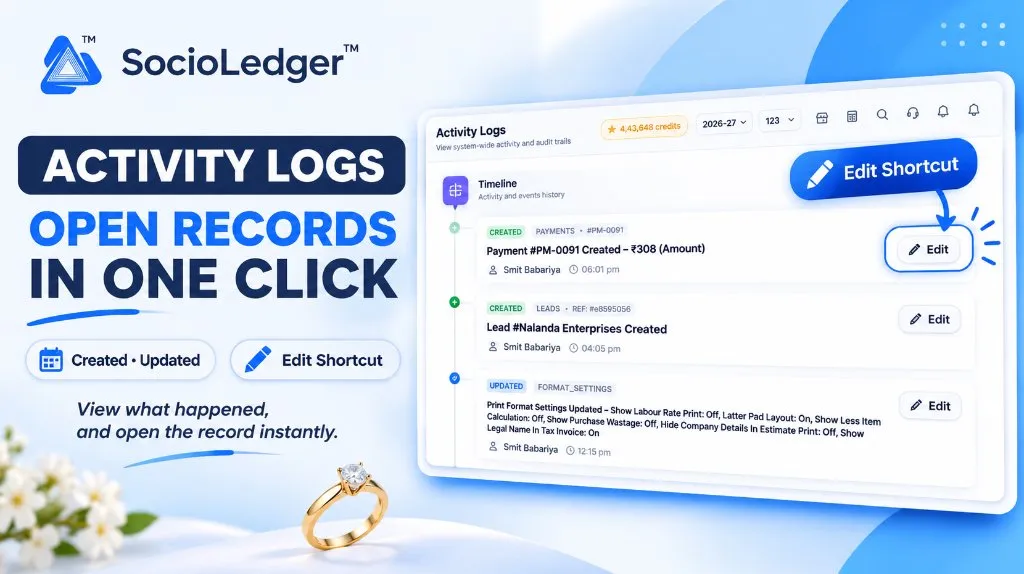
Table of contents
Open Table of contents
- The gap between reading a log and acting on it
- What’s new: The Edit button on Activity Log entries
- What the Edit button opens
- What the Activity Log already tells you
- Why this matters for jewelry businesses
- How it works: Step by step
- Where to find the Edit shortcut
- Part of SocioLedger’s audit and accountability tools
- An audit trail you can act on
The gap between reading a log and acting on it
The Activity Logs timeline in SocioLedger gives you a system-wide view of everything happening across your jewelry business — payments, leads, print settings, vouchers, tags, and more. Every entry tells you what changed, who changed it, and when.
But knowing something happened and being able to act on it are two different things. In a busy jewelry showroom or wholesale operation, the typical flow looked like this:
- Spot an unexpected entry in the log — a payment created for an unusual amount, a lead that should not have been marked updated, a print format setting changed by the wrong person.
- Navigate away from the Activity Logs page.
- Open the correct module — Payments, Leads, Format Settings, or wherever the record lives.
- Search for the specific record by reference number, name, or date.
- Open the record, review it, and make a correction if needed.
That is four or five extra steps every time the log flags something worth checking. For accountants in high-volume jewelry hubs like Surat or Zaveri Bazaar, where dozens of entries can appear between morning opening and lunch, that friction adds up fast.
What’s new: The Edit button on Activity Log entries
In the Activity Logs timeline, entries for Created and Updated activity now display an Edit button directly on the entry card. Click it, and the record that the entry refers to opens immediately inside the platform.
+--------------------------------------------------------------------+
|  CREATED  PAYMENTS  •  #PM-0091                       [ Edit ]    |
|  Payment #PM-0091 Created – ₹308 (Amount)                         |
|  Smit Babariya  ⏱ 06:01 pm                                        |
+--------------------------------------------------------------------+

+--------------------------------------------------------------------+
|  CREATED  LEADS  •  REF: #e8595056                    [ Edit ]    |
|  Lead #Nalanda Enterprises Created                                 |
|  Smit Babariya  ⏱ 04:05 pm                                        |
+--------------------------------------------------------------------+

+--------------------------------------------------------------------+
|  UPDATED  FORMAT_SETTINGS                             [ Edit ]    |
|  Print Format Settings Updated – Show Labour Rate Print: Off,      |
|  Latter Pad Layout: On, Show Less Item Legal Name In Tax Invoice   |
|  Smit Babariya  ⏱ 12:15 pm                                        |
+--------------------------------------------------------------------+
No module switching. No record searching. The log takes you there itself.
What the Edit button opens
The shortcut works across the different kinds of activity shown in the timeline:
- A payment that was created: Click Edit to open that payment voucher, verify the amount and party details, or correct a data entry mistake right away.
- A lead that was created: Click Edit to open the lead record, review the contact details, and follow up or reassign it immediately.
- A settings change: Click Edit to open the settings screen that was updated — such as print format settings — and check or revert the change without hunting through the menu.
The Edit button appears on both Created entries and Updated entries, so whether someone added a new record or modified an existing one, you have a direct path back to it.
What the Activity Log already tells you
The Activity Logs page gives you a complete, system-wide audit timeline. For every entry in the timeline you can already see:
| Field | What It Shows |
|---|---|
| Status tag | Whether the action was Created or Updated |
| Module | Which part of the platform — Payments, Leads, Format Settings, etc. |
| Reference | The unique record identifier, such as #PM-0091 or #e8595056 |
| Description | What changed — the amount, the record name, or the specific settings toggled |
| User | Who performed the action |
| Time | When it happened |
The Filter button lets you narrow the timeline by date, user, or module so you can zero in on the entries that matter. The Refresh button pulls in the latest activity without a full page reload.
The Edit shortcut builds on top of this existing context. You read the log to understand what happened, then click Edit to open the record itself — context first, action second.
Why this matters for jewelry businesses
+----------------------------------------------------------+
|        Before: Log Entry to Record Correction            |
+----------------------------------------------------------+
|  Spot entry in Activity Log                              |
|       │                                                  |
|       ▼                                                  |
|  Navigate away from Activity Logs                        |
|       │                                                  |
|       ▼                                                  |
|  Open the correct module manually                        |
|       │                                                  |
|       ▼                                                  |
|  Search for the record by reference or name              |
|       │                                                  |
|       ▼                                                  |
|  Open record → Review → Correct                          |
+----------------------------------------------------------+

+----------------------------------------------------------+
|        After: Log Entry to Record Correction             |
+----------------------------------------------------------+
|  Spot entry in Activity Log                              |
|       │                                                  |
|       ▼                                                  |
|  Click Edit on the entry                                 |
|       │                                                  |
|       ▼                                                  |
|  Record opens directly → Review → Correct                |
+----------------------------------------------------------+
The practical benefits for jewelry showrooms and wholesale operations:
- From log to record in one click: No searching for the right module or scrolling through a list of records to find the one the log flagged.
- Faster corrections: When an entry looks wrong — an incorrect payment amount, a lead assigned to the wrong person — you can open it and fix it immediately while the context is still in front of you.
- Quicker audits and reviews: Accountants and managers checking end-of-day activity can verify what happened and inspect the underlying record in the same flow, without jumping between screens.
- Works for creates and updates: The shortcut appears on both kinds of entries, so every new record and every modification has a direct path back to the source.
- Clear context first: The log still tells you who did what and when before you click, so you always know why you are opening the record.
How it works: Step by step
Using the Edit shortcut is straightforward:
- Open Activity Logs: Navigate to Activity Logs from the platform’s main menu.
- Find the entry: Browse the timeline or click Filter to narrow by module, user, or date range.
- Click Edit: On the entry card, click the Edit button on the right side.
- Review or correct: The record opens directly in the relevant module — review it, make corrections if needed, and save.
No extra navigation. No reference number copy-paste. No search.
Where to find the Edit shortcut
The Edit button appears on every Created and Updated entry in the Activity Logs timeline. It is available to any user who has access to Activity Logs and the relevant module.
Find Activity Logs in your SocioLedger platform navigation.
Part of SocioLedger’s audit and accountability tools
The Edit shortcut works alongside the broader set of accountability and security features built into SocioLedger for jewelry businesses:
- Freeze settled ledger data: Seal verified vouchers against edits using Lock Ledger Period.
- Prevent backdated tampering: Automatically lock entries after set hours with Retroactive Lock.
- Control who sees what: Restrict modules and reports with Role-Based Access Control.
- Protect data from accidental deletion: Require confirmation before tag removal with Tag Delete Confirmation.
- Back up your records: Keep your data independent and recoverable with Data Management & Backup.
An audit trail you can act on
A log is most useful when it leads somewhere. With the Edit button on created and updated entries in the Activity Logs timeline, jewellers and their teams can go from reading what happened to opening the record in a single click — reviewing it, correcting it, or following up without any detour.
Want another shortcut in the Activity Logs? Tell us — contact our team and we will look into it.