
Tags don’t always get printed once and forgotten. A label gets damaged during customer handling, a piece is pulled aside for an upcoming trade exhibition, or an ornament simply needs a fresh barcode after resizing. When that happens, you need to reprint it quickly in the exact format required, without digging back through historical purchase or receipt vouchers. SocioLedger’s Tag Reprint now supports the Tag Exhibition Offline print format alongside standard tag printing, letting you scan any jewelry tag and print it either way in a single click.
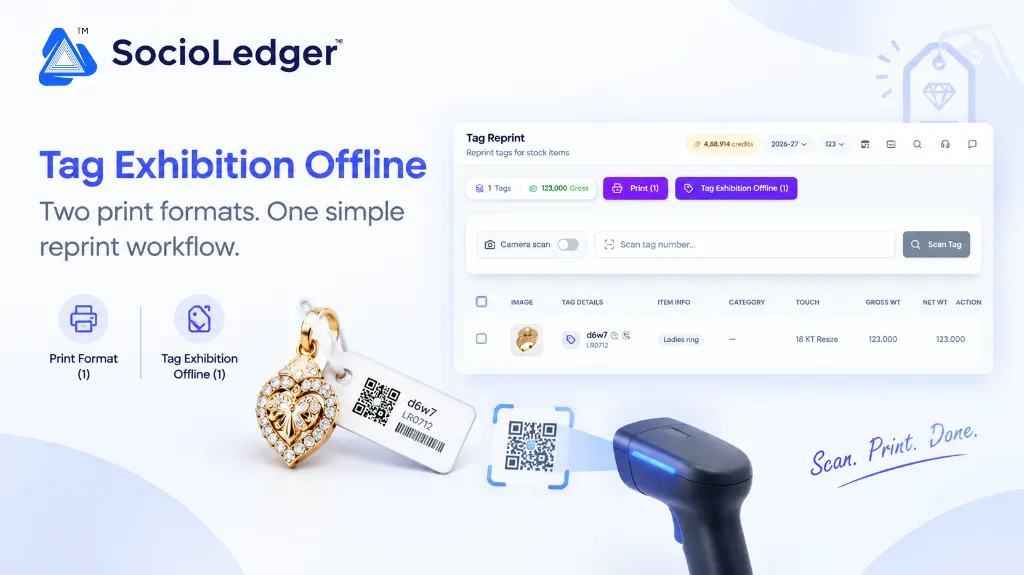
Table of contents
Open Table of contents
- Why jewelry tag reprinting is a constant showroom necessity
- What’s new: Tag Exhibition Offline format inside Tag Reprint
- How the reprint flow works: scan to print in seconds
- Permission-based access: protecting exhibition print formats
- Standard Tag Print vs. Tag Exhibition Offline: format comparison
- Why this matters for your jewelry business
- Where to find Tag Exhibition Offline in SocioLedger
- Part of SocioLedger’s jewelry inventory and tagging ecosystem
- The right tag, printed the way you need it
Why jewelry tag reprinting is a constant showroom necessity
In high-volume jewelry hubs like Zaveri Bazaar, Karol Bagh, Surat, and Manek Chowk, inventory labels take real punishment. Trays of 22K bangles, diamond studs, and gold chains are pulled out, weighed, tried on by customers, and restocked dozens of times a week. Over time, adhesive tags smudge, tear, or lose their barcode sharpness.
Beyond regular wear and tear, jewelry businesses routinely prepare assortments for off-site sales and trade events:
- Exhibition preparation: Curating select pieces for booth showcases at major trade fairs like IIJS Premiere, IIJS Signature, or regional buyer meets often requires specific exhibition tag formats.
- Counter damaged labels: A customer snagging a ring tag or a counter associate handling heavy bridal sets can crease a barcode sticker, causing scanner read errors during billing.
- After-repair tag renewal: When a piece returns from a karigar after size adjustment or stone tightening, its net weight or polish details may require an updated physical tag.
- The voucher retrieval bottleneck: In traditional software, reprinting a tag often forces staff to locate the original inward receipt note, voucher number, or casting batch. Hunting down historical documents just to replace one damaged sticker wastes valuable counter time.
Your team needs a dedicated reprint desk where any physical ornament can be scanned and reprinted immediately, regardless of when or how it was initially entered.
+-----------------------------------------------------------------------------+
|                SocioLedger Tag Reprint Multi-Format Workflow                |
+-----------------------------------------------------------------------------+
|                                                                             |
|                      [ Physical Jewelry Tag in Hand ]                       |
|               (Damaged Label / Resized Piece / Exhibition Prep)             |
|                                     │                                       |
|                                     ▼                                       |
|                  ┌─────────────────────────────────────┐                    |
|                  │      Scan Tag via Camera or USB     │                    |
|                  │    (Or Type Alphanumeric Tag ID)    │                    |
|                  └──────────────────┬──────────────────┘                    |
|                                     │                                       |
|                                     ▼                                       |
|                  ┌─────────────────────────────────────┐                    |
|                  │      Review Ornament Details        │                    |
|                  │ Image, Purity, Gross Wt, Net Wt, Lot│                    |
|                  └──────────────────┬──────────────────┘                    |
|                                     │                                       |
|                                     ▼                                       |
|                  ┌─────────────────────────────────────┐                    |
|                  │    Select Tags via Checkboxes       │                    |
|                  │   (Single Piece or Batch Select)    │                    |
|                  └──────────────────┬──────────────────┘                    |
|                                     │                                       |
|             ┌───────────────────────┴───────────────────────┐               |
|             ▼                                               ▼               |
|   [ Print (N) ]                               [ Tag Exhibition Offline (N) ]|
|   ┌─────────────────────────┐                 ┌───────────────────────────┐ |
|   │ Standard Showroom Label │                 │ Exhibition Offline Label  │ |
|   │ Full Retail Details     │                 │ Optimized Trade Layout    │ |
|   │ Normal Barcode & Price  │                 │ Offline Exhibition Format │ |
|   └─────────────────────────┘                 └───────────────────────────┘ |
|                                                                             |
+-----------------------------------------------------------------------------+
What’s new: Tag Exhibition Offline format inside Tag Reprint
The Tag Exhibition Offline print format has long been available on receipt notes, giving wholesalers and manufacturers an exhibition-ready label format straight from stock intake.
Now, that capability extends directly to Tag Reprint — the central screen used to reprint tags for existing stock items across your company.
Once enabled in Settings, the Tag Reprint screen presents two print buttons side by side at the top of the interface:
- Print — generates the standard, normal jewelry tag print format used across your showroom counters.
- Tag Exhibition Offline — generates the specialized exhibition offline tag print format, optimized for trade shows, traveling sales sample cases, and offline exhibition counters.
Real-time selection counters keep you in control
Both buttons dynamically update to reflect the exact number of tags you have selected in your working list.
For example, when you check a single tag, the actions display Print (1) and Tag Exhibition Offline (1). If you select five tags across different trays, the buttons immediately read Print (5) and Tag Exhibition Offline (5).
This clear visual indicator ensures counter staff always know precisely how many labels are queued before sending print commands to the thermal barcode printer.
How the reprint flow works: scan to print in seconds
The Tag Reprint workflow is built for speed and precision, whether you are replacing one damaged sticker or re-tagging an entire exhibition tray.
+-------------+      +-------------------+      +------------------+      +-------------------+
| 1. Scan Tag | ───> | 2. Review Details | ───> | 3. Select Pieces | ───> | 4. Choose Format  |
| Camera/Type |      | Weight, Touch, Img|      | Checkbox Toggles |      | Print or Exhibit  |
+-------------+      +-------------------+      +------------------+      +-------------------+
1. Scan the tag
Type or scan the tag number using your standard USB barcode scanner, or flip on the Camera scan switch to scan the barcode directly using your laptop webcam, tablet, or smartphone camera. The item appears instantly in your reprint list.
2. Review the tag details
Each scanned tag loads with complete ornament metadata:
- Product image — a clear thumbnail confirming visual identification.
- Tag details — tag code, lot reference, and tracking timestamps.
- Item info — description, such as
Ladies ring,Bridal necklace, orKada. - Category — product grouping and design classification.
- Touch / Purity — metal purity standards (e.g.,
18 KT Resize,22 KT 916). - Gross weight and Net weight — high-precision weights displayed to three decimal places (e.g.,
123.000g).
The top bar keeps a running tally of total scanned tags and cumulative gross weight, giving operators an instant sanity check before printing.
3. Select the tags you want to print
Use the individual checkboxes next to each piece, or click the header checkbox to select all items currently loaded on your screen.
4. Choose your print format
Click Print for the standard showroom label, or click Tag Exhibition Offline for the exhibition-specific format. The label prints immediately using your pre-configured printer settings.
5. Print individually or in batches
You do not have to print one tag at a time. Scan five, ten, or fifty ornaments into the screen, select them together, and trigger a batch print in your chosen format in a single action.
Permission-based access: protecting exhibition print formats
Not every team member on the retail floor needs access to exhibition print layouts. Exhibition formats often carry specific pricing conventions, wholesale markings, or distinct barcode structures intended strictly for trade fairs and senior sales managers.
Tag Exhibition Offline in Tag Reprint operates on role-based permissions:
- Controlled visibility: The
Tag Exhibition Offlinebutton only appears for users and roles explicitly granted permission in system administration. - Uncluttered interface for regular staff: Floor associates without exhibition privileges continue to see only the standard
Printbutton, keeping daily showroom counter workflows simple and mistake-proof. - Administrative auditability: Store owners and vault managers retain complete control over who can generate exhibition-ready tags from existing showroom stock.
Standard Tag Print vs. Tag Exhibition Offline: format comparison
Understanding when to use each print format ensures your jewelry labels match the exact retail or trade context:
| Dimension | Standard Tag Print | Tag Exhibition Offline |
|---|---|---|
| Primary Purpose | Everyday showroom display & retail POS billing | Trade exhibitions, wholesale fairs & off-site shows |
| Barcode / QR Layout | Standard retail barcode or QR code | Exhibition-optimized layout for rapid handheld scanning |
| Purity & Weight Display | Gross weight, net weight, stone details, touch | Condensed trade specs with exhibition lot markings |
| Price / Code Visibility | Retail price code or standard making charge tag | Wholesale exhibition rate codes / trade fair pricing |
| Supported Screens | Tag Reprint, Inward Receipt, Barcode Tagging | Receipt Notes and Tag Reprint |
| User Access | Standard showroom counter staff | Authorized users via role-based permissions |
| Best Used For | Replacing smudged tags, post-repair re-tagging | Preparing booths for IIJS, GJS, or buyer roadshows |
Why this matters for your jewelry business
Integrating both print options into Tag Reprint solves everyday operational headaches across your store and wholesale operations.
1. Both formats in one place
Normal tag prints and exhibition prints now live on the exact same screen. Your team no longer needs to jump between inventory receipt notes, purchase vouchers, and reporting screens just to switch label styles.
2. Fast with a scan
Finding a tag takes less than a second. Whether typing a tag number, scanning with a handheld laser gun, or pointing a phone camera using the camera tag scanner, the ornament record pulls up instantly without manual searching.
3. Print in batches
Preparing for an exhibition often means re-tagging dozens of pieces selected from showroom showcases. With multi-select checkboxes and batch printing, you can process entire display trays in minutes rather than reprinting tags one by one.
4. Granular role-based security
Permission-based controls ensure that specialized exhibition tags remain restricted to authorized team members, protecting your business’s trade pricing formulas and wholesale conventions.
5. Consistent across the platform
The Tag Exhibition Offline format in Tag Reprint produces the identical layout used on receipt notes. Tags printed during stock intake and tags reprinted weeks later for a trade show share the exact same typography, barcode density, and layout standards.
Where to find Tag Exhibition Offline in SocioLedger
Using the new reprint format takes two quick steps:
- Enable in Settings: Head to Settings in your SocioLedger console and ensure the Tag Exhibition Offline toggle is switched on.
- Open Tag Reprint: From the main navigation, open Reports and select Tag Reprint.
Once enabled, both print buttons — Print and Tag Exhibition Offline — sit side by side above the tag table, ready for action the moment you scan your first ornament.
Part of SocioLedger’s jewelry inventory and tagging ecosystem
This enhancement works hand in hand with SocioLedger’s comprehensive jewelry management toolset:
- Optical Camera Scanning: Read tags instantly using any built-in device camera with our camera barcode scanner.
- 1-Click Tag Creation: Generate new tags seamlessly during stock entry with the Save & Create Tag button.
- Granular Tagging Rules: Customize how individual categories generate tags using the tag-by-item setting.
- Transfer Audits: Verify entire multi-item branch dispatches in one go with Verify All Tags.
- Accidental Deletion Protection: Safeguard active inventory records with tag delete confirmation.
- Exhibition Stock Management: Keep booth counts reconciled during major trade events using exhibition stock tally tracking.
The right tag, printed the way you need it
Whether a piece needs a quick replacement label on your retail counter or a specialized format for an upcoming trade show booth, you can now generate either one from the same screen — with a simple scan and a single click.
Want another print option or custom label layout added to Tag Reprint? Tell us — contact our team and we will look into it.