
A busy counter or back office does not have time for unnecessary clicks. Opening a search bar, saving a form, printing a receipt — each of these is a small action on its own, but repeated dozens of times a day, every extra click adds up. SocioLedger now introduces a comprehensive set of Keyboard Shortcuts so your team can move through everyday actions directly from the keyboard, without reaching for the mouse each time.
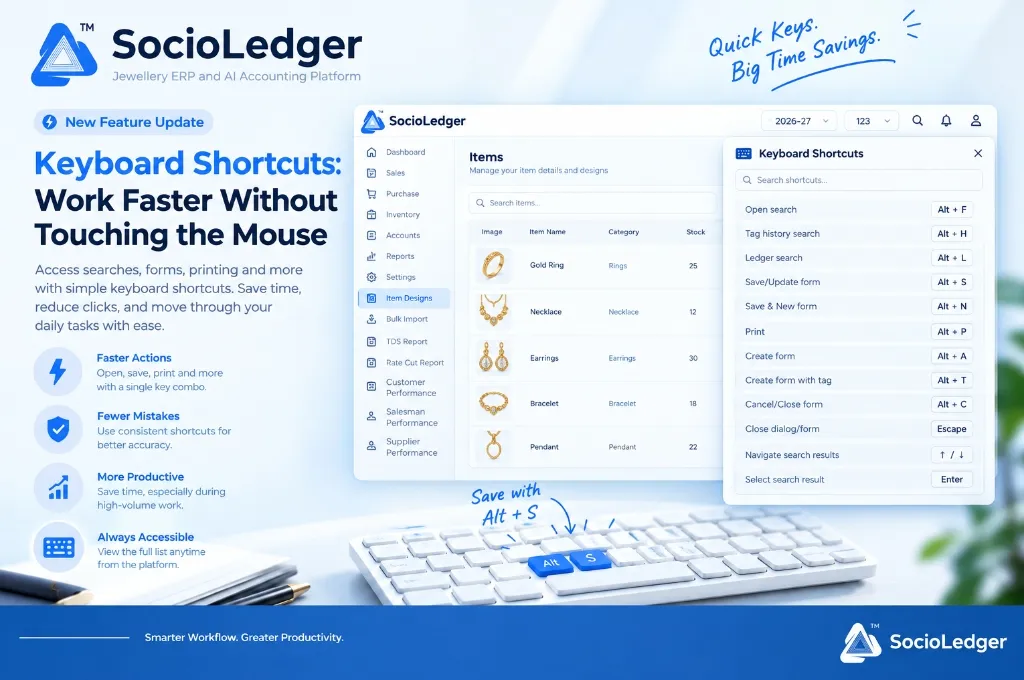
Table of contents
Open Table of contents
- Why repetitive mouse clicks slow down busy jewelry operations
- What’s new: Complete keyboard shortcuts across SocioLedger
- How keyboard shortcuts streamline core jewelry workflows
- Why this matters for jewelry store owners and staff
- Mouse navigation vs. SocioLedger keyboard shortcuts
- How to use and access shortcuts in SocioLedger
- Built for speed, accuracy, and effortless productivity
Why repetitive mouse clicks slow down busy jewelry operations
In fast-paced jewelry retail showrooms and busy wholesale trading offices across hubs like Zaveri Bazaar, Karol Bagh, Rajkot, and Surat, speed and accuracy at the billing counter determine customer satisfaction. During peak trading hours, wedding seasons, and festival rushes like Dhanteras or Akshaya Tritiya, counter staff handle hundreds of customer interactions, barcode scans, ledger reconciliations, and print requests.
Traditionally, completing everyday actions in management software requires constant hand switching between the keyboard and the mouse:
- Disrupted data entry flow: An operator types out customer details or tag weights on the numeric keypad, only to lift their hand, locate the mouse pointer, move across the screen, and click a save button.
- Wasted seconds on high-volume counters: Searching for an account ledger, opening tag history, or printing an estimate voucher takes multiple mouse movements and menu clicks. Repeated across 200 transactions a day, this friction costs valuable hours.
- Accidental misclicks during rush hours: When queues build up at the billing desk, rushing with a mouse often results in clicking the wrong button — such as accidentally closing an active form or selecting the wrong ledger from a dropdown.
- Physical strain and wrist fatigue: Constantly shifting back and forth between keyboard typing and mouse navigation causes physical fatigue for full-time billing operators and data entry staff.
A high-performance jewelry ERP should empower operators to execute their most frequent tasks in milliseconds without their hands ever leaving the home row of the keyboard.
+-----------------------------------------------------------------------------+
|                 Friction: Mouse Navigation vs. Keyboard Flow                |
+-----------------------------------------------------------------------------+
|                                                                             |
|      [ Traditional Workflow ]                [ SocioLedger Shortcuts ]      |
|      ┌─────────────────────────┐             ┌─────────────────────────┐    |
|      │ 1. Type data entry      │             │ 1. Type data entry      │    |
|      │ 2. Grab mouse           │             │ 2. Press Alt + S        │    |
|      │ 3. Aim & click 'Save'   │             │                         │    |
|      │ 4. Grab mouse for menu  │             │ Instant Save & Advance  │    |
|      │ 5. Aim & click 'Search' │             │ Hands Stay on Keyboard  │    |
|      └─────────────────────────┘             └─────────────────────────┘    |
|                                                                             |
|      Result: 4-6 seconds lost per entry  vs. Instant sub-second action      |
+-----------------------------------------------------------------------------+
What’s new: Complete keyboard shortcuts across SocioLedger
SocioLedger now equips every user with a complete suite of standard keyboard shortcuts designed specifically for high-speed jewelry operations. These hotkeys cover the actions your team performs dozens of times every hour:
+-----------------------------------------------------------------------------+
|                     SocioLedger Core Keyboard Map                           |
+-----------------------------------------------------------------------------+
|                                                                             |
|   [ Alt + F ] Open Search             [ Alt + S ] Save / Update Form        |
|   [ Alt + H ] Tag History Search      [ Alt + N ] Save & New Form           |
|   [ Alt + L ] Ledger Search           [ Alt + P ] Print Voucher / Tag       |
|   [ Alt + A ] Create Form             [ Alt + C ] Cancel / Close Form       |
|   [ Alt + T ] Create Form with Tag    [ Escape  ] Dismiss Dialog / Modal    |
|                                                                             |
|   [ ↑ / ↓ ]   Navigate Search Results [ Enter   ] Select Search Result      |
|                                                                             |
+-----------------------------------------------------------------------------+
Full shortcut reference directory
| Category | Shortcut | Action | Operational Purpose |
|---|---|---|---|
| Search & Discovery | Alt + F | Open Search | Opens global search across items, tags, and contacts |
| Search & Discovery | Alt + H | Tag History Search | Jumps straight to tag history search for instant provenance lookup |
| Search & Discovery | Alt + L | Ledger Search | Opens ledger search to pull up customer, artisan, or supplier books |
| Form Operations | Alt + S | Save / Update Form | Saves the active entry or commits changes instantly |
| Form Operations | Alt + N | Save & New Form | Saves current record and resets fields for next entry |
| Form Operations | Alt + A | Create Form | Opens a blank creation form in the active module |
| Form Operations | Alt + T | Create Form with Tag | Opens creation form with automatic item tagging enabled |
| Form Operations | Alt + C | Cancel / Close Form | Closes active form without committing changes |
| Navigation & Modals | Escape | Close Dialog / Form | Instantly dismisses open modals, drawers, or popups |
| Navigation & Modals | ↑ / ↓ | Navigate Search Results | Moves focus through search suggestions smoothly |
| Navigation & Modals | Enter | Select Search Result | Confirms highlighted item, ledger, or menu selection |
A built-in Quick Reference Panel is accessible directly within the platform navigation bar, meaning staff never have to memorize combinations cold — a single click displays the entire hotkey directory whenever needed.
How keyboard shortcuts streamline core jewelry workflows
SocioLedger’s keyboard shortcuts directly accelerate the five most critical touchpoints in daily jewelry store administration and showroom management.
1. Instant global, tag, and ledger searches
Instead of navigating through sidebar menus to look up customer outstanding balances or ornament details, operators can trigger specialized search tools instantly:
- Press
Alt + Lanywhere on the platform to launch Ledger Search. Type the party name, use↑/↓to highlight the account, and pressEnterto open their financial statement. - Press
Alt + Hto launch Tag History Search when a customer brings in a piece for exchange or repair. Scan or type the tag number, and view its complete manufacturing and pricing history in seconds. - Press
Alt + Fto trigger the universal search bar for fast item designs, order lookups, and module jumping.
+-----------------------------------------------------------------------------+
|                      Instant Search from Any Screen                         |
+-----------------------------------------------------------------------------+
|                                                                             |
|   Press [ Alt + L ] ────────►  ┌────────────────────────────────────────┐   |
|                                │ Search Ledgers: Ramesh Jewellers...    │   |
|                                ├────────────────────────────────────────┤   |
|   Press [ ↑ / ↓ ]   ────────►  │ 1. Ramesh Jewellers (Retail Customer)  │   |
|                                │ 2. Ramesh Bullion Corp (Supplier)      │   |
|   Press [ Enter ]   ────────►  │ 3. Ramesh Karigar (Job Worker)        │   |
|                                └────────────────────────────────────────┘   |
|                                                                             |
+-----------------------------------------------------------------------------+
2. High-speed form creation and tag generation
Opening a new voucher or stock entry no longer requires locating screen buttons:
- Press
Alt + Ato instantly initialize a new transaction or inventory record. - Press
Alt + Tto open a creation form with automated tag assignment pre-configured, perfectly paired with save and create tag workflows.
3. Rapid data saving and continuous batch entry
For back-office teams entering hundreds of new jewelry pieces, casting receipts, or wholesale purchase invoices:
- Press
Alt + Sto save and commit the active voucher immediately. - Press
Alt + Nfor Save & New. This commits the current item and clears the input fields with cursor focus ready at the first field, allowing continuous data entry without a single mouse touch.
4. Fast printing and document generation
Counter staff frequently need to print estimates, GST tax invoices, or thermal barcode tags:
- Press
Alt + Pto trigger the print dialog for the current transaction, estimate voucher, or jewelry tag layout instantly.
5. Fluid keyboard navigation and modal dismissal
- Use arrow keys (
↑and↓) to scroll through autocomplete dropdowns, design search results, and party lists. - Hit
Enterto confirm a selection and automatically advance focus to the next relevant input field. - Hit
EscapeorAlt + Cto close dialogs, cancel edits, or dismiss modal overlays without hunting for small “X” close icons.
Why this matters for jewelry store owners and staff
Implementing system-wide keyboard shortcuts delivers tangible operational improvements across both retail counters and wholesale administrative offices.
Faster repetitive actions across every department
Saving a form, printing a receipt, or checking an artisan ledger is performed hundreds of times every day. Eliminating mouse transitions trims 3 to 5 seconds from every single interaction, translating to hours of saved administrative time each week.
Fewer errors caused by rushed clicking
During festive shopping rushes, counter operators often rush with the mouse, risking accidental clicks on incorrect action buttons or wrong customer records. Shortcut combinations execute precise, deterministic commands every single time.
Smoother experience for power users
Staff who spend their entire workday inside SocioLedger — including billing clerks, inventory managers, and accountants — experience significant productivity gains and reduced physical fatigue when they can keep their hands firmly on the keyboard.
Everything searchable without menu hopping
Finding a party ledger, checking a tag’s stone weight, or finding a CAD design is always a single keystroke away. There is no need to back out of your current module or open extra browser tabs.
Mouse navigation vs. SocioLedger keyboard shortcuts
| Task / Operation | Traditional Mouse Workflow | SocioLedger Shortcut Workflow | Time Saved per Action |
|---|---|---|---|
| Open Ledger Lookup | Click menu → Accounts → Search → Click bar | Press Alt + L | ~4 seconds |
| Inspect Tag History | Navigate to Inventory → Tag Search → Focus input | Press Alt + H | ~5 seconds |
| Save Transaction Voucher | Scroll down → Find Save button → Click | Press Alt + S | ~3 seconds |
| Batch Item Data Entry | Click Save → Click ‘Add New’ → Click first field | Press Alt + N | ~4 seconds |
| Print Invoice / Tag | Move pointer to top-right → Click Print icon | Press Alt + P | ~3 seconds |
| Dismiss Pop-up Modal | Move pointer → Locate small ‘X’ button → Click | Press Escape | ~2 seconds |
How to use and access shortcuts in SocioLedger
Using keyboard shortcuts in SocioLedger requires zero setup or complicated configuration:
- Use shortcuts anywhere they apply: Press combinations like
Alt + Sto save a form orAlt + Lto open ledger search from any screen in your workspace. - Navigate results with arrow keys: Once a search overlay opens, use
↑and↓to move through matching entries, and hitEnterto select. - Close dialogs instantly: Hit
EscapeorAlt + Cto close any modal window without reaching for the mouse. - Access the quick cheatsheet: Click the Keyboard Shortcuts icon in the top navigation bar at any time to review all available key combinations.
+-----------------------------------------------------------------------------+
|                      Where to Find Keyboard Shortcuts                       |
+-----------------------------------------------------------------------------+
|                                                                             |
|   SocioLedger Header Bar                                                    |
|   ┌─────────────────────────────────────────────────────────────────────┐   |
|   │ ⌂ Dashboard   [2026-27]   [123]   [🔍]  [⌨ Shortcuts]  [🔔]  [👤]   │   |
|   └───────────────────────────────────────────────┬─────────────────────┘   |
|                                                   │                         |
|                               Click to Open Quick Reference Panel           |
+-----------------------------------------------------------------------------+
Built for speed, accuracy, and effortless productivity
The best interface improvements are often the ones you stop noticing because they become second nature. Keyboard Shortcuts in SocioLedger are built to help jewelers and their teams move through searches, forms, and printing faster, with fewer clicks and fewer chances for mistakes along the way.
Whether you are managing rapid-fire counter billing, tracking artisan metal disbursements, or cataloging fresh jewelry collections, your ERP now keeps pace with your fastest operators.
Want a shortcut added for something you do often? Tell us — contact our team and we will look into adding it.