
Verifying tags one by one before accepting a stock transfer is thorough, and for many jewelry showrooms and wholesale houses, that is exactly the level of scrutiny they need. But tag-by-tag verification is not always necessary — when a transfer comes from a trusted internal branch, a sealed dispatch pouch, or a sales representative returning from a short local tour, counter staff need a fast way to confirm receipt without scanning every individual barcode. SocioLedger’s new Verify All Tags setting gives businesses the flexibility to verify and accept an entire batch in a single click while preserving full tag-by-tag verification whenever detailed checks are required.
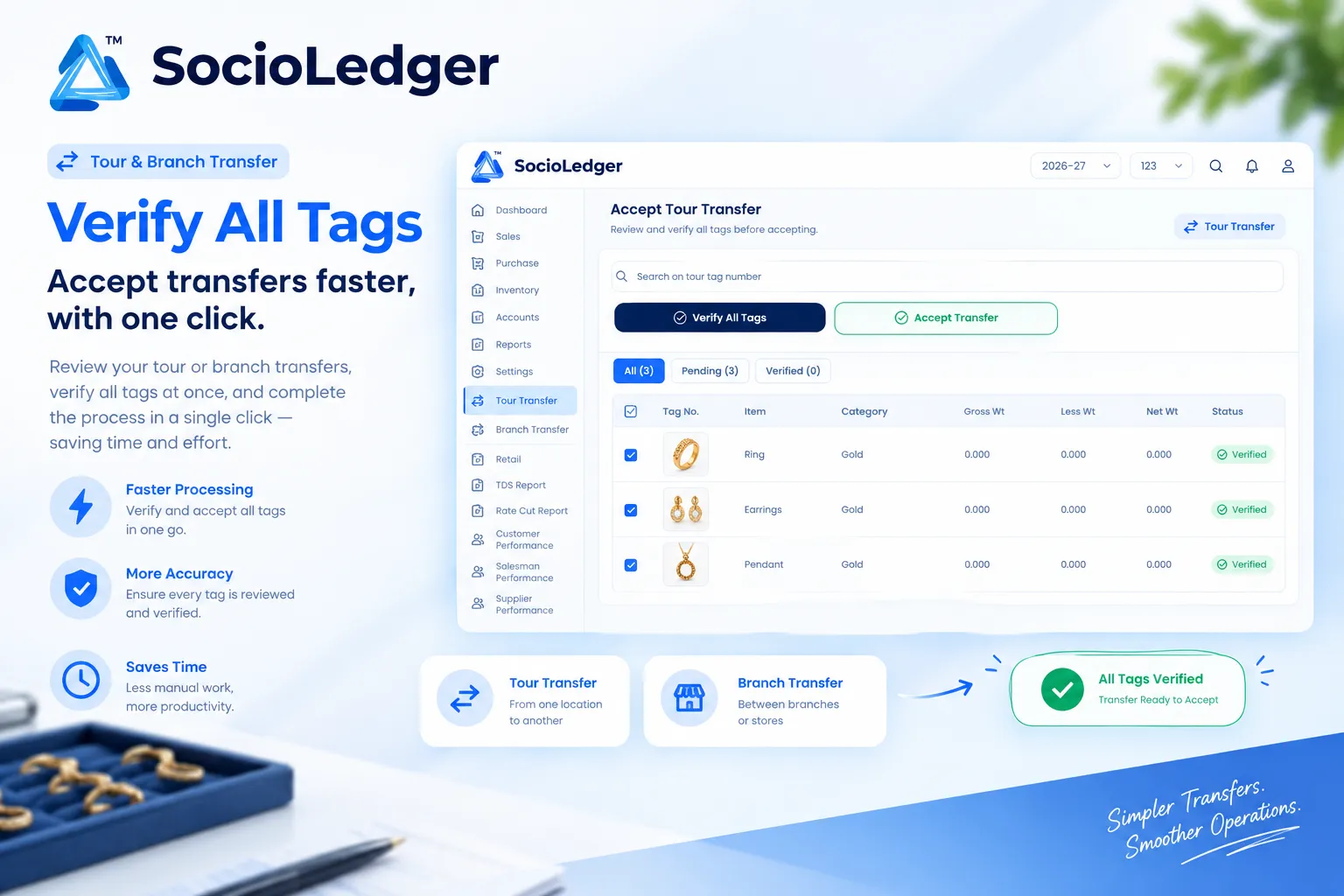
Table of contents
Open Table of contents
- Why tag-by-tag verification isn’t always necessary
- What’s new: The Verify All Tags system setting
- Why this matters for jewelry businesses
- How it works: Step-by-step verification workflow
- Individual tag verification vs. 1-click Verify All Tags
- Where to find Verify All Tags in SocioLedger
- Part of SocioLedger’s jewelry inventory ecosystem
- Choose the pace that fits the transfer
Why tag-by-tag verification isn’t always necessary
In fast-paced jewelry hubs like Zaveri Bazaar, Surat, Jaipur, and Karol Bagh, moving inventory between showrooms or managing jewelry samples on sales tours is a daily routine. Whether transferring a tray of lightweight gold rings between city branches or receiving unsold diamond jewelry back from a wholesale tour, receiving staff must inspect and accept incoming stock into their active ledger.
Until now, accepting incoming stock meant checking every single ornament sequentially:
- Repetitive scanning for routine batches: Scanning 50 or 100 individual tags by optical camera or hand-held barcode reader takes valuable minutes during peak counter rush.
- Unnecessary friction for trusted transfers: Sealed boxes packed by central vaults or transfers between sister branches often carry pre-verified weight manifests that do not require item-by-item rescanning.
- Tour return bottlenecks: When traveling sales agents return from wholesale client visits with dozens of sample trays, receiving managers frequently need a rapid way to check in the returned assortment.
- Rigid software workflows: Rigid ERP systems often force users into an all-or-nothing approach — either no verification at all, or mandatory one-by-one scanning with no middle ground.
Transfer verification should match the context of the dispatch. High-value custom orders from third-party logistics can be verified piece by piece, while trusted intra-company dispatches can be confirmed immediately.
+-----------------------------------------------------------------------------+
|               SocioLedger Transfer Acceptance Workflow Modes                |
+-----------------------------------------------------------------------------+
|                                                                             |
|                      [ Pending Transfer Received ]                          |
|                     (Tour Transfer or Branch Transfer)                      |
|                                     │                                       |
|                                     ▼                                       |
|                  ┌─────────────────────────────────────┐                    |
|                  │    Choose Your Verification Mode    │                    |
|                  └──────────────────┬──────────────────┘                    |
|                                     │                                       |
|             ┌───────────────────────┴───────────────────────┐               |
|             ▼                                               ▼               |
|   [ Mode A: Tag-by-Tag ]                          [ Mode B: 1-Click ]       |
|   ┌─────────────────────────┐                     ┌───────────────────────┐ |
|   │ Camera Scan / Barcode   │                     │ Click "Verify All"    │ |
|   │ Enter Tag IDs Manually  │                     │ System Setting Enabled│ |
|   └───────────┬─────────────┘                     └───────────┬───────────┘ |
|               │                                               │             |
|               ▼                                               ▼             |
|   ┌─────────────────────────┐                     ┌───────────────────────┐ |
|   │ Tally Pending vs Done   │                     │ All Tags Verified     │ |
|   │ All (3) | Pen(0) | Ver(3)│                    │ Instantly at Once     │ |
|   └───────────┬─────────────┘                     └───────────┬───────────┘ |
|               │                                               │             |
|               └─────────────────────┬─────────────────────────┘             |
|                                     │                                       |
|                                     ▼                                       |
|                         ┌───────────────────────┐                           |
|                         │ Click Accept Transfer │                           |
|                         │ Stock Added to Branch │                           |
|                         └───────────────────────┘                           |
+-----------------------------------------------------------------------------+
What’s new: The Verify All Tags system setting
SocioLedger introduces a dedicated system setting that unlocks the Verify All Tags action across both Tour Transfer and Branch Transfer acceptance screens.
With this setting active, users get instant access to a batch verification button alongside the standard one-by-one optical scanning flow:
- Batch confirmation in one action: Clicking
Verify All Tagsimmediately marks every tag in that transfer sheet as verified, allowing you to accept the entire transfer in seconds. - Preserved one-by-one verification: You can still scan tags individually using camera barcode scanning or type tag numbers manually, tracked in real time under
All,Pending, andVerifiedtabs. - Unified across transfer types: The setting works consistently whether you are accepting inventory from Branch Transfer or checking in merchandise from a wholesaler sales tour.
- Live weight and status tracking: Total tag count, gross weight, less weight, and net weight remain fully visible throughout the acceptance screen.
+-----------------------------------------------------------------------------+
|             Accept Transfer Screen: Tag Status & Metrics View               |
+-----------------------------------------------------------------------------+
|  Search: [ Enter tag number... ]                                            |
|  Actions: [ ✓ Verify All Tags ]   [ ⟳ Accept Transfer ]                     |
+-----------------------------------------------------------------------------+
|  Tabs: [ All (3) ]   [ Pending (0) ]   [ Verified (3) ]                     |
+-----------------------------------------------------------------------------+
|  [✓] Tag No.  Item     Category   Gross Wt   Less Wt   Net Wt   Status      |
|  [✓] T-201    Ring     Gold       4.250 g    0.150 g   4.100 g  (✓ Verified)|
|  [✓] T-202    Earrings Gold       8.600 g    0.300 g   8.300 g  (✓ Verified)|
|  [✓] T-203    Pendant  Gold       5.120 g    0.000 g   5.120 g  (✓ Verified)|
+-----------------------------------------------------------------------------+
|  Status: All Tags Verified — Transfer Ready to Accept                       |
+-----------------------------------------------------------------------------+
Why this matters for jewelry businesses
Operating multi-branch showrooms or managing traveling sales teams requires balancing strict stock integrity with everyday counter efficiency. The Verify All Tags setting delivers clear operational advantages.
1. Faster acceptance for trusted transfers
When an incoming shipment has already been verified at packing or comes from an internal vault team you trust, rescanning every tag creates unnecessary friction. With Verify All Tags, receiving staff can confirm the entire batch instantly and move the stock straight into their live inventory.
2. Still fully optional for complete control
Enabling the setting does not force your team into batch acceptance. Counter staff retain complete freedom to scan individual items one by one whenever a shipment requires line-by-line inspection, giving you the best of both worlds.
3. Consistent experience across Tour and Branch Transfers
Staff do not have to learn different interfaces for different departments. Whether an associate is accepting a multi-branch stock dispatch in the retail showroom or a vault manager is settling a sales tour return from the field, the verification layout and one-click option operate identically.
4. Controlled via system settings
Because this behavior is controlled by a centralized platform toggle, business owners and store administrators decide whether fast acceptance fits their standard operating procedures. You maintain full administrative governance over inventory controls.
How it works: Step-by-step verification workflow
Accepting an incoming transfer with Verify All Tags takes just four simple steps in SocioLedger:
- Enable the setting in System Settings: Navigate to System Settings in your admin console and toggle on the Verify All Tags permission for transfer acceptance.
- Open a pending Tour or Branch Transfer: Go to Tour Transfer or Branch Transfer in the main navigation and select any pending transfer awaiting acceptance.
- Choose your verification approach:
- Option A (Individual Scan): Scan barcodes with your camera or enter tag numbers manually. The items move automatically from the
Pendingtab to theVerifiedtab. - Option B (1-Click Batch): Click the Verify All Tags button to mark all tags in the transfer as verified in one go.
- Option A (Individual Scan): Scan barcodes with your camera or enter tag numbers manually. The items move automatically from the
- Accept the transfer: Click Accept Transfer to complete the receipt. All verified ornaments are immediately credited to your branch inventory.
Individual tag verification vs. 1-click Verify All Tags
Choosing between individual scanning and batch verification depends on your showroom’s audit protocols and the transfer source:
| Operational Dimension | Individual Tag Scanning (Manual / Camera) | 1-Click Verify All Tags (Setting Enabled) |
|---|---|---|
| Acceptance Speed | 2–10 minutes depending on tag count | Under 2 seconds for the entire transfer |
| Physical Scrutiny | High — every barcode is scanned individually | Batch — assumes physical parcel is pre-tallied |
| Hardware / Camera Need | Requires barcode scanner or device camera | Single click on screen; no scanner needed |
| Item Status Breakdown | Real-time tally across All, Pending, Verified | All items marked Verified simultaneously |
| Best Used For | High-value diamond parcels, 3rd party couriers | Intra-branch moves, routine tour returns |
| Audit Log Traceability | Recorded with individual item time stamps | Recorded with batch acceptance time stamp |
Where to find Verify All Tags in SocioLedger
The Verify All Tags configuration is located directly inside System Settings under your company administration menu.
Once toggled on, the Verify All Tags button appears prominently on the acceptance screen for both Tour Transfers and Branch Transfers, situated right alongside the search bar and the Accept Transfer action. You can switch between individual tag scanning and batch verification at any point during the review process.
Part of SocioLedger’s jewelry inventory ecosystem
The Verify All Tags feature connects seamlessly with SocioLedger’s end-to-end jewelry stock management capabilities:
- Branch Stock Transfers: Manage multi-showroom stock movements with Branch Transfer tag tracking.
- Optical Tag Scanning: Scan physical barcodes effortlessly using our built-in camera tag scanner.
- Tour Sales Management: Track sample trays on the road with wholesaler sales tour tracking.
- Daily Vault Audits: Keep digital records aligned with physical trays using daily stock tally verification.
- Tag Safety Controls: Safeguard critical ornament metadata with tag delete confirmation.
Choose the pace that fits the transfer
Not every jewelry transfer requires the same degree of inspection. By giving jewelers the choice between careful tag-by-tag verification and a single-click Verify All Tags option, SocioLedger allows your team to move quickly when speed matters, while keeping detailed item checks readily available whenever they are needed.
Want more control over how verification works elsewhere on the platform? Tell us — contact our team and we will look into it.