
Not everyone reads the Ledger Report in the same way. When reconciling monthly bank statements or auditing customer vouchers, you need every column — opening balances, cumulative debits, credits, and closing balances. But when conducting morning cashbook checks or reviewing party dues before bullion deliveries, wading through multiple columns of transaction turnover slows you down. A single fixed layout cannot satisfy every operational moment. SocioLedger’s new Ledger Report Index Layouts setting gives jewelry showroom owners and accountants three distinct report views to match their exact reporting needs.
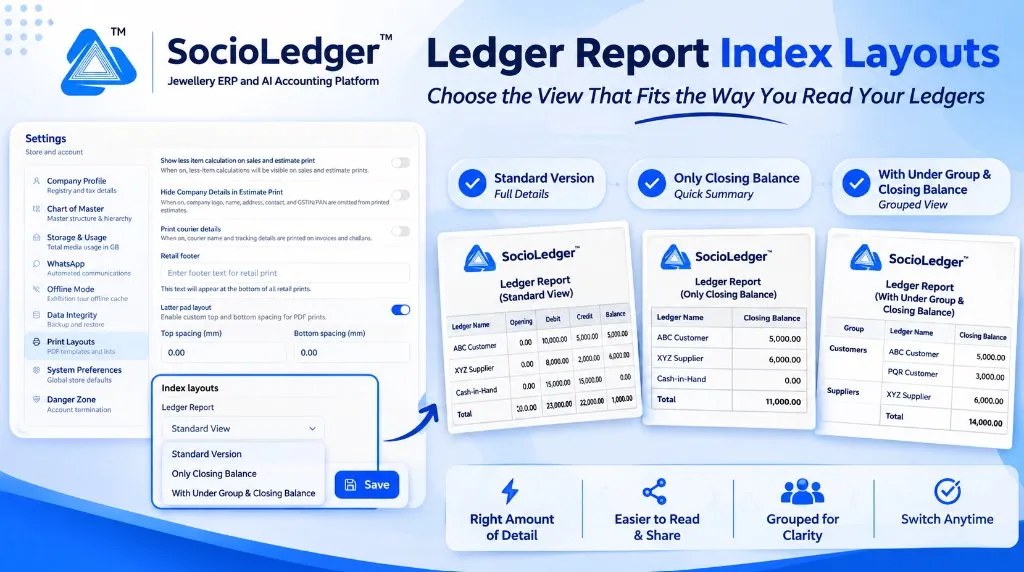
Table of contents
Open Table of contents
- The challenge of one-size-fits-all financial reporting
- What’s new: Three purpose-built Ledger Report index layouts
- Which layout should you choose?
- Why this matters for jewelry businesses
- Comparison: Fixed traditional reporting vs. SocioLedger Index Layouts
- How it works: Step-by-step setup guide
- Where to find the setting
- Part of SocioLedger’s jewelry accounting suite
- One report, three ways to read your books
The challenge of one-size-fits-all financial reporting
In active jewelry trading hubs like Zaveri Bazaar in Mumbai, Surat’s bullion corridors, Rajkot, and Karol Bagh in Delhi, the Ledger Report is opened dozens of times every day. Store partners, accountants, and sales heads all rely on it, but each role requires a different depth of information:
- Auditing and verification: Chartered accountants and inventory auditors need comprehensive turnover figures to trace how opening values transformed into current figures.
- Counter collections and credit management: Showroom partners need a quick, uncluttered list of what customers and corporate accounts owe right now without visual clutter.
- Departmental group summaries: Managing directors reviewing wholesale vs. retail debtor balances prefer closing balances arranged neatly by category rather than an unstructured alphabetical list.
When accounting software forces every user into a single fixed table layout, team members either spend unnecessary time scrolling past unwanted columns or export raw data into spreadsheets just to hide fields manually.
What’s new: Three purpose-built Ledger Report index layouts
Located inside Settings → Print Layouts under the Index layouts section, a new Ledger Report dropdown allows you to choose between three purpose-built document layouts:
+---------------------------------------------------------------------------------+
|  Settings  >  Print Layouts  >  Index layouts                                   |
|                                                                                 |
|  Ledger Report: [ Standard View                         v ]                     |
|                 │ Standard Version                        │                     |
|                 │ Only Closing Balance                    │                     |
|                 │ With Under Group & Closing Balance      │                     |
|                 └─────────────────────────────────────────┘                     |
|                                                                   [ Save ]      |
+---------------------------------------------------------------------------------+
1. Standard Version (Full Details)
The classic, comprehensive Ledger Report view containing every accounting column:
- Ledger Name
- Opening Balance
- Debit Turnover
- Credit Turnover
- Net Closing Balance
This layout provides complete accounting traceability for detailed audits, reconciliation workflows, and official book inspections.
2. Only Closing Balance (Quick Summary)
A streamlined, two-column index designed for rapid scanning and external sharing:
- Ledger Name
- Closing Balance
By stripping away intermediate transaction turnover, this view lets store owners review active debtor and creditor positions in seconds. It is also clean enough to print and place on a sales desk or share with financial partners without exposing sensitive turnover figures.
3. With Under Group & Closing Balance (Grouped View)
A categorized summary view that organizes balances under their respective master accounting groups:
- Group (e.g., Sundry Debtors / Customers, Sundry Creditors / Suppliers)
- Ledger Name
- Closing Balance
- Group Subtotals & Grand Totals
This view makes it effortless to analyze balance distributions across commercial segments, evaluate total supplier credit exposure, and review total customer receivables at a glance.
+-----------------------------------------------------------------------------+
|  Standard View: Full Columns                                                |
|  Ledger Name          | Opening    | Debit        | Credit       | Balance  |
|  ABC Customer         | 0.00       | 10,000.00    | 5,000.00     | 5,000.00 |
|  XYZ Supplier         | 0.00       | 8,000.00     | 2,000.00     | 6,000.00 |
+-----------------------------------------------------------------------------+
|  Only Closing Balance: Streamlined Summary                                  |
|  Ledger Name                       | Closing Balance                        |
|  ABC Customer                      | 5,000.00                               |
|  XYZ Supplier                      | 6,000.00                               |
+-----------------------------------------------------------------------------+
|  With Under Group & Closing Balance: Categorized View                       |
|  Group           | Ledger Name                     | Closing Balance        |
|  Customers       | ABC Customer                    | 5,000.00               |
|                  | PQR Customer                    | 3,000.00               |
|  Suppliers       | XYZ Supplier                    | 6,000.00               |
+-----------------------------------------------------------------------------+
Which layout should you choose?
Selecting the right layout depends on your immediate operational goal:
| Use Case / Scenario | Recommended Layout | Key Benefit |
|---|---|---|
| Comprehensive Audits & Book Checks | Standard Version | Verifies exact opening balances, debit flows, and credit receipts. |
| Daily Outstanding Balances Scan | Only Closing Balance | Zero visual distraction; focuses purely on who owes what right now. |
| Meeting With Partners or Clients | Only Closing Balance | Clean, discrete printout that hides confidential turnover volume. |
| Executive Overview by Category | With Under Group & Closing Balance | Summarizes customer receivables vs. supplier liabilities with subtotals. |
| Tax Preparations & Schedules | Standard Version | Provides complete accounting trail for quarterly GST and annual filings. |
Why this matters for jewelry businesses
Configuring index layouts directly within Print Layouts delivers immediate practical advantages:
- The right amount of detail: Switch between full accounting transparency and concise closing summaries depending on the task.
- Faster scanning and decision-making: Review hundreds of customer dues in minutes without scanning across five wide columns.
- Professional client sharing: Hand a clean closing balance statement to a buyer or supplier without revealing overall turnover or margin indicators.
- Clear categorical division: See total debt segmented by wholesale clients, retail customers, and artisan karigars in the grouped layout.
- Zero data loss: Changing the view never impacts your financial records; the Standard Version is always available whenever detailed inspection is needed.
- Effortless switching: Update your preference in Settings at any time with a single dropdown selection.
Comparison: Fixed traditional reporting vs. SocioLedger Index Layouts
| Reporting Dimension | Traditional Accounting Software | SocioLedger Index Layouts |
|---|---|---|
| Layout Flexibility | Fixed multi-column grid only | 3 selectable layouts (Full, Minimal, Grouped) |
| Closing Balance Scan | Must ignore opening, debit, and credit columns | Dedicated 2-column “Only Closing Balance” view |
| Group Categorization | Requires separate custom reports or queries | Native “With Under Group & Closing Balance” view |
| External Sharing | Manual spreadsheet cropping needed | Clean, presentation-ready printouts out of the box |
| Configuration Effort | Requires complex template redesigns | 1-click dropdown inside Print Layouts settings |
How it works: Step-by-step setup guide
Changing your Ledger Report index layout takes less than thirty seconds:
- Open Settings: Log in to SocioLedger and select Settings from the main menu.
- Access Print Layouts: Navigate to Print Layouts in the sidebar.
- Locate Index Layouts: Scroll to the Index layouts section near the bottom of the page.
- Select Your Layout: Open the Ledger Report dropdown and choose Standard Version, Only Closing Balance, or With Under Group & Closing Balance.
- Save Preferences: Click the Save button.
- View the Ledger Report: Open Reports → Ledger Report. The table and print outputs immediately reflect your chosen layout.
Where to find the setting
- Go to Settings → Print Layouts → Index layouts → Ledger Report.
The setting resides alongside other document layout options, including retail footers, courier details, and letter pad top and bottom spacing.
Part of SocioLedger’s jewelry accounting suite
The Ledger Report Index Layouts feature integrates smoothly with SocioLedger’s broader suite of financial governance tools built for modern jewelers:
- Quick party phone dialling: View and call debtors straight from the report using Mobile Number in Ledger Report.
- Tamper-proof financial security: Freeze checked voucher periods with Lock Ledger Period.
- Audit historical trajectories: Trace running balance evolution across dates using the Ledger History Panel.
- Granular account filtering: Search and isolate ledgers instantly with the Ledger Search Field-Wise Filter.
- Party master directories: Export comprehensive customer and vendor profiles using the Customer Detail Report.
One report, three ways to read your books
A financial report should present exactly the information you need to make decisions — nothing more and nothing less. With three Ledger Report index layouts available at the flip of a setting, jewelers can inspect accounts in granular detail or scan summary balances with total clarity.
Want another index format or summary column added to your accounting reports? Tell us — contact our team and our team will be glad to help customize your reporting experience.