
Checking your books is only useful if the entries you checked stay the way they were. If a voucher can still be edited or deleted after you have verified it, you can never be fully sure that the numbers you reviewed are the numbers that remain in your system today. SocioLedger’s new Lock Ledger Period feature closes that gap by allowing jewelers to select verified voucher transactions directly in the Ledger Report and lock them for a chosen period, ensuring confirmed entries can never be modified or deleted.
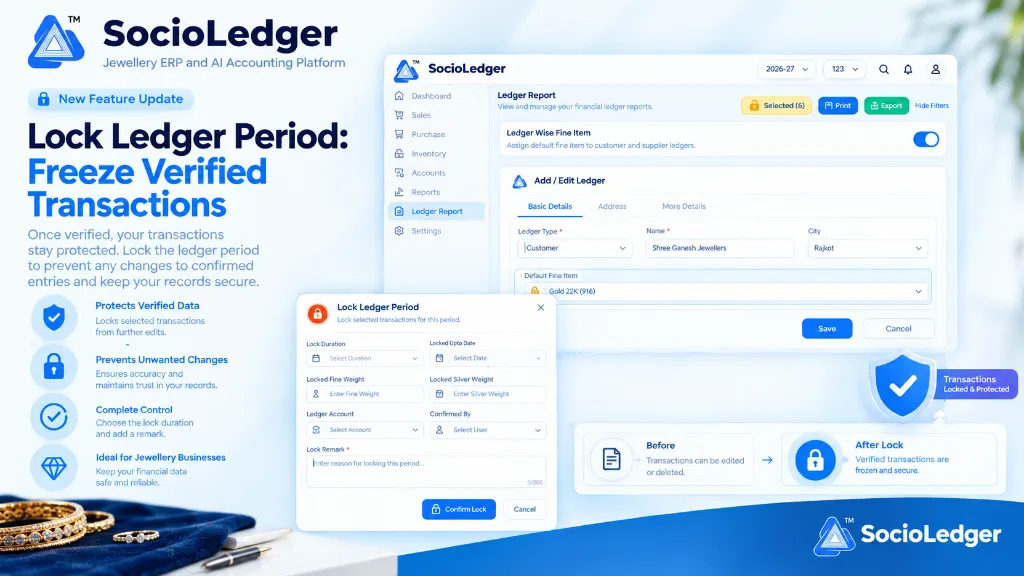
Table of contents
Open Table of contents
- The vulnerability of unsealed historical vouchers in jewelry accounting
- What’s new: Lock Ledger Period in SocioLedger
- Inside the Lock Ledger Period modal: Total clarity before you commit
- What locking means: Permanent protection for verified records
- Why selective voucher locking matters for jewelry businesses
- How to lock ledger period transactions step-by-step
- Comparison: Traditional unlocked ledgers vs. SocioLedger Lock Ledger Period
- Part of SocioLedger’s comprehensive data security suite
- Check once, keep it checked
The vulnerability of unsealed historical vouchers in jewelry accounting
In fast-paced jewelry trading hubs like Zaveri Bazaar, Surat, Rajkot, and Karol Bagh, accountants and showroom owners spend hours reconciling customer balances, supplier metal payments, karigar issue-receipt vouchers, and bullion rate cuts. Every transaction represents significant value — whether it is a high-value bridal jewelry invoice, a pure gold scrap exchange, or a multi-lakh cash settlement.
Reconciling your ledgers takes serious effort. But in traditional jewelry accounting software, once an account is audited and agreed upon, the underlying records remain completely vulnerable:
- Stealth backdated edits: A billing clerk or counter associate might quietly adjust a discount, tweak making charges, or change a fine weight on an old voucher weeks after the books were settled.
- Accidental record deletions: While searching or sorting through historical ledger logs, staff can unintentionally delete a past payment or receipt voucher, throwing opening and closing balances into disarray.
- Lost audit credibility: When physical stock counts, metal balances, or bank settlements fail to match system totals at year-end, finding the root cause becomes a nightmare if historical entries have shifted.
- Blunt all-or-nothing software locks: Generic accounting systems either leave everything editable or impose rigid system-wide period freezes that block ongoing day-to-day counter billing.
Checking your books should create a dependable checkpoint. Once you verify that an account’s transactions are accurate, those specific records should stay permanently frozen.
+-----------------------------------------------------------------------------+
|               Traditional Vulnerable Ledger Reconciliation Flow             |
+-----------------------------------------------------------------------------+
|                                                                             |
|   [ Review & Verify Vouchers ] ──► [ Agree on Closing Balance with Party ]  |
|                                                │                            |
|                                                ▼                            |
|                            [ Vouchers Remain Open & Unprotected ]           |
|                                                │                            |
|                                                ▼                            |
|   • Accidental Deletion   • Unauthorized Edits   • Discrepancies in Balances|
|                                                                             |
|   Result: Unreliable audit trail, lost time investigating backdated changes |
+-----------------------------------------------------------------------------+
|              SocioLedger Lock Ledger Period Protection Workflow             |
+-----------------------------------------------------------------------------+
|                                                                             |
|   [ Open Ledger Report ] ──► [ Group by Vouchers ] ──► [ Select Checked Rows]|
|                                                                    │        |
|                                                                    ▼        |
|   ┌───────────────────────────────────────────────────────────────────────┐ |
|   │                       Lock Ledger Period Modal                        │ |
|   │ • Lock Duration (From - To)     • Verified Totals (Rs, Fine, Silver)  │ |
|   │ • Selected Ledger Account       • Confirmed By User                   │ |
|   │ • Mandatory Lock Remark (Audit Reason)                                │ |
|   └───────────────────────────────────┬───────────────────────────────────┘ |
|                                       │                                     |
|                                       ▼                                     |
|                        [ Click "Confirm Lock" ]                             |
|                                       │                                     |
|                                       ▼                                     |
|            ┌─────────────────────────────────────────────────────┐          |
|            │   Selected Transactions Permanently Frozen (🔒)      │          |
|            │   • Edit: BLOCKED        • Delete: BLOCKED          │          |
|            │   • Audit Logged with User, Date, and Reason        │          |
|            └─────────────────────────────────────────────────────┘          |
|                                                                             |
+-----------------------------------------------------------------------------+
What’s new: Lock Ledger Period in SocioLedger
SocioLedger introduces Lock Ledger Period directly inside the Ledger Report, empowering store owners and head accountants to lock verified voucher transactions with surgical precision.
When viewing a Ledger Report grouped by Vouchers, each transaction row features an interactive checkbox. You simply select the vouchers you have verified, and a dynamic yellow Lock button immediately appears in the top action bar showing the exact number of selected records — for example, Selected (6) or Selected (8).
Clicking this button opens the Lock Ledger Period configuration modal, where you review aggregated transaction totals and define audit details before securing the entries.
+-----------------------------------------------------------------------------+
|             Ledger Report: Interactive Voucher Selection & Action Bar       |
+-----------------------------------------------------------------------------+
|                                                                             |
|  Ledger Report                                                              |
|  View and manage your financial ledger reports.                             |
|                                                                             |
|  [ ✓ Selected (6) 🔒 ]    [ 🖨 Print ]    [ ⤓ Export ]    [ Hide Filters ]  |
|                                                                             |
|  Group by: [ Vouchers ▼ ]                                                   |
|                                                                             |
|  ┌───┬────────────┬─────────────┬─────────────┬──────────────┬───────────┐  |
|  │ ☑ │ Date       │ Voucher No. │ Type        │ Fine Wt (g)  │ Total (₹) │  |
|  ├───┼────────────┼─────────────┼─────────────┼──────────────┼───────────┤  |
|  │ ☑ │ 01/10/2026 │ VOUCH-0841  │ Payment     │    24.500    │  1,85,000 │  |
|  │ ☑ │ 03/10/2026 │ VOUCH-0849  │ Receipt     │    50.000    │  3,75,000 │  |
|  │ ☑ │ 05/10/2026 │ VOUCH-0855  │ Rate Cut    │    15.250    │  1,14,375 │  |
|  └───┴────────────┴─────────────┴─────────────┴──────────────┴───────────┘  |
|                                                                             |
+-----------------------------------------------------------------------------+
Inside the Lock Ledger Period modal: Total clarity before you commit
Securing financial and precious metal entries requires complete transparency. The Lock Ledger Period modal presents every critical metric and verification field in one clean interface so you know exactly what is being locked:
+-----------------------------------------------------------------------------+
|                             Lock Ledger Period                              |
|                    Lock selected transactions for this period.         [ ✕ ]|
+-----------------------------------------------------------------------------+
|                                                                             |
|  Lock Duration                           Locked Upto Date                   |
|  ┌───────────────────────────────┬───┐   ┌───────────────────────────┬───┐  |
|  │ Select Duration               │ ▼ │   │ Select Date               │ 📅│  |
|  └───────────────────────────────┴───┘   └───────────────────────────┴───┘  |
|                                                                             |
|  Locked Fine Weight                      Locked Silver Weight               |
|  ┌───────────────────────────────────┐   ┌───────────────────────────────┐  |
|  │ 89.750 g                          │   │ 2,450.000 g                   │  |
|  └───────────────────────────────────┘   └───────────────────────────────┘  |
|                                                                             |
|  Ledger Account                          Confirmed By                       |
|  ┌───────────────────────────────┬───┐   ┌───────────────────────────┬───┐  |
|  │ Shree Ganesh Jewellers        │ ▼ │   │ Dinesh Rabara (Admin)     │ ▼ │  |
|  └───────────────────────────────┴───┘   └───────────────────────────┴───┘  |
|                                                                             |
|  Lock Remark *                                                              |
|  ┌───────────────────────────────────────────────────────────────────────┐  |
|  │ Reconciled Q2 gold fine balance and rupee settlement with party.      │  |
|  │                                                                68/200 │  |
|  └───────────────────────────────────────────────────────────────────────┘  |
|                                                                             |
|                                          [ 🔒 Confirm Lock ]    [ Cancel ]  |
+-----------------------------------------------------------------------------+
1. Lock Duration and Locked Upto Date
Define the exact start date and cutoff date covering the verified accounting period. This ensures your lock corresponds precisely to your settlement cycle — whether a week, a month, or a fiscal quarter.
2. Locked totals (Amount, Fine Gold Weight, and Silver Weight)
The modal automatically calculates and displays the combined rupee value, 24K pure gold fine weight, and fine silver weight of all selected vouchers. Seeing these aggregated numbers before hitting confirm gives you immediate verification that you selected the exact set of entries agreed with the party.
3. Ledger Account
Specifies the exact counterparty account (retail customer, bullion trader, casting unit, or wholesale manufacturer) whose voucher entries are being secured.
4. Confirmed By
Records the user identity of the manager, head cashier, or auditor authorizing the lock, establishing transparent ownership and operational accountability.
5. Lock Remark
A mandatory 200-character audit note where you document the specific reason for locking the period (e.g., “Monthly ledger tallied and physical metal settled”, “Quarterly audit completed with chartered accountant”). This creates a permanent explanation attached to the lock record.
Click Confirm Lock, and the selected transactions are instantly locked.
What locking means: Permanent protection for verified records
Once a transaction is locked in SocioLedger, it enters a protected state:
- Edits are blocked: No staff member, cashier, or operator can modify voucher amounts, weights, metal purities, item descriptions, or rates.
- Deletions are prevented: The entry cannot be removed or cancelled, safeguarding opening balances and inventory reconciliations from accidental data loss.
- Uncompromised audit checkpoints: The transaction stays exactly as it was when you reviewed and verified it, ensuring complete alignment between physical records, counter agreements, and digital books.
+-----------------------------------------------------------------------------+
|                            Visual State Comparison                          |
+-----------------------------------------------------------------------------+
|                                                                             |
|      [ Before Lock ]                            [ After Lock ]              |
|   ┌─────────────────────┐                   ┌─────────────────────┐         |
|   │ 📄 Unlocked Voucher │                   │ 🔒 Locked Voucher   │         |
|   │                     │        ───►       │                     │         |
|   │ • Can be edited     │                   │ • Cannot be edited  │         |
|   │ • Can be deleted    │                   │ • Cannot be deleted │         |
|   │ • Open to changes   │                   │ • Frozen & secure   │         |
|   └─────────────────────┘                   └─────────────────────┘         |
|                                                                             |
+-----------------------------------------------------------------------------+
Why selective voucher locking matters for jewelry businesses
Locking transactions at the voucher level provides substantial advantages for modern jewelry retail, wholesale, and manufacturing operations:
1. Verified means final
When you balance your books with a supplier or customer, that agreement represents a completed business checkpoint. Locking those transactions ensures no one can quietly alter voucher terms or erase entries after the counter handshake is done.
2. A crystal-clear audit trail
Every lock stores the complete operational context: who verified and confirmed the lock, the exact date window covered, the metal weights involved, and the audit remark explaining why it was done. When external auditors or tax consultants inspect your books, every locked period has an airtight paper trail.
3. Lock exactly what you checked
Traditional accounting packages force you into blunt, company-wide accounting freezes that stop everyone from entering new bills. SocioLedger allows you to lock only the specific vouchers you reviewed, leaving ongoing day-to-day entries completely accessible.
4. Visible totals before you commit
Viewing combined rupee totals, fine gold weight, and silver weight in the modal acts as an essential pre-flight check. If the aggregated fine weight in the modal does not match your physical settlement slip, you can cancel immediately, fix the missing voucher, and re-select.
5. Perfect for periodic reconciliations
Whether you settle accounts weekly with karigars, close supplier ledgers on the 1st of every month, or prepare books for Diwali and fiscal year-end audits, Lock Ledger Period fits naturally into your routine closing workflow.
How to lock ledger period transactions step-by-step
Securing verified vouchers in SocioLedger takes less than a minute:
- Open Ledger Report: Navigate to Reports > Ledger Report and apply your desired date range and party filters.
- Group by Vouchers: Set the report grouping to Vouchers to display individual transaction rows.
- Select verified transactions: Use the row checkboxes to select the specific vouchers you have audited and reconciled.
- Click the Lock button: Click the yellow
Selected (X)Lock button in the top action bar. - Fill in lock details: Review the locked metal and currency totals, set the lock duration, choose who confirmed it, and enter a clear Lock Remark.
- Confirm Lock: Click Confirm Lock to permanently freeze the selected vouchers.
Comparison: Traditional unlocked ledgers vs. SocioLedger Lock Ledger Period
| Feature / Capability | Traditional Jewelry Software | SocioLedger Lock Ledger Period |
|---|---|---|
| Post-Audit Integrity | Records remain open to unauthorized edits | Transactions are permanently frozen against changes |
| Deletion Protection | Vouchers can be deleted at any time | Locked entries cannot be removed or cancelled |
| Lock Granularity | Blunt system-wide cutoff or no lock | Selective checkbox-level voucher locking |
| Pre-Commit Verification | Blind confirmation without summary | Real-time totals for amount, fine gold, and silver |
| Audit Context | No record of why entries were frozen | Full audit trail: user, timestamp, duration, remark |
| Operational Flexibility | Ongoing billing often halted by locks | Active daily billing continues uninterrupted |
Part of SocioLedger’s comprehensive data security suite
Lock Ledger Period works alongside SocioLedger’s robust accounting and access control features to provide end-to-end data security for jewelry enterprises:
- Automated Time Locks: Protect fresh entries against team edits after configured hours with the retroactive lock setting.
- Instant Ledger Insights: Inspect 30-day activity, vouchers, and pending balances directly on the ledger history panel.
- Default Metal Items: Save counter time by configuring default metal purities using the ledger wise fine item setting.
- Granular Permissions: Restrict financial configurations and export options using role-based access control.
- Complete Traceability: Review system actions, user logins, and data modifications through ERP activity logs and audit trails.
Check once, keep it checked
Careful book review should lead to financial records you can rely on with complete peace of mind. With Lock Ledger Period, jewelers can verify a set of transactions and protect them immediately — backed by clear audit metadata showing who locked them and why.
Looking for additional ways to protect your business records or streamline accounting workflows? Tell us — contact our team and we’ll be happy to help you implement best practices for your jewelry business.