
Understanding a single party’s full financial and trading picture usually meant jumping between separate reports — one for vouchers, another for payments, and yet another for rate cuts — just to piece together what actually happened with that customer or supplier. Checking recent transactions shouldn’t require hunting across multiple screens during a busy trading day. SocioLedger solves this with the new Ledger History panel, giving jewelry retailers and wholesalers a complete 360-degree view of any party directly on their detail page.
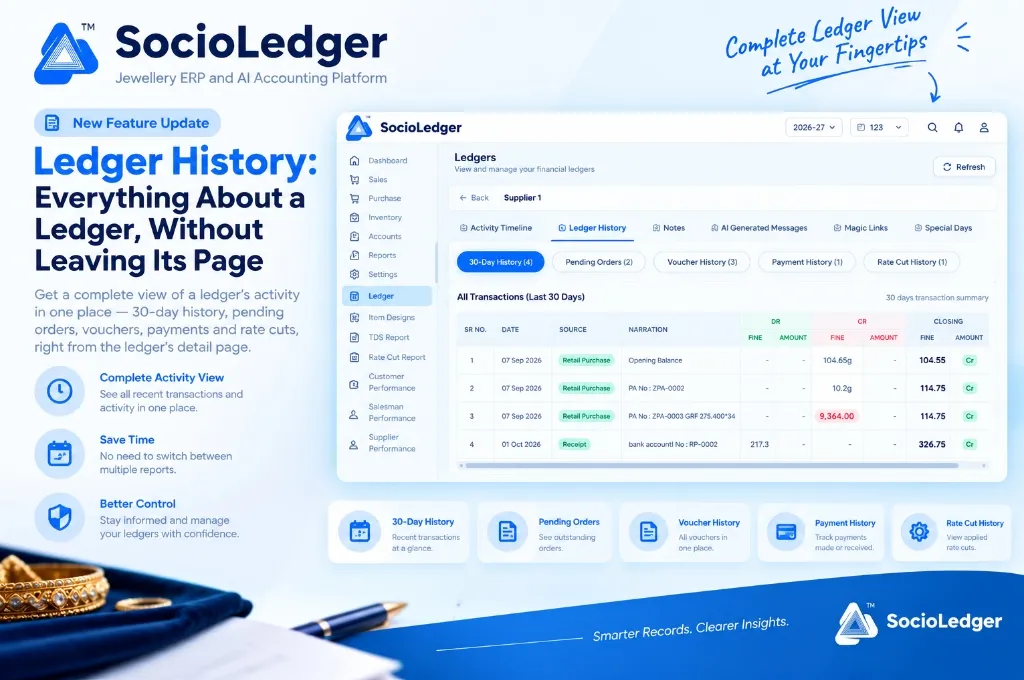
Table of contents
Open Table of contents
- The friction of multi-screen report hopping in jewelry accounting
- What’s new: The dedicated Ledger History panel
- Deep dive: The 5 tabs inside Ledger History
- Direct 1-click access to the full Ledger Report
- Why this matters for jewelry showroom and wholesale teams
- How to use Ledger History in SocioLedger: Step-by-step
- Traditional disjointed reporting vs. SocioLedger unified Ledger History
- Part of SocioLedger’s 360-degree party management ecosystem
- A complete ledger story, right where you need it
The friction of multi-screen report hopping in jewelry accounting
In fast-paced jewelry trading hubs like Zaveri Bazaar, Surat, and Karol Bagh, counter sales executives, accountants, and showroom managers interact with dozens of clients, bullion dealers, and karigars daily. When a supplier calls to discuss outstanding dues or a retail client walks into the showroom to settle their account, answering their questions requires immediate, accurate context.
Traditionally, gathering this context in jewelry ERP software is a frustrating, fragmented exercise:
- Jumping between separate modules: To check what a party bought, you open sales reports. To check when they last paid, you navigate to the payment register. To verify their metal rate cuts, you open the rate cut book.
- Losing context during phone calls: When a wholesale partner asks about a pending gold balance or recent receipt while on the phone, digging through separate menus creates awkward pauses and slows down business.
- Blind clicks across empty tabs: Without knowing whether a party has pending orders or recent rate cuts, operators waste time opening empty report screens just to verify activity.
- Disconnect between ledger profiles and transaction history: Finding a party in the master ledger list only showed basic contact and balance information, forcing you to leave the page immediately to see transaction details.
Software should deliver instant clarity right where you are working, rather than sending you across half a dozen menus.
+-----------------------------------------------------------------------------+
|                     Traditional Disjointed Workflow                         |
+-----------------------------------------------------------------------------+
|                                                                             |
|   [ Open Ledger Page ] ───► Only shows balance & basic info                 |
|            │                                                                |
|            ├──► (Leave Page) ──► Navigate to Voucher Register               |
|            ├──► (Leave Page) ──► Navigate to Payment Report                 |
|            ├──► (Leave Page) ──► Navigate to Rate Cut Log                   |
|            └──► (Leave Page) ──► Navigate to Pending Orders                 |
|                                                                             |
|   Result: 4-5 screen hops, multiple searches, wasted counter time           |
+-----------------------------------------------------------------------------+
|                     SocioLedger Unified Ledger History                      |
+-----------------------------------------------------------------------------+
|                                                                             |
|   [ Open Ledger Detail Page ]                                               |
|            │                                                                |
|            └──► [ 📊 Ledger History Tab ] ──► Everything in one place:      |
|                 • 30-Day History (Rolling transactions & balance)           |
|                 • Pending Orders (Active bookings with badge counts)        |
|                 • Voucher History (Complete voucher records)                |
|                 • Payment History (Cash, bank, & metal receipts)            |
|                 • Rate Cut History (Applied metal rate cuts)                |
|                 • Direct 1-Click Link to Full In-Depth Ledger Report        |
|                                                                             |
|   Result: Instant context, zero navigation, faster counter conversations    |
+-----------------------------------------------------------------------------+
What’s new: The dedicated Ledger History panel
Every customer and supplier detail page in SocioLedger now features a dedicated Ledger History section alongside existing tools like Activity Timeline, Notes, AI Generated Messages, Magic Links, and Special Days.
Instead of navigating away from the ledger profile, you get an organized breakdown across five dedicated sub-tabs:
- 30-Day History (with count badge) — A rolling chronological view of every transaction over the last 30 days, complete with date, source voucher, narration, debit/credit fine gold and cash amounts, and the running closing balance.
- Pending Orders (with count badge) — Instant visibility into all open, unfulfilled orders currently booked for this party.
- Voucher History (with count badge) — A complete log of every commercial voucher (sales, purchases, returns, transfers) recorded against this account.
- Payment History (with count badge) — Every payment and receipt entered to or from this party, including bank transfers, cash settlements, and metal adjustments.
- Rate Cut History (with count badge) — All rate cuts applied specifically to this ledger, tracking booked rates, fine weights, and settlement values.
Each tab displays a live count badge (such as 30-Day History (4) or Pending Orders (2)), so you can instantly see the volume of records in each category before clicking into it.
+-------------------------------------------------------------------------------------------------------+
|  Ledgers > Supplier 1                                                                [ 🔄 Refresh ]   |
+-------------------------------------------------------------------------------------------------------+
|                                                                                                       |
|  [ Activity Timeline ]  [ 📁 Ledger History ]  [ 📝 Notes ]  [ 🤖 AI Messages ]  [ 🔗 Magic Links ]   |
|  ───────────────────────────────────────────────────────────────────────────────────────────────────  |
|                                                                                                       |
|  ┌──────────────────┐ ┌────────────────────┐ ┌─────────────────────┐ ┌─────────────────┐ ┌──────────┐  |
|  │ 30-Day History(4)│ │ Pending Orders (2) │ │ Voucher History (3) │ │Payment History(1)│ │Rate Cut(1)│  |
|  └──────────────────┘ └────────────────────┘ └─────────────────────┘ └─────────────────┘ └──────────┘  |
|                                                                                                       |
|  All Transactions (Last 30 Days)                                          30 days transaction summary |
|  ┌─────┬────────────┬─────────────────┬───────────────────┬──────────────┬──────────────┬──────────┐  |
|  │SR NO│ DATE       │ SOURCE          │ NARRATION         │  DR (FINE/₹) │  CR (FINE/₹) │ CLOSING  │  |
|  ├─────┼────────────┼─────────────────┼───────────────────┼──────────────┼──────────────┼──────────┤  |
|  │  1  │ 07 Sep 2026│ Retail Purchase │ Opening Balance   │    -    -    │ 104.65g   -  │ 104.55 Cr│  |
|  │  2  │ 07 Sep 2026│ Retail Purchase │ PA No : ZPA-0002  │    -    -    │  10.20g   -  │ 114.75 Cr│  |
|  │  3  │ 07 Sep 2026│ Retail Purchase │ PA No : ZPA-0003  │    -    -    │   -   9,364  │ 114.75 Cr│  |
|  │  4  │ 01 Oct 2026│ Receipt         │ bank account:RP-02│  217.3g  -   │   -       -  │ 326.75 Cr│  |
|  └─────┴────────────┴─────────────────┴───────────────────┴──────────────┴──────────────┴──────────┘  |
|                                                                                                       |
+-------------------------------------------------------------------------------------------------------+
Deep dive: The 5 tabs inside Ledger History
Each sub-tab inside the Ledger History section focuses on a specific operational aspect of your relationship with that party.
1. 30-Day History — Rolling transaction timeline and running balances
The 30-Day History tab gives you an immediate rolling summary of all activity from the past month. For every entry, you see:
- Sequential Serial Number: Clean numbered rows for effortless reference during calls.
- Date & Source Tag: Color-coded badges indicating whether an entry originated from a Retail Purchase, Sale, Receipt, Payment, or Journal Voucher.
- Narration: Full invoice, purchase voucher, or reference details (e.g.,
PA No : ZPA-0003 GRF 275.400*34). - DR / CR Split: Distinct fine weight (grams) and currency amount (₹) columns for both debits and credits.
- Running Closing Balance: Real-time balance updates after each transaction, tagged with
DrorCrindicators.
This rolling view gives you the exact story of the last month without having to pull a custom date-filtered report.
2. Pending Orders — Outstanding order commitments
Never wonder whether a customer has an unfulfilled custom jewelry piece or if a wholesale partner is waiting on a casting batch. The Pending Orders tab filters directly to outstanding orders booked under that ledger, showing item descriptions, ordered weights, delivery dates, and current order status.
3. Voucher History — Complete commercial record
Every invoice, purchase bill, return voucher, and metal issue voucher associated with this party is listed chronologically in the Voucher History tab. You can audit bill numbers, dates, metal purities, and voucher totals at a glance.
4. Payment History — Fast settlement tracking
Whether tracking cash disbursements, RTGS/NEFT bank receipts, or pure gold deposits, the Payment History tab aggregates all financial receipts and payments made with this party. It allows showroom managers to instantly verify when the last payment was recorded and through which payment channel.
5. Rate Cut History — Applied metal price bookings
Gold and silver rate fixings are central to daily jewelry trade. The Rate Cut History tab displays every rate cut transaction booked for that ledger — including booking dates, agreed metal bhav, fine weights fixed, and paired voucher references. This makes it simple to cross-check settlements against your payment receipt to rate cut shortcuts.
Direct 1-click access to the full Ledger Report
While the Ledger History tab provides a fast, focused summary of recent activity, complex audits or annual financial reconciliations sometimes require inspecting a party’s complete multi-year ledger history.
Instead of forcing you to navigate back to the main menu and search for the party inside the Reports module, SocioLedger includes a direct Ledger Report link inside the panel.
Clicking this link opens the comprehensive, detailed financial report for that exact ledger with all historical date ranges, detailed remarks, and export options pre-configured — giving you both the quick summary and the exhaustive ledger report from the exact same screen.
+-----------------------------------------------------------------------------+
|                         SocioLedger Ledger View Options                     |
+-----------------------------------------------------------------------------+
|                                                                             |
|                     ┌─────────────────────────────┐                         |
|                     │   Ledger Detail Page        │                         |
|                     └──────────────┬──────────────┘                         |
|                                    │                                        |
|            ┌───────────────────────┴───────────────────────┐                |
|            ▼                                               ▼                |
|   ┌─────────────────────────────┐         ┌─────────────────────────────┐   |
|   │ 📊 Ledger History Tab       │         │ 📑 Full Ledger Report Link  │   |
|   │ (Quick 360° Summary)        │         │ (Deep Financial Audit)      │   |
|   ├─────────────────────────────┤         ├─────────────────────────────┤   |
|   │ • 30-day rolling activity   │         │ • Custom multi-year dates   │   |
|   │ • Tab count preview badges  │         │ • Complete audit trail logs │   |
|   │ • Pending order pipeline    │         │ • PDF & Excel export        │   |
|   │ • Fast counter reference    │         │ • Formal tax reconciliation │   |
|   └─────────────────────────────┘         └─────────────────────────────┘   |
|                                                                             |
+-----------------------------------------------------------------------------+
Why this matters for jewelry showroom and wholesale teams
Adding a complete Ledger History panel directly to ledger detail pages delivers practical benefits across daily jewelry operations:
1. Everything in one place without screen switching
Showroom counters and trading desks move fast. Having 30-day activity, pending orders, vouchers, payments, and rate cuts unified in a single panel eliminates the need to open five different browser tabs or ERP menus.
2. Instant context on any customer or supplier
When a client walks in or a vendor calls regarding their balance, opening their profile gives you their entire recent trading history in seconds. You can see their recent purchases, recent payments, and open orders before even speaking a word.
3. Quick counts prevent unnecessary digging
The badge counts on each tab ((4), (2), (1)) tell you immediately how many records exist. If the Pending Orders tab displays (0), you know there are no active orders without needing to click into the tab.
4. Confident counter and phone conversations
When negotiating metal rates, discussing outstanding dues, or finalizing order deliveries, having exact dates, voucher numbers, and fine weights in front of you ensures transparent, confident communication with counterparties.
5. Seamless bridge from quick view to full audit
You no longer have to choose between a quick summary and a deep report. The 30-day rolling view answers 90% of daily questions instantly, while the direct Ledger Report link handles comprehensive end-of-year or audit reconciliations in one click.
How to use Ledger History in SocioLedger: Step-by-step
Using the new Ledger History panel is straightforward:
- Open any ledger detail page: Navigate to Ledger in the main sidebar, search for any customer, supplier, or karigar using our ledger search filters, and click to open their profile.
- Select the Ledger History tab: Click the Ledger History tab located alongside Activity Timeline, Notes, and AI Generated Messages.
- Browse sub-tabs with count badges: Switch across 30-Day History, Pending Orders, Voucher History, Payment History, and Rate Cut History based on what information you need.
- Access the full report when needed: Click the Ledger Report button anytime you want the exhaustive, full-period report instead of the summarized ledger-wise view.
Traditional disjointed reporting vs. SocioLedger unified Ledger History
Here is how daily party tracking compares between traditional multi-screen ERP workflows and SocioLedger’s unified Ledger History panel:
| Operational Dimension | Traditional ERP Workflow | SocioLedger Ledger History Panel |
|---|---|---|
| Transaction Visibility | Fragmented across 4–5 separate report screens | Unified in one panel on the ledger page |
| Navigation Overhead | Constant screen jumping and menu searching | Zero screen hopping; all sub-tabs in one view |
| Activity Discovery | Must open empty tabs manually to check records | Instant count badges on every sub-tab |
| Recent 30-Day Snapshot | Requires setting custom date filter parameters | Pre-loaded rolling 30-day transaction history |
| Fine Weight & Cash Duals | Often separated into distinct screens | Unified fine metal (grams) and currency (₹) |
| Deep Report Access | Exit page, open Reports menu, re-select party | 1-click direct link to full Ledger Report |
| Counter Response Speed | 1–2 minutes of manual searching | Instant, sub-second context availability |
Part of SocioLedger’s 360-degree party management ecosystem
The Ledger History panel works seamlessly alongside a complete suite of party management tools built into SocioLedger:
- Custom Operational Notes: Pin internal reminders and customer preferences using the notes field on ledgers.
- Field-Wise Search: Find parties instantly by name, city, phone, or group using ledger search and field filters.
- Accelerated Accounting: Convert receipts directly into metal bookings with the payment receipt to rate cut shortcut.
- Metal vs. Currency Balances: Separate pure gold from rupee obligations using the jewelry accounting bhav filter.
- Granular Security Controls: Protect sensitive financial history and reports with role-based access control.
A complete ledger story, right where you need it
Knowing a customer or supplier’s recent activity shouldn’t mean leaving their page to piece together scattered reports. With 30-day history, pending orders, vouchers, payments, and rate cuts all organized in one intuitive panel — and the complete report just a single click away — Ledger History gives jewelers a faster, clearer way to understand exactly where things stand with any party.
Want another view or custom filter added to ledger history? Tell us — contact our team and we will look into it.