
Once a transaction is recorded and the day moves on, the entry should remain fixed. But without strict guardrails, team members can revisit older records to alter weights, adjust prices, or delete vouchers long after the trade took place — whether by honest mistake or unauthorized intent. SocioLedger’s new Retroactive Lock setting protects your store’s data integrity by automatically locking entries from editing or deletion by team members after a custom time delay you define.
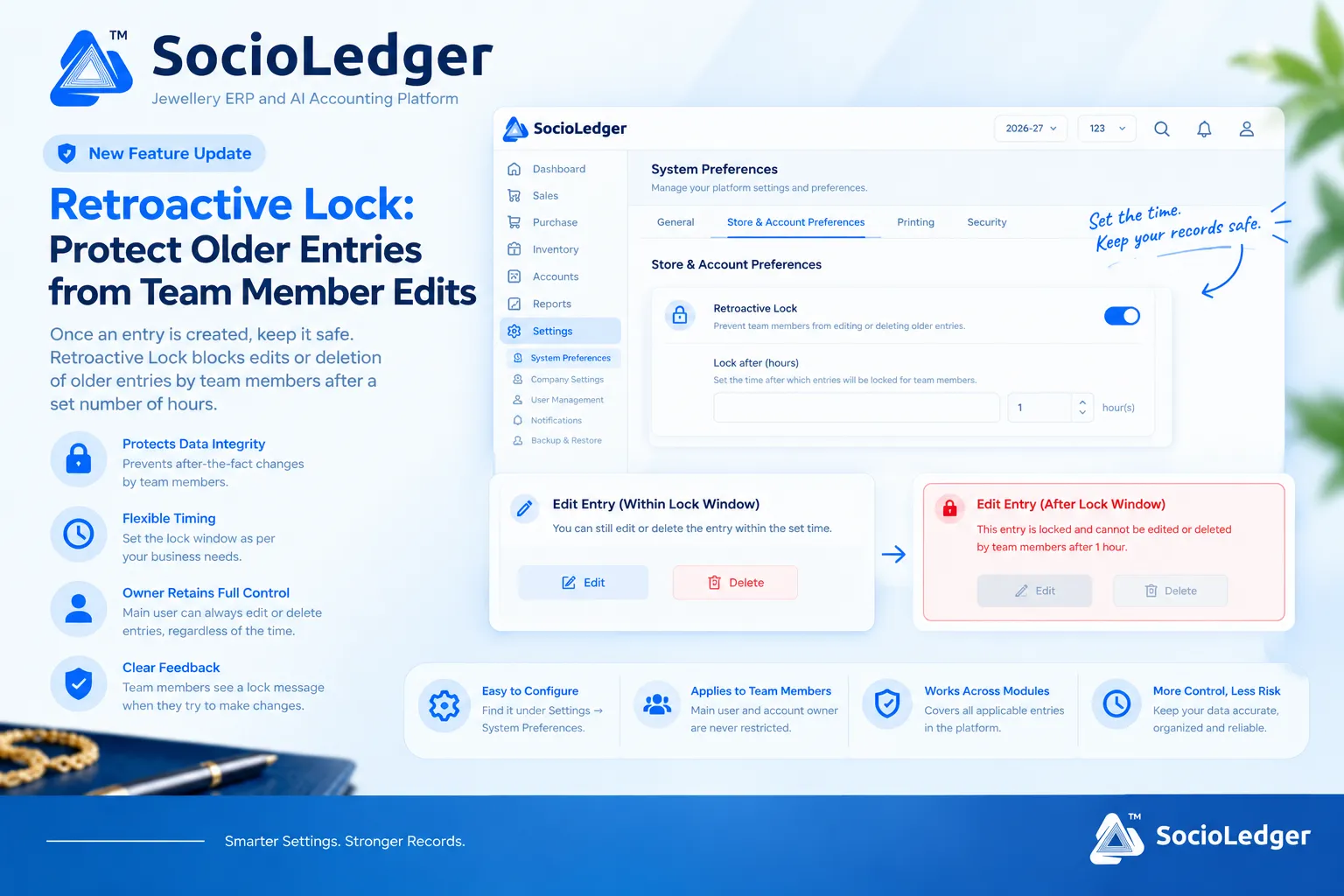
Table of contents
Open Table of contents
- Why unmonitored after-the-fact edits create operational risk
- What’s new: The Retroactive Lock system preference
- Who it applies to: Team restrictions vs. owner control
- What happens when the lock kicks in
- Why this matters for jewelry business owners
- How it works: Step-by-step setup guide
- Unlocked entries vs. Retroactive Lock enabled
- Where to find Retroactive Lock in SocioLedger
- Part of SocioLedger’s jewelry security ecosystem
- Keeping records reliable, without losing owner control
Why unmonitored after-the-fact edits create operational risk
In high-volume jewelry hubs like Zaveri Bazaar, Surat, and Karol Bagh, showroom counters and wholesale desks handle hundreds of critical entries every day. From billing retail customers and recording supplier gold receipts to logging cash disbursements and issuing job work to karigars, every digital voucher represents real precious metal and money.
When staff members have indefinite edit and delete privileges on historical records, several operational vulnerabilities emerge:
- Quiet ledger adjustments: A counter sales executive or cashier could quietly change an invoice rate, metal purity, or making charge days after the customer left the showroom, throwing off daily cashbook reconciliations.
- Accidental record deletion: While browsing historical logs or searching customer ledgers, an operator can mistakenly tap delete on a past voucher, erasing transaction histories and messing up stock counts.
- Lost accountability for discrepancies: If stock tallies or cash balances do not match physical drawer counts at month-end, determining who altered what becomes nearly impossible when old entries can be freely modified.
- No grace period balance: Blanket permission locks often stop staff from quickly fixing genuine typos right after entering them, while open permissions leave the door open to unauthorized revisions weeks later.
Jewelry businesses need a smart time window: enough time for staff to catch and correct immediate data-entry typos, followed by an automatic, permanent lock on team edits.
+-----------------------------------------------------------------------------+
|                 SocioLedger Retroactive Lock Execution Flow                 |
+-----------------------------------------------------------------------------+
|                                                                             |
|                     [ Team Member Creates New Entry ]                       |
|                   (Sale, Purchase, Payment, Tag, Stock)                     |
|                                     │                                       |
|                                     ▼                                       |
|                     ┌───────────────────────────────┐                       |
|                     │   Timer Starts Automatically  │                       |
|                     │   Configured: Lock After (X h)│                       |
|                     └───────────────┬───────────────┘                       |
|                                     │                                       |
|            ┌────────────────────────┴────────────────────────┐              |
|            ▼                                                 ▼              |
|   [ Within Lock Window ]                           [ After Lock Window ]    |
|   (e.g., Elapsed < 1 hour)                         (e.g., Elapsed > 1 hour) |
|            │                                                 │              |
|            ▼                                                 ▼              |
| ┌───────────────────────┐                         ┌───────────────────────┐ |
| │ Team Member Actions:  │                         │ Check User Role:      │ |
| │ • Edit Entry: ALLOWED │                         └───────────┬───────────┘ |
| │ • Delete: ALLOWED     │                                     │             |
| └───────────────────────┘                         ┌───────────┴───────────┐ |
|                                                   ▼                       ▼ |
|                                         [ Team Member ]         [ Account Owner /   |
|                                         ┌─────────────┐           Main User ]       |
|                                         │ • Edit: ✕   │         ┌─────────────────┐ |
|                                         │ • Delete: ✕ │         │ • Edit: ALLOWED │ |
|                                         │ (Lock Error)│         │ • Delete:ALLOWED│ |
|                                         └─────────────┘         └─────────────────┘ |
+-----------------------------------------------------------------------------+
What’s new: The Retroactive Lock system preference
SocioLedger introduces a dedicated configuration inside System Preferences under Store & Account Preferences that lets store owners enforce automated time-delayed locking on entries.
The feature consists of two core controls:
- Retroactive Lock Toggle: Activating this switch turns on the time-based lock across all applicable entry forms and vouchers in your company database.
- Lock After (Hours): A precision time field where you define the exact duration (in hours) an entry remains open for team member edits.
For instance, if you set the threshold to 1 hour, any voucher, sale, purchase, or ledger entry created by a team member remains editable for exactly 60 minutes. Once that 60-minute window elapses, the entry is automatically frozen for team members, preventing any further modifications or deletions.
+-----------------------------------------------------------------------------+
|          Store & Account Preferences: Retroactive Lock Configuration        |
+-----------------------------------------------------------------------------+
|                                                                             |
|  [🔒] Retroactive Lock                                              [ (•) ] |
|      Prevent team members from editing or deleting older entries.   (ON)    |
|                                                                             |
|      Lock after (hours)                                                     |
|      Set the time after which entries will be locked for team members.      |
|      ┌───────────────────────────────────────────────┬───────┬───┐          |
|      │                                               │   1   │ ⇅ │ hour(s)  |
|      └───────────────────────────────────────────────┴───────┴───┘          |
|                                                                             |
+-----------------------------------------------------------------------------+
Who it applies to: Team restrictions vs. owner control
A common frustration with rigid enterprise software is when security restrictions accidentally lock out the business owner from managing their own financial ledgers.
Retroactive Lock is engineered specifically around store hierarchy:
- Applied strictly to Team Members: Staff users, billing clerks, counter operators, and sales representatives are subject to the configured lock window. They can input data and make quick corrections within the allowed window, but cannot touch historical entries once the time has passed.
- Unrestricted Account Owner Access: The main user and account owner retain full, unrestricted editing and deletion rights at all times. If a vendor dispute or tax reconciliation requires adjusting a voucher from three months ago, the account owner can make the update immediately without jumping through hoops or disabling system policies.
This separation ensures your staff operates within safe guardrails while the business owner maintains absolute control over company data.
What happens when the lock kicks in
When an entry passes the configured time threshold, the platform visually and functionally restricts team members from altering the record:
- Disabled edit and delete actions: The edit and delete buttons are either locked or intercepted upon execution.
- Clear lock validation message: If a team member attempts to update or remove an older entry, SocioLedger displays an on-screen lock notification stating that the entry is locked and cannot be edited or deleted by team members after the set window.
- Zero silent failures: Instead of allowing subtle edits or showing vague system errors, staff receive immediate, transparent feedback explaining why the action is blocked.
This instant clarity prevents confusion across the team and reinforces standard operating procedures.
+-----------------------------------------------------------------------------+
|             Entry Action States: Before vs. After Lock Window               |
+-----------------------------------------------------------------------------+
|                                                                             |
|  [ WITHIN LOCK WINDOW ]                                                     |
|  ✎ Edit Entry (Within Lock Window)                                          |
|  You can still edit or delete the entry within the set time.                |
|                                                                             |
|  [ ✎ Edit ]     [ 🗑 Delete ]    <-- (Active, Clickable Buttons)            |
|                                                                             |
| ─────────────────────────────────────────────────────────────────────────── |
|                                                                             |
|  [ AFTER LOCK WINDOW ]                                                      |
|  🔒 Edit Entry (After Lock Window)                                          |
|  This entry is locked and cannot be edited or deleted by team               |
|  members after 1 hour.                                                      |
|                                                                             |
|  [ 🔒 Edit (Disabled) ]     [ 🔒 Delete (Disabled) ]                        |
|                                                                             |
+-----------------------------------------------------------------------------+
Why this matters for jewelry business owners
Implementing time-locked entry management brings tangible security and operational benefits to retail showrooms, wholesale offices, and manufacturing units.
1. Protects core data integrity
Precious metal accounting leaves zero room for untracked changes. Once daily sales, raw gold issues, or customer payments are posted and verified, locking them prevents after-the-fact tampering and keeps historical ledgers in perfect sync with physical assets.
2. Flexible timing for your store workflow
Every business operates at its own pace. If your counter staff need only a few minutes to double-check tag weights or customer phone numbers, set a tight 1-hour window. If your team manages inter-city dispatches or wholesale sample approvals, configure an 8-hour or 24-hour grace period.
3. Preserves unconditional owner authority
Security policies should protect owners, not hinder them. Because the primary account owner is never restricted by Retroactive Lock, legitimate administrative corrections, year-end adjustments, or audit reconciliations can be completed whenever necessary.
4. Provides clear, immediate feedback
When restrictions are vague, employees waste time wondering if the internet dropped or the system froze. SocioLedger’s explicit lock message tells team members exactly what happened, setting clear expectations across the organization.
5. Builds team discipline and accountability
When staff members know vouchers lock permanently after a fixed time, they naturally take greater care to enter correct metal rates, diamond weights, purity tags, and customer ledger details accurately the first time.
How it works: Step-by-step setup guide
Enabling Retroactive Lock in SocioLedger takes less than a minute:
- Open Settings: Log in as an administrator and click Settings in the left navigation sidebar.
- Select System Preferences: Go to the System Preferences tab and open Store & Account Preferences.
- Enable Retroactive Lock: Click the toggle switch next to Retroactive Lock to turn the protection on.
- Set Lock After (Hours): Enter the number of hours (for example,
1,2, or12) that entries should remain editable by team members before locking. - Save Preferences: The configuration takes effect immediately across all active team member sessions.
Once activated, team members can create and refine entries as usual. When the time window expires, the platform automatically locks those records from team modifications while keeping them fully accessible to the account owner.
Unlocked entries vs. Retroactive Lock enabled
Here is how your business operations compare with and without Retroactive Lock active:
| Operational Metric | Unlocked System (Setting Off) | Retroactive Lock (Setting On) |
|---|---|---|
| After-the-Fact Edit Risk | High — entries can be modified weeks later | Eliminated — locked after configured hours |
| Typo Correction Window | Indefinite and unmonitored | Controlled grace period (e.g., 1–2 hours) |
| Team Member Privileges | Unrestricted edit and delete access | Auto-locked after time threshold passes |
| Account Owner Governance | Full access | Full access with zero restrictions |
| Discrepancy Investigation | Hard to trace who modified old records | High confidence in locked historical records |
| Staff Error Communication | Silent edits slip through unnoticed | Clear on-screen lock notification |
| Audit & Ledger Reliability | Vulnerable to accidental or unauthorized gaps | Airtight records matching physical books |
Where to find Retroactive Lock in SocioLedger
You can configure Retroactive Lock at any time by navigating to:
Settings → System Preferences → Store & Account Preferences
Both the Retroactive Lock toggle and the Lock after (hours) input field are located together on this screen, giving you a single place to fine-tune entry security.
Part of SocioLedger’s jewelry security ecosystem
Retroactive Lock works alongside a comprehensive suite of data governance and security features in SocioLedger:
- Granular User Roles: Restrict sensitive reports and menus with role-based access control.
- Complete Audit Trail: Monitor all platform actions with ERP activity logs and audit trails.
- Inventory Safeguards: Prevent accidental ornament removals using tag delete confirmation.
- Daily Physical Audits: Reconcile digital stock with display trays via daily stock tally verification.
- Data Ownership: Keep your jewelry records backed up and secure through independent data management.
Keeping records reliable, without losing owner control
Entries should reflect what actually happened on the showroom floor, not what got quietly adjusted days later. Retroactive Lock gives jewelry showroom owners and enterprise managers a dependable way to establish a reasonable editing buffer for their team, while preserving absolute administrative control in the hands of the account owner.
Want another setting or workflow rule to help manage your team’s day-to-day activity? Tell us — contact our team and we will look into it.