
SocioLedger’s new Ledger Wise Fine Item setting allows jewelry businesses to assign a default fine item to customer and supplier ledgers, automatically selecting it whenever a metal transaction is booked for that account. Not every supplier or customer deals in the same fine item every time — one party might consistently transact in 22K (916) gold fine items, while another deals exclusively in fine silver (999) or 24K bullion. Manually picking the right metal purity and item type transaction after transaction is a small but repetitive step that slows down daily billing. SocioLedger removes that repetition entirely, ensuring faster entries and fewer mistakes across all metal transactions.
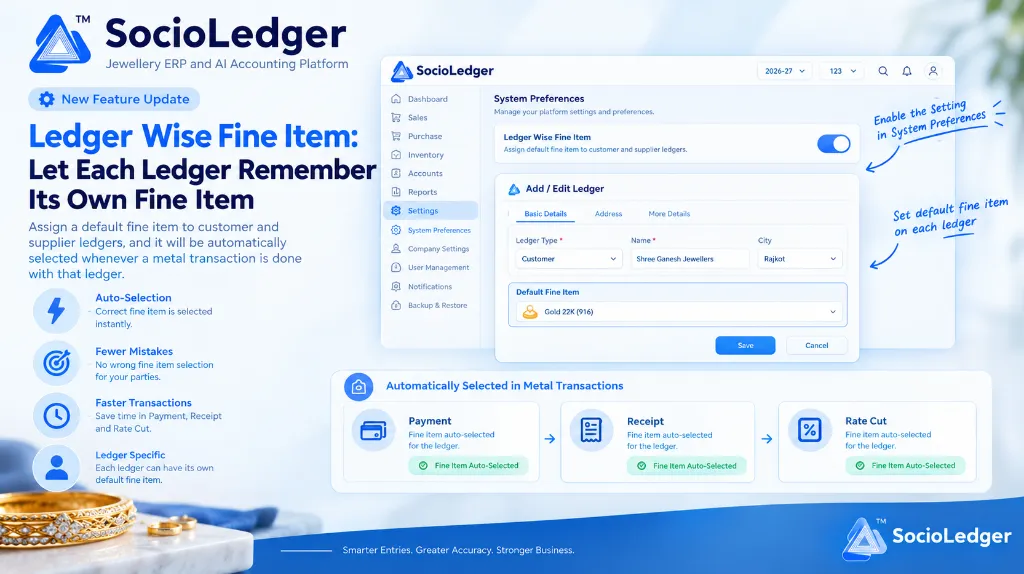
Table of contents
Open Table of contents
- The friction of manual fine item selection in jewelry accounting
- What is the Ledger Wise Fine Item setting?
- How auto-selection works across metal transactions
- Why this matters for jewelry showroom and wholesale teams
- How to configure and use Ledger Wise Fine Item in SocioLedger
- Comparison: Traditional manual selection vs. SocioLedger Ledger Wise Fine Item
- Part of SocioLedger’s intelligent jewelry accounting suite
- One setting, fewer clicks on every metal transaction
The friction of manual fine item selection in jewelry accounting
In fast-moving jewelry trading hubs like Zaveri Bazaar, Rajkot, Surat, and Karol Bagh, cashiers and accountants process dozens of metal receipts, supplier payments, and rate bookings daily. Counter staff interact with retail customers, bullion dealers, job-work karigars, and wholesale ornament manufacturers — each with their own established trading preferences.
In traditional jewelry accounting software, recording a metal transaction follows a rigid, repetitive routine:
- Redundant drop-down clicks: Even when you know a supplier only delivers 22K (916) melting scrap or a karigar only receives 24K fine gold bars, the operator must pause and manually select the fine item from a list every single time.
- Accidental purity mismatches: During busy showroom hours or festival rushes, rushing through entry screens increases the risk of selecting the wrong fine item (such as booking 22K fine weight under 24K fine item or vice versa), causing balance discrepancies that take hours to reconcile.
- Wasted counter time: Having to pick the metal type on every single Payment, Receipt, and Rate Cut entry introduces unnecessary friction into routine counter settlements.
- System inflexibility: Most generic ERP systems treat all ledger accounts identically, ignoring the specific metal categories each party routinely buys, sells, or exchanges.
Accounting software should anticipate routine choices rather than demanding the same manual selections for every repetitive task.
+-----------------------------------------------------------------------------+
|               Traditional Repetitive Metal Entry Workflow                  |
+-----------------------------------------------------------------------------+
|                                                                             |
|   [ Open Payment / Receipt / Rate Cut ]                                     |
|            │                                                                |
|            ├──► Select Customer or Supplier Ledger                          |
|            │                                                                |
|            ├──► (Manual Step) Scroll through Dropdown Menu                  |
|            │                                                                |
|            ├──► (Manual Step) Search & Pick Specific Fine Item Every Time   |
|            │                                                                |
|            └──► Enter Weight & Save                                         |
|                                                                             |
|   Result: Extra clicks, slower counter flow, risk of selecting wrong purity |
+-----------------------------------------------------------------------------+
|                 SocioLedger Automated Ledger-Wise Workflow                  |
+-----------------------------------------------------------------------------+
|                                                                             |
|   [ Open Payment / Receipt / Rate Cut ]                                     |
|            │                                                                |
|            ├──► Select Customer or Supplier Ledger                          |
|            │                                                                |
|            └──► ⚡ Fine Item Auto-Selected Instantly (e.g., Gold 22K 916)    |
|                 (Zero extra clicks — ready to enter weight immediately)     |
|                                                                             |
|   Result: Instant entry, zero dropdown fatigue, 100% accurate settlements  |
+-----------------------------------------------------------------------------+
What is the Ledger Wise Fine Item setting?
Under Settings > System Preferences, SocioLedger provides a dedicated toggle for Ledger Wise Fine Item — “Assign default fine item to customer and supplier ledgers.”
Once enabled, the ledger creation and edit modal gains a new Default Fine Item field under the Basic Details tab. This allows you to link a specific fine item — such as Gold 22K (916), Gold 24K (999), Gold 18K (750), or Silver Fine (999) — directly to any customer, supplier, or karigar profile.
This default isn’t merely an informational label stored in the database. It is an active operational default that connects directly to your daily accounting workflow. Whenever that ledger is selected in a metal transaction, SocioLedger immediately pre-populates the assigned fine item.
+-------------------------------------------------------------------------------------------------------+
|  Settings > System Preferences                                                                        |
+-------------------------------------------------------------------------------------------------------+
|                                                                                                       |
|  Ledger Wise Fine Item                                                                       [ (ON) ] |
|  Assign default fine item to customer and supplier ledgers.                                           |
|                                                                                                       |
+-------------------------------------------------------------------------------------------------------+
|  Add / Edit Ledger                                                                                    |
+-------------------------------------------------------------------------------------------------------+
|                                                                                                       |
|  [ Basic Details ]   [ Address ]   [ More Details ]                                                   |
|  ───────────────────────────────────────────────────────────────────────────────────────────────────  |
|                                                                                                       |
|  Ledger Type *                     Name *                              City                           |
|  [ Customer               ▼ ]      [ Shree Ganesh Jewellers      ]     [ Rajkot                  ▼ ]  |
|                                                                                                       |
|  Default Fine Item                                                                                    |
|  [ 🪙 Gold 22K (916)                                                                              ▼ ]  |
|                                                                                                       |
|                                                           [ Save Changes ]      [ Cancel ]            |
+-------------------------------------------------------------------------------------------------------+
How auto-selection works across metal transactions
Once a default fine item is linked to a ledger, SocioLedger streamlines entries across the three primary metal transaction modules:
+-----------------------------------------------------------------------------------------+
|                  Auto-Selection Across Core Metal Transaction Modules                   |
+-----------------------------------------------------------------------------------------+
|                                                                                         |
|   ┌─────────────────────────┐   ┌─────────────────────────┐   ┌─────────────────────┐   |
|   │ 💳 Payment Module       │   │ 🧾 Receipt Module       │   │ 🏷️ Rate Cut Module   │   |
|   ├─────────────────────────┤   ├─────────────────────────┤   ├─────────────────────┤   |
|   │ Metal issued to party   │   │ Metal received at desk  │   │ Metal bhav fixed    │   |
|   │ • Auto-loads Fine Item  │   │ • Auto-loads Fine Item  │   │ • Auto-loads Purity │   |
|   │ • Zero manual searching │   │ • Instant counter slip  │   │ • Error-free fixing │   |
|   │ [ ✔️ Fine Item Loaded ]  │   │ [ ✔️ Fine Item Loaded ]  │   │ [ ✔️ Auto-Selected ]│   |
|   └─────────────────────────┘   └─────────────────────────┘   └─────────────────────┘   |
|                                                                                         |
+-----------------------------------------------------------------------------------------+
1. Payment vouchers — Instant metal disbursements
When settling metal accounts with karigars, casting manufacturers, or wholesale suppliers in the Payment module, selecting the party automatically populates their default fine item. If a wholesale supplier consistently receives 24K pure gold granules, their payment voucher is pre-set to 24K the instant their name is chosen.
2. Receipt vouchers — Swift metal intake and counter settlements
When receiving metal returns, old gold exchanges, or pure bullion deposits in the Receipt module, the assigned fine item is automatically selected. Counter staff can enter the gross and fine weights immediately without needing to navigate through fine item menus.
3. Rate Cut vouchers — Frictionless metal price fixing
Fixing metal rates with customers or bullion dealers in the Rate Cut module requires precise purity tracking. With Ledger Wise Fine Item active, opening a rate cut for a party automatically locks in their standard trading fine item. This pairs seamlessly with SocioLedger’s payment receipt to rate cut shortcuts for rapid rate fixing.
4. Full flexibility with on-the-fly overrides
Automation should never get in the way of real-world exceptions. If a customer who usually transacts in 22K gold brings in 18K ornament scrap for a one-off exchange, operators can still click the dropdown and select a different fine item for that specific entry. The system remembers the default, but never locks you out of making adjustments.
Why this matters for jewelry showroom and wholesale teams
Implementing ledger-specific fine items delivers immediate operational advantages across daily counter and accounting workflows:
1. No repeated selection on routine transactions
Jewelry businesses handle dozens of repetitive metal transactions every week with the same regular counterparties. Setting the default once on the ledger profile eliminates hundreds of redundant clicks over the course of a month.
2. Fewer human errors and audit discrepancies
Accidentally selecting the wrong fine item when entering a metal voucher creates confusing ledger discrepancies between pure gold weights and rupee values. Automated selection eliminates manual guesswork, ensuring entries match the exact metal purity agreed with that party.
3. Faster metal entries at the billing desk
Whether booking a quick advance in pure gold or recording a bulk metal delivery at the wholesale desk, removing an extra mandatory dropdown field speeds up entry turnaround times and keeps queues moving.
4. Ledger-specific accuracy that mirrors real business relationships
Different counterparties trade in different purity standards. A hallmarked jewelry manufacturer deals in 22K (916), a diamond jewelry workshop handles 18K (750), and a bullion trader deals in 24K (999.9). SocioLedger adapts directly to the specific trading reality of each individual account.
5. Completely optional and modular
The feature is fully controlled by a system-wide toggle in System Preferences. Ledgers without an assigned default fine item continue to operate with standard manual selection, allowing businesses to roll out defaults gradually at their own pace.
How to configure and use Ledger Wise Fine Item in SocioLedger
Setting up ledger-wise defaults in SocioLedger takes less than a minute:
- Enable the setting in System Preferences: Go to Settings > System Preferences, locate Ledger Wise Fine Item, and switch the toggle to ON.
- Assign a default fine item to a ledger: Navigate to Ledgers, open any customer or supplier’s add/edit form, and select their standard metal under the Default Fine Item dropdown in the Basic Details tab.
- Transact as usual: Open Payment, Receipt, or Rate Cut. When you select the ledger, their designated fine item is pre-selected automatically.
- Override when needed: If a particular transaction involves a different metal grade, simply select an alternative item from the dropdown for that single entry.
Comparison: Traditional manual selection vs. SocioLedger Ledger Wise Fine Item
| Operational Dimension | Traditional Manual Selection | SocioLedger Ledger Wise Fine Item |
|---|---|---|
| Fine Item Selection | Manual dropdown search on every transaction | Automatically selected based on party profile |
| Data Entry Speed | Slower; requires scrolling and verifying purity | Instant; ready for weight and value input |
| Risk of Purity Error | High during peak hours and rapid entries | Near zero; pre-configured to party standard |
| Handling Exceptions | Standard manual choice | Retains full override flexibility per entry |
| Setup Flexibility | None; all accounts treated identically | Granular; customized per individual ledger |
| System Adoption | N/A | Fully optional via System Preferences toggle |
Part of SocioLedger’s intelligent jewelry accounting suite
The Ledger Wise Fine Item setting integrates seamlessly with the full suite of accounting and party management tools built into SocioLedger:
- Unified Ledger Insights: Inspect 30-day activity, vouchers, and pending balances directly on the ledger history panel.
- Accelerated Rate Bookings: Convert metal receipts into rate cuts in seconds with the payment receipt to rate cut shortcut.
- Dual Balance Tracking: Distinguish pure metal grams from currency receivables using the bhav filter for rupee vs gold balances.
- Precise Party Lookup: Locate accounts instantly by phone, city, or group with field-wise ledger search filters.
- Role-Based Security: Restrict financial configurations and preferences with role-based access control.
One setting, fewer clicks on every metal transaction
Metal transactions occur dozens of times every day, and having to select the same fine item for the same party every single time is exactly the kind of repetitive friction that modern ERP software should automate. SocioLedger’s Ledger Wise Fine Item setting does just that — remembering each party’s preferred metal type so your team can process entries faster and with complete confidence.
Have another ledger-specific default or automation you’d find useful? Tell us — contact our team and we will be happy to assist you.