
When a jewelry parcel leaves your counter or dispatch desk, the recipient’s first question is almost always: “how will it reach me, and how can I track it?” If the courier agency and airway bill number remain trapped inside your digital database, showroom staff spend hours answering repetitive phone calls and chat messages. SocioLedger’s new Print courier details setting solves this problem by printing the courier partner and tracking number directly onto the invoice or challan that travels with the parcel.
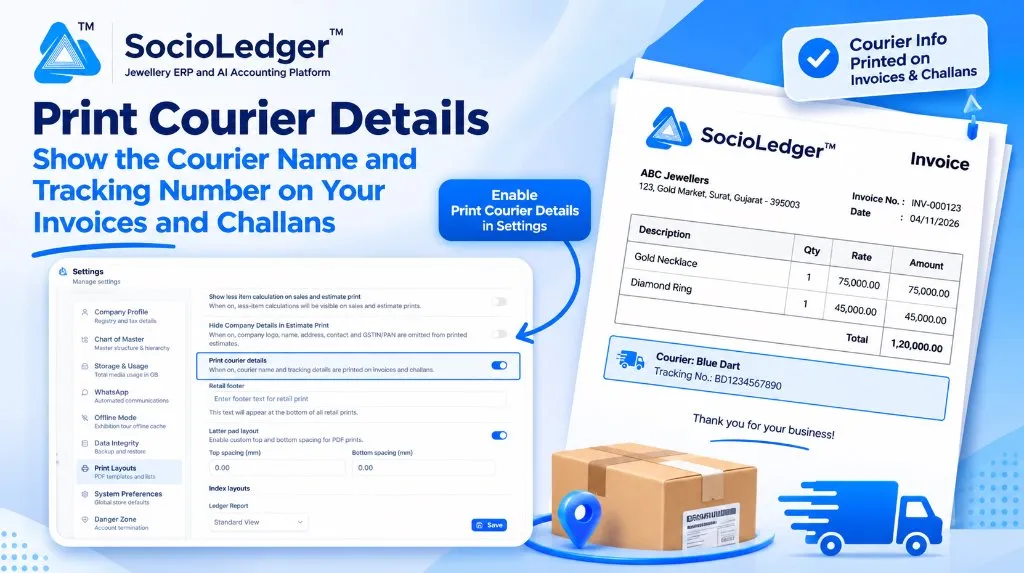
Table of contents
Open Table of contents
- The communication gap in jewelry parcel dispatches
- What’s new: The Print Courier Details setting
- Zero duplicate data entry
- Visualizing the dispatch document workflow
- Why this matters for jewelry businesses
- Comparison: Traditional dispatch vs. SocioLedger Print Courier Details
- How it works: Step-by-step setup guide
- Where to find the setting
- Part of SocioLedger’s jewelry logistics ecosystem
- Clear tracking information on every dispatch
The communication gap in jewelry parcel dispatches
In active jewelry hubs like Surat, Zaveri Bazaar in Mumbai, Rajkot, and Karol Bagh in Delhi, dispatching parcels is a daily routine. Whether you are shipping high-value bridal gold ornaments to a retail customer or sending a batch of finished diamond jewelry via delivery challan to an outstation showroom, transit security and tracking clarity are critical.
Traditionally, recording logistics information and communicating it to the customer were disjointed:
- Manual message follow-ups: Dispatch clerks entered courier info into the system or courier booking portal, but customers had no visibility unless someone typed out a WhatsApp message or SMS.
- Influx of “where is my parcel?” calls: Customers anxious about valuable shipments repeatedly phoned the showroom inquiring about shipment progress.
- Physical paperwork lacked transit details: The printed invoice or challan inside the parcel listed items, weights, and taxes, but gave no indication of which logistics carrier was handling the delivery.
- Disputes during delivery handovers: If an outstation branch or recipient questioned the arrival timeline or courier partner, verifying transit details required checking backend software records.
Dispatch paperwork should provide complete transit clarity from the moment it is printed.
What’s new: The Print Courier Details setting
Located inside Settings → Print Layouts, the new Print courier details toggle enables automated printing of logistics data on your outward documentation:
- On Invoices: Displays the assigned courier name and docket tracking number clearly near the footer of customer sales invoices.
- On Delivery Challans: Prints the courier agency and tracking reference on wholesale and inter-branch delivery challans.
- Universal coverage: Works across both retail sales orders and B2B wholesale dispatches.
+-------------------------------------------------------------------------------+
|  ABC Jewellers                                                        Invoice |
|  123, Gold Market, Surat, Gujarat - 395003                                    |
|                                                     Invoice No.: INV-000123   |
|                                                     Date       : 04/11/2026   |
|-------------------------------------------------------------------------------|
|  Description                   | Qty  | Rate (₹)       | Amount (₹)           |
|--------------------------------|------|----------------|----------------------|
|  Gold Necklace                 | 1    | 75,000.00      | 75,000.00            |
|  Diamond Ring                  | 1    | 45,000.00      | 45,000.00            |
|-------------------------------------------------------------------------------|
|                                                 Total  | 1,20,000.00          |
|-------------------------------------------------------------------------------|
|  [🚚] Courier: Blue Dart                                                      |
|       Tracking No.: BD1234567890                                              |
|-------------------------------------------------------------------------------|
|                          Thank you for your business!                         |
+-------------------------------------------------------------------------------+
When activated, you no longer have to manually stamp, write, or separate delivery dockets from invoices. The physical paperwork arrives with its own verified tracking information printed cleanly on the page.
Zero duplicate data entry
The courier information on the print is pulled directly from the delivery details you already capture on the voucher:
- Delivery Mode: Courier, Hand Delivery, Air Freight, or Dedicated Transit.
- Courier Agency: Blue Dart, BVC Logistics, Sequel Logistics, India Post Speed Post, or local angadia services.
- Tracking / Docket Number: The tracking code generated by your logistics partner.
There is nothing extra to fill out for printing. You record delivery details once during voucher entry, and the system formats and renders them onto the printed document automatically.
If a voucher has no courier details entered — such as an over-the-counter walk-in sale — the courier box is omitted completely, keeping in-store receipts clean and free from empty labels.
Visualizing the dispatch document workflow
+-----------------------------------------------------------------------------+
|             Traditional Disconnected Dispatch & Tracking Flow               |
+-----------------------------------------------------------------------------+
|                                                                             |
|   [ Create Sale / Challan ] ──► [ Book Courier Partner ]                    |
|                                           │                                 |
|                                           ▼                                 |
|                         [ Print Document (No Courier Info) ]                |
|                                           │                                 |
|                                           ▼                                 |
|                         [ Customer Calls Asking for Tracking ]              |
|                                           │                                 |
|                                           ▼                                 |
|                         [ Staff Looks Up Docket & Sends Chat ]              |
|                                                                             |
|   Result: Repetitive inquiries, disconnected paperwork, wasted desk time    |
+-----------------------------------------------------------------------------+
|              SocioLedger Integrated Courier Print Workflow                  |
+-----------------------------------------------------------------------------+
|                                                                             |
|   [ Enter Sale / Challan ] ──► [ Input Courier & Tracking No. on Voucher ]  |
|                                           │                                 |
|                                           ▼                                 |
|                         [ Enable: Print Courier Details ]                   |
|                                           │                                 |
|                                           ▼                                 |
|                     [ Print Invoice / Challan With Courier Box ]            |
|                                           │                                 |
|                                           ▼                                 |
|            [ Document & Tracking Travel Together Directly to Recipient ]     |
|                                                                             |
|   Result: Self-serve tracking, zero followup calls, transparent paper trail |
+-----------------------------------------------------------------------------+
Why this matters for jewelry businesses
Printing courier and tracking credentials on your documentation offers immediate operational benefits:
- Instant self-service tracking: Recipients immediately see the courier name and docket code on their invoice or challan copy.
- Drastic reduction in followup calls: Showroom and accounts teams spend far less time answering “where has my parcel reached?” inquiries.
- Unifies retail and wholesale operations: A single toggle handles both walk-out courier orders and inter-city wholesale shipments.
- Airtight paper audit trail: Physical records in binders or dispatch registers clearly preserve how and through whom the goods were transported.
- Zero additional workload: The print engine consumes existing voucher logistics data without requiring extra keystrokes.
- Flexible business control: Easily turned on or off based on your showroom policies or customer delivery preferences.
Comparison: Traditional dispatch vs. SocioLedger Print Courier Details
| Feature / Dimension | Traditional Billing Systems | SocioLedger Print Courier Details |
|---|---|---|
| Courier Name Display | Missing or hand-written with pen | System-printed below voucher totals |
| Tracking Number Visibility | Kept in carrier receipt books | Printed directly on customer paperwork |
| Retail & Wholesale Parity | Disconnected print layouts | Unified print rule across invoices & challans |
| Staff Overhead | High manual texting and call handling | Zero extra steps beyond standard billing |
| Clean Walk-in Handling | Often leaves blank fields or labels | Dynamically omitted if no courier is set |
| Carrier Flexibility | Rigid or non-configurable | Supports Blue Dart, Sequel, BVC, Speed Post |
How it works: Step-by-step setup guide
Enabling courier details on your print layouts requires just a few clicks:
- Open Settings: Log in as an administrator and click Settings from the left navigation bar.
- Access Print Layouts: Navigate to the Print Layouts section.
- Turn on Print Courier Details: Locate the Print courier details toggle switch and turn it On.
- Save Configuration: Click the Save button at the bottom of the layout panel.
- Bill and dispatch: When creating an invoice or delivery challan, enter the courier agency name and tracking number in the voucher delivery section.
- Print the document: Print or export your document as a PDF — the courier block appears clearly below item details.
Where to find the setting
The setting is organized under platform print preferences:
- Go to Settings → Print Layouts → Print courier details.
It sits alongside other print customization settings, including less-item calculation, estimate print details, letter pad top and bottom spacing, and retail footers.
Part of SocioLedger’s jewelry logistics ecosystem
The courier print setting works in tandem with SocioLedger’s broader suite of logistics, delivery, and audit tools designed for high-value jewelry operations:
- Verify shipment contents with photos: Capture parcel weights and webcam inspection proof using Delivery Challan Courier Confirmation.
- Automated parcel dispatch slips: Print standardized dispatch labels with Parcel Confirmation Courier Label.
- Inter-branch stock shipments: Transfer finished items between stores safely with Branch Transfer Tags.
- Outward consignments for tours: Track traveling sales kits with Wholesaler Sales Tour Tracking.
- Activity log shortcuts: Inspect and edit dispatch activity directly with Activity Logs Edit Shortcut.
Clear tracking information on every dispatch
Sending jewelry by courier requires mutual trust and accountability between you and your customer. When tracking numbers are printed directly on the invoice or delivery challan, clients receive everything they need to track their package the moment it ships.
With SocioLedger’s Print courier details setting, jewelers eliminate dispatch confusion, reduce customer service inquiries, and present a professional, polished document with every parcel that leaves their showroom.
Want more options or custom layouts added to your print templates? Tell us — contact our team and we will be happy to help tailor your documents to your exact business needs.