
Sending jewelry by courier is a moment of trust. Once a parcel leaves your dispatch counter, you need a clear, unshakeable record that it went out correctly: the exact verified weight, the piece count, and photographic proof of the packed box and tamper seal. If an insurance query or customer question comes up days later, a high-resolution photo taken at the moment of handover settles the dispute immediately. The new Courier Details confirmation in SocioLedger’s Delivery Challans gives jewelry manufacturers, wholesalers, and retail showrooms that exact operational safeguard.
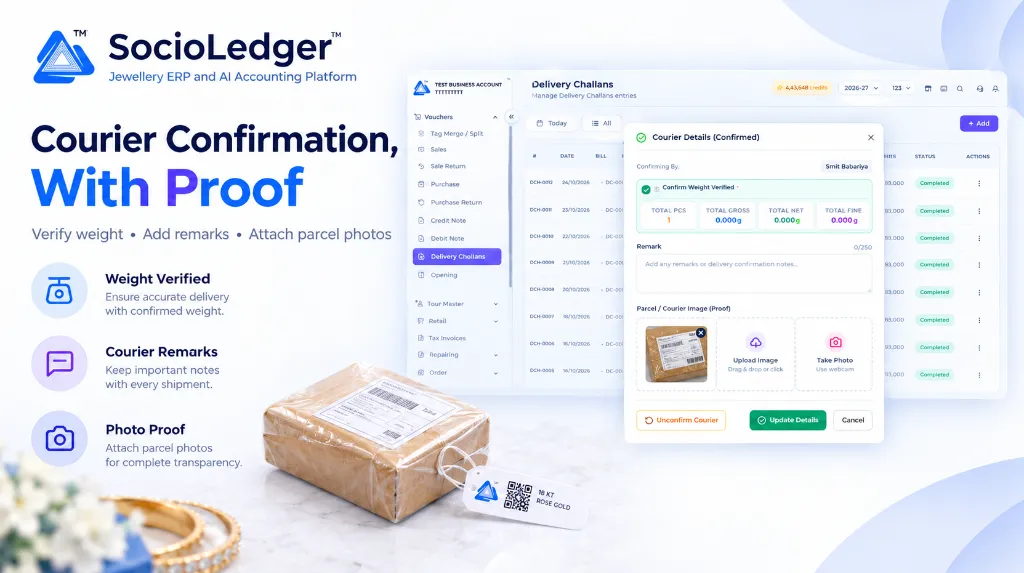
Table of contents
Open Table of contents
- Why parcel dispatch proof matters for jewelry businesses
- What’s new in the Courier Details confirmation window
- Instant proof preview directly from the Delivery Challan list
- Built exclusively for Delivery Challans
- Why this matters for modern jewelry operations
- Comparison: Traditional dispatch vs. SocioLedger Courier Confirmation
- How it works: Step-by-step courier confirmation
- Where to find the Courier Details confirmation
- Part of SocioLedger’s integrated dispatch and inventory suite
- A clear record for every parcel
Why parcel dispatch proof matters for jewelry businesses
In major jewelry trading hubs across India — such as Zaveri Bazaar in Mumbai, Surat’s diamond district, Johari Bazaar in Jaipur, or Karol Bagh in Delhi — high-value shipments leave workshops and wholesale desks daily. Goods travel by specialized secure logistics (like BVC Logistics, Sequel Logistics, or Malca-Amit) as well as express courier services to branch showrooms, retail partners, and outstation clients.
When goods travel under a Delivery Challan, the handover moment between your dispatch team and the courier pickup agent carries significant operational risk:
- Post-dispatch weight disputes: A recipient opens a courier parcel and claims a gold chain or diamond bracelet is missing, alleging the package weighed less than invoiced.
- Tampering during transit: Polybags or security seals get damaged or retaped in transit, leaving both sender and courier pointing fingers over when the seal broke.
- Vague handover records: Dispatch registers often record only a docket tracking number on a piece of paper, with no verified digital record of who packed the box or what scale reading was checked.
- Burden of proof for insurance: Filing transit insurance claims requires concrete proof of the package condition, security tape, and weight immediately prior to carrier handover.
Relying on verbal assurances or searching through scattered phone photo galleries days later is stressful and unreliable. Your jewelry ERP should capture verified weights, operator attribution, and parcel photos right inside the voucher record at the moment of dispatch.
+-----------------------------------------------------------------------------------+
|               Traditional Courier Dispatch Vulnerabilities                        |
+-----------------------------------------------------------------------------------+
|                                                                                   |
|   Parcel Packed ──► Paper Courier Slip ──► Carrier Pickup ──► Client Delivery     |
|                            │                                        │             |
|                            ▼                                        ▼             |
|                   No photo captured                          Weight discrepancy?  |
|                   No mandatory weight check                  Damaged seal?        |
|                   No named operator log                      Dispute arises!      |
|                                                                                   |
+-----------------------------------------------------------------------------------+
|               SocioLedger Verified Courier Confirmation Workflow                  |
+-----------------------------------------------------------------------------------+
|                                                                                   |
|   Delivery Challan ──► Open [ Courier Details ]                                   |
|                                │                                                  |
|                                ├── Confirming By: Recorded automatically          |
|                                ├── Confirm Weight Verified: Mandatory checkbox    |
|                                │   (Shows Total Pcs, Gross, Net, Fine)            |
|                                ├── Remarks: Note airway bill / security seal tag  |
|                                └── Attach Proof Photo: Webcam capture or upload   |
|                                │                                                  |
|                                └──► Click [ Update Details ]                      |
|                                                                                   |
|   Result: Sealed digital audit trail + instant photo preview on challan list      |
+-----------------------------------------------------------------------------------+
What’s new in the Courier Details confirmation window
When you confirm a courier dispatch for any delivery challan in SocioLedger, a dedicated Courier Details confirmation window opens with every field required to close the loop cleanly.
1. Confirming By: Named accountability on every shipment
Every confirmation explicitly shows Confirming By with the active user’s name (e.g., Smit Babariya). This ensures that every courier parcel dispatched from your workshop or showroom has a specific team member tied to its inspection, preventing anonymous handovers.
2. Confirm Weight Verified: Required verification with live totals
Before a courier confirmation can be saved, the operator must tick the Confirm Weight Verified checkbox. Directly inside the prompt card, SocioLedger displays the exact totals from the challan items:
- Total Pcs: Confirms the physical item count inside the parcel.
- Total Gross: Shows total gross weight in grams (down to three decimal places:
0.000 g). - Total Net: Shows calculated net metal weight.
- Total Fine: Reflects the calculated pure fine metal content.
By placing the challan totals right next to the confirmation checkbox, counter staff can verify the parcel on their certified bench scale against the ERP figures before marking it cleared.
3. Remark: Up to 250 characters for dispatch notes
An optional Remark field (with a clear 0/250 character counter) allows dispatch teams to add relevant shipment context, such as:
- Courier airway bill (AWB) or tracking docket numbers.
- Tamper-evident security pouch bar codes or lead seal numbers.
- Specific driver, pickup agent, or logistics partner details.
- Special delivery instructions requested by the receiving party.
4. Parcel / Courier Image (Proof): Dual capture modes up to 2MB
Attaching a photo of the packed parcel provides unquestionable proof of shipment. SocioLedger offers two convenient ways to attach the image:
- Upload Image: Drag and drop an image file or click to select from your local drive.
- Take Photo: Activate your counter’s connected webcam with a single click to snap a live photo of the packaged parcel, security seal, and shipping label sitting on the counter.
Images up to 2MB are supported. If you need to swap the image, a quick delete button (✕) on the preview thumbnail allows immediate replacement.
5. Reversible via Unconfirm Courier
Operations in busy jewelry businesses need flexibility. If a courier fails to pick up the parcel on time, or if an item must be added or removed from the shipment before the carrier arrives, you are never locked in. The window includes an orange Unconfirm Courier button that instantly resets the confirmation status.
+-------------------------------------------------------------------------------------------------------+
|  Vouchers > Delivery Challans                                                [ Today ]  [ All ]  [ + Add ] |
+-------------------------------------------------------------------------------------------------------+
|                                                                                                       |
|  ┌─────────────────────────────────────────────────────────────────────────────────────────────────┐  |
|  │ 🟢  Courier Details (Confirmed)                                                              [✕] │  |
|  ├─────────────────────────────────────────────────────────────────────────────────────────────────┤  |
|  │                                                                                                 │  |
|  │  Confirming By:                                                      [ Smit Babariya          ] │  |
|  │                                                                                                 │  |
|  │  ┌───────────────────────────────────────────────────────────────────────────────────────────┐  │  |
|  │  │  ☑  Confirm Weight Verified *                                                             │  │  |
|  │  │                                                                                           │  │  |
|  │  │   TOTAL PCS         TOTAL GROSS            TOTAL NET              TOTAL FINE              │  │  |
|  │  │       1               0.000 g                0.000 g                0.000 g               │  │  |
|  │  └───────────────────────────────────────────────────────────────────────────────────────────┘  │  |
|  │                                                                                                 │  |
|  │  Remark                                                                                   0/250 │  |
|  │  [ Add any remarks or delivery confirmation notes...                                          ] │  |
|  │                                                                                                 │  |
|  │  Parcel / Courier Image (Proof)                                                                 │  |
|  │  ┌──────────────┐     ┌─────────────────────────┐     ┌─────────────────────────┐               │  │  |
|  │  │ [Parcel Pic] │     │      ☁ Upload Image     │     │      📷 Take Photo      │               │  │  |
|  │  │          [✕] │     │    Drag & drop or click │     │       Use webcam        │               │  │  |
|  │  └──────────────┘     └─────────────────────────┘     └─────────────────────────┘               │  │  |
|  │                                                                                                 │  |
|  │  [ ↺ Unconfirm Courier ]                                 [ ✓ Update Details ]      [ Cancel ]   │  |
|  └─────────────────────────────────────────────────────────────────────────────────────────────────┘  |
+-------------------------------------------------------------------------------------------------------+
Instant proof preview directly from the Delivery Challan list
One of the biggest time-savers in this update is how proof photos are accessed after saving.
In standard ERP systems, inspecting an attachment requires clicking into a transaction, waiting for the document detail page to render, and finding the media tab. When reconciling dozens of shipments with a logistics vendor at the end of the week, this friction becomes frustrating.
In SocioLedger, once a proof photo has been uploaded, you can view it directly from the Delivery Challan list:
- Simply hover over the entry on the challan index table.
- A floating preview card appears displaying the uploaded parcel photo in full clarity.
- You can inspect packing condition, shipping labels, and tamper tape without leaving the list or opening individual records.
Built exclusively for Delivery Challans
Dispatch verification is tailored strictly to where it matters most: the Delivery Challans module.
Because delivery challans represent physical outward movement of valuable stock (whether for client approvals, branch transfers, exhibition showcases, or finished order shipments), courier verification belongs here. Internal workshop vouchers, manufacturing job cards, or daily retail sales receipts remain clean and unencumbered by courier popups.
Why this matters for modern jewelry operations
Adding verified weights and photo attachments directly to your delivery challans resolves long-standing logistics headaches for jewelry teams:
1. Concrete evidence when disputes occur
If a client claims a parcel arrived open or missing pieces, you have a timestamped photo showing the parcel’s condition, intact tamper seals, and verified weights at the exact time of dispatch.
2. Mandatory weight checks prevent packing errors
Requiring staff to tick “Confirm Weight Verified” while displaying live pieces, gross, net, and fine weight totals stops careless handovers before the parcel leaves your premises.
3. Clear accountability with named staff attribution
Every confirmation logs who verified and cleared the parcel, fostering responsibility across your dispatch counter team.
4. Consolidated dispatch remarks
Keep tracking docket numbers, airway bill references, and special packaging notes bound directly to the challan rather than scattered in chat threads or paper notebooks.
5. Instant review with zero-click hover previews
Auditors and accounts managers can inspect parcel photos across dozens of dispatches in seconds simply by moving their cursor down the challan index.
6. Fully reversible workflow
If a delivery schedule changes, the built-in “Unconfirm Courier” option gives you immediate control to make adjustments without complex administrative overrides.
7. Fast capture via integrated webcam
Counter staff do not need to take photos on personal mobile phones, transfer files via WhatsApp, or download attachments. They hold the parcel up to the packing station webcam, click “Take Photo”, and the record is complete.
Comparison: Traditional dispatch vs. SocioLedger Courier Confirmation
| Feature / Capability | Traditional Courier Dispatch | SocioLedger Courier Confirmation with Proof |
|---|---|---|
| Weight Verification | Optional, often written on paper slips | Mandatory required checkbox against live ERP totals |
| Weight Visibility | Must cross-check separate invoice printouts | Total Pcs, Gross, Net, and Fine shown in modal |
| Parcel Photo Proof | Personal mobile photos or none at all | Attached to ERP record (Webcam capture or upload) |
| List View Inspection | Must open each voucher to view attachments | Instant hover preview directly from challan list |
| Operator Attribution | Anonymous or manual signature on physical slip | Named user logged automatically (“Confirming By”) |
| Shipment Remarks | Written in margins or lost in chat messages | Dedicated 250-character field saved with voucher |
| Reversibility | Difficult to revert without voiding entries | One-click “Unconfirm Courier” button |
How it works: Step-by-step courier confirmation
Confirming courier dispatches in SocioLedger is fast and intuitive:
- Open the Delivery Challan list: Navigate to Vouchers → Delivery Challans in the left menu.
- Select your challan: Locate the challan ready for courier dispatch.
- Open Courier Details: Click to open the courier confirmation window.
- Verify weight: Check the parcel on your scale against the displayed Total Pcs, Total Gross, Total Net, and Total Fine, then check Confirm Weight Verified.
- Add a remark (optional): Type your courier docket number or shipment notes in the 250-character remark box.
- Attach parcel photo: Click Take Photo to snap the parcel with your webcam, or Upload Image to attach an existing picture.
- Save confirmation: Click Update Details to lock in the confirmation.
- Preview anytime: Hover over the challan entry on the list view whenever you need to inspect the proof photo.
Where to find the Courier Details confirmation
The courier confirmation feature is built into the Vouchers → Delivery Challans module in SocioLedger. You can access it directly from the delivery challan table actions on your active dashboard.
Part of SocioLedger’s integrated dispatch and inventory suite
Courier confirmation works alongside SocioLedger’s broader suite of logistics and accounting tools designed specifically for jewelry businesses:
- Settlement adjustments on dispatch: Apply balanced, transparent adjustments directly on delivery slips with Round Off Discount in Delivery Challan.
- Tamper-proof accounting locks: Protect confirmed records against retroactive changes with Lock Ledger Period.
- Daily stock reconciliation: Keep physical showroom pieces matching your books with Stock Tally & Daily Verification.
- Tag lifecycle tracking: Monitor how long pieces have been on the counter using Tag Age & Created Date on Scan.
- Wholesale bullion movements: Account for pure gold and silver handovers accurately with Fine items in wholesale vouchers.
A clear record for every parcel
When valuable jewelry travels, a clear, verifiable record protects your business, your courier partners, and your clients. By combining mandatory weight verification, named staff attribution, and live parcel photo capture right inside your Delivery Challans, SocioLedger ensures you never have to guess what left your dispatch counter.
Want proof attachments or courier confirmations in another process? Tell us — contact our team and we will be happy to assist.