
The bill is ready, the customer is happy, and now comes the final step: getting paid. In a busy jewelry showroom or wholesale counter, that usually means reading out a UPI ID across the counter, asking the customer to type the amount on their phone, and hoping nobody makes a typing mistake. When dealing with outstation clients or courier dispatches, it often means manually composing a separate WhatsApp message and hoping the customer enters the correct bill figure. SocioLedger’s new Secure UPI Checkout puts the entire payment collection step right inside the voucher itself, generating an exact, dynamic UPI QR code on screen and letting you share payment requests instantly on WhatsApp.
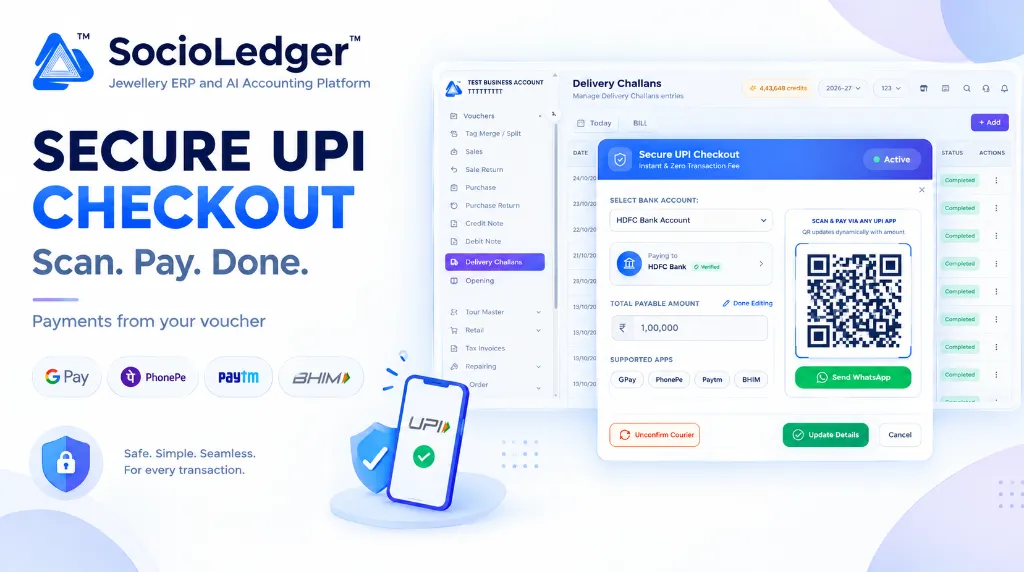
Table of contents
Open Table of contents
- The payment friction at busy jewelry counters
- What’s new in Secure UPI Checkout
- Where it works: Available across all commercial vouchers
- Change the amount or the bank account when you need to
- Set up once on your Bank Ledger
- Why Secure UPI Checkout matters for jewelry businesses
- Comparison: Traditional manual payments vs. SocioLedger Secure UPI Checkout
- How it works: Step-by-step payment collection guide
- Where to find Secure UPI Checkout
- Part of SocioLedger’s integrated jewelry management suite
- Payment collected where the bill is made
The payment friction at busy jewelry counters
In active jewelry trading hubs like Zaveri Bazaar in Mumbai, Surat’s jewelry quarter, Karol Bagh in Delhi, and Manek Chowk in Ahmedabad, billing counters handle fast-paced, high-value transactions throughout the day. When a sale closes or a delivery challan is issued, completing payment should be smooth and immediate.
Yet, traditional payment collection across jewelry retail and wholesale operations is fraught with friction:
- Manual amount entry errors: Asking a walk-in buyer to manually type ₹1,48,500 into their phone app frequently leads to typos — such as missing a zero or reversing digits — forcing awkward counter reconciliations.
- Payee uncertainty and customer hesitation: Static printouts of laminated QR codes do not show the exact invoice total. Customers scan blindly, type the amount themselves, and question whether they sent funds to the right entity.
- Counter queues during festival rushes: During high-volume festive occasions like Dhanteras, Akshaya Tritiya, and peak wedding seasons, taking an extra two minutes per customer to verify UPI reference numbers causes counter congestion.
- Friction with remote and courier dispatches: When dispatching goods under a delivery challan or sharing a quotation, staff have to copy figures into personal WhatsApp chats, send static banking details, and repeatedly follow up.
Your jewelry software should connect the bill to the payment without friction or manual data entry.
+-----------------------------------------------------------------------------------+
|               Traditional Manual UPI Payment Collection Bottlenecks               |
+-----------------------------------------------------------------------------------+
|                                                                                   |
|   Voucher Finalized ──► Staff Reads UPI ID ──► Customer Manually Types Amount    |
|                                                                │                  |
|                                                                ▼                  |
|                                                     Typing Error or Wrong Sum?    |
|                                                     Unverified Payee Hesitation?  |
|                                                     Delay at Billing Counter!     |
|                                                                                   |
+-----------------------------------------------------------------------------------+
|               SocioLedger Secure UPI Checkout Embedded Workflow                   |
+-----------------------------------------------------------------------------------+
|                                                                                   |
|   Voucher (Sale, Challan, Estimate, Quotation) ──► Click [ Actions > UPI Payment ]|
|                                                          │                        |
|                                                          ├── Auto-filled voucher sum
|                                                          ├── Dynamic UPI QR Code  |
|                                                          ├── Verified Bank Payee  |
|                                                          └── Instant WhatsApp link|
|                                                          │                        |
|                                                          ▼                        |
|   Result: Scan & pay with zero typing errors or share directly to customer phone  |
+-----------------------------------------------------------------------------------+
What’s new in Secure UPI Checkout
For any voucher that carries a price, the Actions menu on the voucher list now includes a dedicated UPI payment option. Clicking it opens the Secure UPI Checkout window with every detail ready to go:
- The amount to pay: Pre-filled automatically with the exact total of the voucher entry.
- Dynamic UPI QR code: Generated on the spot for that exact figure and linked directly to your designated bank account, ready to scan with any UPI application.
- Bank account details with Verified badge: Displays the selected receiving bank name, account label, a green Verified mark, and the exact UPI ID attached to it.
- Supported apps list: Clearly highlights compatibility with Google Pay, PhonePe, Paytm, and BHIM.
- Send WhatsApp button: A one-click green button that prepares a payment request with complete details and opens WhatsApp to message the customer directly.
- Instant & Zero Transaction Fee: Labeled explicitly on the modal header, ensuring direct bank-to-bank settlement without payment gateway deductions or merchant fees.
+-------------------------------------------------------------------------------------------------------+
|  Vouchers > Delivery Challans / Sales / Estimates                     [ Today ]  [ BILL ]   [ + Add ] |
+-------------------------------------------------------------------------------------------------------+
|                                                                                                       |
|  ┌─────────────────────────────────────────────────────────────────────────────────────────────────┐  |
|  │ 🛡️  Secure UPI Checkout                                                             ● Active [✕] │  |
|  │    Instant & Zero Transaction Fee                                                               │  |
|  ├─────────────────────────────────────────────────────────────────────────────────────────────────┤  |
|  │                                                                                                 │  |
|  │  SELECT BANK ACCOUNT:                                  ┌─────────────────────────────────────┐  │  |
|  │  ┌───────────────────────────────────────────────┬───┐ │     SCAN & PAY VIA ANY UPI APP      │  │  |
|  │  │ HDFC Bank Account                             │ ▼ │ │   QR updates dynamically with amount│  │  |
|  │  └───────────────────────────────────────────────┴───┘ │  ┌───────────────────────────────┐  │  │  |
|  │                                                        │  │  █▀▀▀▀▀█ ▄ █▄█ █▀▀▀▀▀█         │  │  │  |
|  │  ┌───────────────────────────────────────────────────┐ │  │  █ ███ █ █▄█ ▀ █ ███ █         │  │  │  |
|  │  │ 🏦  Paying to                                     │ │  │  █▀▀▀▀▀█ ▄▀▄ ▄ █▀▀▀▀▀█         │  │  │  |
|  │  │     HDFC Bank  ✔ Verified                       > │ │  │  ▀▀▀▀▀▀▀ ▀   ▀ ▀▀▀▀▀▀▀         │  │  │  |
|  │  └───────────────────────────────────────────────────┘ │  │  [       UPI QR CODE       ]   │  │  │  |
|  │                                                        │  └───────────────────────────────┘  │  │  |
|  │  TOTAL PAYABLE AMOUNT                     ✎ Edit       │                                     │  │  |
|  │  ┌───────────────────────────────────────────────────┐ │  ┌───────────────────────────────┐  │  │  |
|  │  │ ₹  1,00,000                                       │ │  │  💬 Send WhatsApp             │  │  │  |
|  │  └───────────────────────────────────────────────────┘ │  └───────────────────────────────┘  │  │  |
|  │                                                        └─────────────────────────────────────┘  │  |
|  │  SUPPORTED APPS                                                                                 │  |
|  │  [ GPay ]   [ PhonePe ]   [ Paytm ]   [ BHIM ]                                                  │  |
|  │                                                                                                 │  |
|  │  [ ↺ Unconfirm Courier ]                                 [ ✔ Update Details ]      [ Cancel ]   │  |
|  └─────────────────────────────────────────────────────────────────────────────────────────────────┘  |
+-------------------------------------------------------------------------------------------------------+
Where it works: Available across all commercial vouchers
Secure UPI Checkout is engineered to support jewelry transactions wherever a price is recorded:
- Sale: Complete counter billing for retail and wholesale transactions. Show the QR code on your sales counter display for instantaneous settlement.
- Delivery Challan: Collect full payment or advance delivery amounts directly when preparing outstation parcels or dispatching approval goods.
- Retail Sale: Accelerate high-volume counter purchases during festive spikes without manually keying values into POS swipe terminals.
- Estimate: Collect initial token deposits from customers who want to lock in gold rates or approve an initial jewelry design estimate.
- Quotation: Share professional payment links alongside formal jewelry quotations to secure bookings before production commences in the workshop.
Change the amount or the bank account when you need to
Operational realities in jewelry businesses demand adaptability. Nothing in Secure UPI Checkout is locked in:
1. Flexible part payments and custom amounts
Customers do not always pay the full invoice amount in a single transaction. A buyer might place a ₹25,000 token advance against a ₹1,00,000 bridal necklace, or split the total across two payment methods.
Click Edit next to the Total Payable Amount, type the updated amount, and click Done Editing. The on-screen UPI QR code updates dynamically to reflect the exact new figure, preventing overpayment or underpayment.
2. Switch bank accounts on the fly
If your primary current account is near daily banking thresholds, or if you prefer routing specific wholesale receivables to a different company bank ledger, simply select another account from the Select Bank Account dropdown.
The payee details, verified badge, and underlying UPI ID change instantaneously, and the QR code reconfigures itself in real time.
Set up once on your Bank Ledger
Getting started with Secure UPI Checkout requires zero complex API integrations, third-party payment gateway merchant accounts, or lengthy approval cycles:
- Open your Bank Ledger master in SocioLedger.
- Enter the official UPI ID associated with your bank account.
- Save the ledger.
That is all. The system binds that UPI ID to the bank account and generates standard, NPCI-compliant UPI merchant QR codes across all future checkout requests.
Why Secure UPI Checkout matters for jewelry businesses
Bringing dynamic QR payments into your daily voucher flow offers clear benefits for retail showrooms, wholesale counters, and manufacturing workshops.
1. No typing, zero misheard amounts
Because the payable total is already encoded into the QR code, customers scan and see the exact amount on their payment screen. There is nothing to type, nothing to mishear over a busy counter, and no risk of entering the wrong sum.
2. Pay with any UPI app
Customers are never restricted to a specific payment ecosystem. The generated QR code supports all major UPI applications — including Google Pay, PhonePe, Paytm, BHIM, and mobile banking applications from HDFC, ICICI, SBI, Axis, and others.
3. Payment collected directly from the voucher
Staff do not have to leave their active screen, switch to a standalone payment terminal, or open an external billing app. You trigger payment collection directly from the voucher record you are already working on.
4. Reach remote customers over WhatsApp
When dealing with outstation clients, corporate gifting orders, or courier consignments, in-person scanning is not an option. Clicking Send WhatsApp generates a pre-formatted message with invoice information and the payment request, sending it directly to the customer’s phone in seconds.
5. Seamless flexibility for custom counter situations
Whether handling split tenders, partial advances, or multi-bank corporate accounts, the ability to edit the payable sum and switch bank accounts on the fly keeps counter transactions moving without roadblocks.
6. Verified payee builds trust
Jewelry purchases involve significant sums. The Verified mark and clear payee display give walk-in customers and remote clients immediate peace of mind that their money is going directly to the legitimate business account.
7. Instant settlement with zero transaction fees
Unlike credit card machines and payment gateways that deduct 1.5% to 2.5% in merchant transaction fees and delay payouts by 24 to 48 hours, UPI transactions settle directly between bank accounts instantly with zero processing fees.
Comparison: Traditional manual payments vs. SocioLedger Secure UPI Checkout
| Payment Dimension | Traditional Manual Payment Collection | SocioLedger Secure UPI Checkout |
|---|---|---|
| Amount Entry | Customer manually types amount in UPI app | Pre-filled dynamically in the QR code |
| Payee Accuracy | Relies on verbal ID or static printout | Verified bank account and registered UPI ID shown |
| Error Risk | High risk of mistyped digits or wrong accounts | Zero manual input errors |
| Supported Apps | Varies by static QR compatibility | Universally compatible with GPay, PhonePe, BHIM, etc |
| Remote Clients | Copying account numbers in manual chat threads | Instant 1-click WhatsApp payment request |
| Part Payments | Customer calculates and enters balance | 1-click amount edit updates QR code dynamically |
| Account Routing | Restricted to one printed counter QR code | Switch between multiple company bank ledgers easily |
| Transaction Fees | 1.5%–2.5% on card swiping gateways | Zero transaction fees with direct bank settlement |
| Counter Speed | 2–3 minutes per customer verification | Under 15 seconds: scan, pay, and complete |
How it works: Step-by-step payment collection guide
Collecting payment with Secure UPI Checkout in SocioLedger takes just a few clicks:
- Open the voucher list: Navigate to the list of sales, delivery challans, retail sales, estimates, or quotations.
- Click Actions: Locate the entry you want to collect payment for and select UPI payment from the Actions menu.
- Verify amount and bank: Check the pre-filled amount and selected bank account. Click Edit if the customer is making a part payment, or switch the receiving bank account if needed.
- Display QR code: Let the in-store customer scan the dynamic QR code on screen using their preferred UPI application.
- Or send via WhatsApp: Click Send WhatsApp to share the payment link and details directly with a remote customer.
- Complete the transaction: Once payment is received in your bank account, proceed to finalize your voucher record.
Where to find Secure UPI Checkout
The UPI payment option is located directly inside the Actions menu on the voucher list view for:
- Vouchers → Sales
- Vouchers → Delivery Challans
- Vouchers → Retail Sales
- Vouchers → Estimates
- Vouchers → Quotations
As long as the voucher carries a monetary price, Secure UPI Checkout is ready to collect funds immediately.
Part of SocioLedger’s integrated jewelry management suite
Secure UPI Checkout connects naturally with SocioLedger’s broader tooling for modern jewelry showrooms and wholesale operations:
- Dispatch verification: Pair delivery challan payments with courier handover logs using Delivery Challan Courier Confirmation with Proof.
- Speedy accounting handoffs: Jump immediately from settlement receipt to metal rate bookings with the Payment Receipt to Rate Cut shortcut.
- Delivery adjustments: Apply balanced counter discounts at dispatch using Round Off Discount in Delivery Challan.
- Tamper-proof accounting: Freeze verified historical invoices against accidental changes with Lock Ledger Period.
- Automated client alerts: Keep customers informed about voucher updates through the WhatsApp Automation Setting.
Payment collected where the bill is made
A jewelry sale is only truly complete when the money reaches your bank account. In high-stakes jewelry trading, payment collection should never be a disjointed, manual chore that slows down your counters or invites typing errors.
With Secure UPI Checkout, jewelry businesses can display an exact, dynamic QR code or send an instant WhatsApp payment request straight from the voucher screen. Payments become faster for your customers, simpler for your counter staff, and completely verified for your business.
Want another way to collect payments or integrate your financial workflows? Tell us — contact our team and we will be happy to help you implement best practices for your jewelry business.