
Picture the moment at the sales counter. A client is asking for a quotation or negotiating a final price on a diamond necklace, and you are about to close the deal. You scan the barcode tag and the gross weight, net weight, and calculated retail price appear on your screen — but an essential question remains unanswered: what did this piece actually cost you, and how long has it been sitting on your shelf? When counter sales staff can verify the true purchase cost and stock age the exact second a tag is scanned, selling with a healthy margin shifts from guesswork into an effortless, confident conversation. SocioLedger now brings a tag’s created date and age in days straight into retail vouchers through an instant Tag & Purchase Details popup.
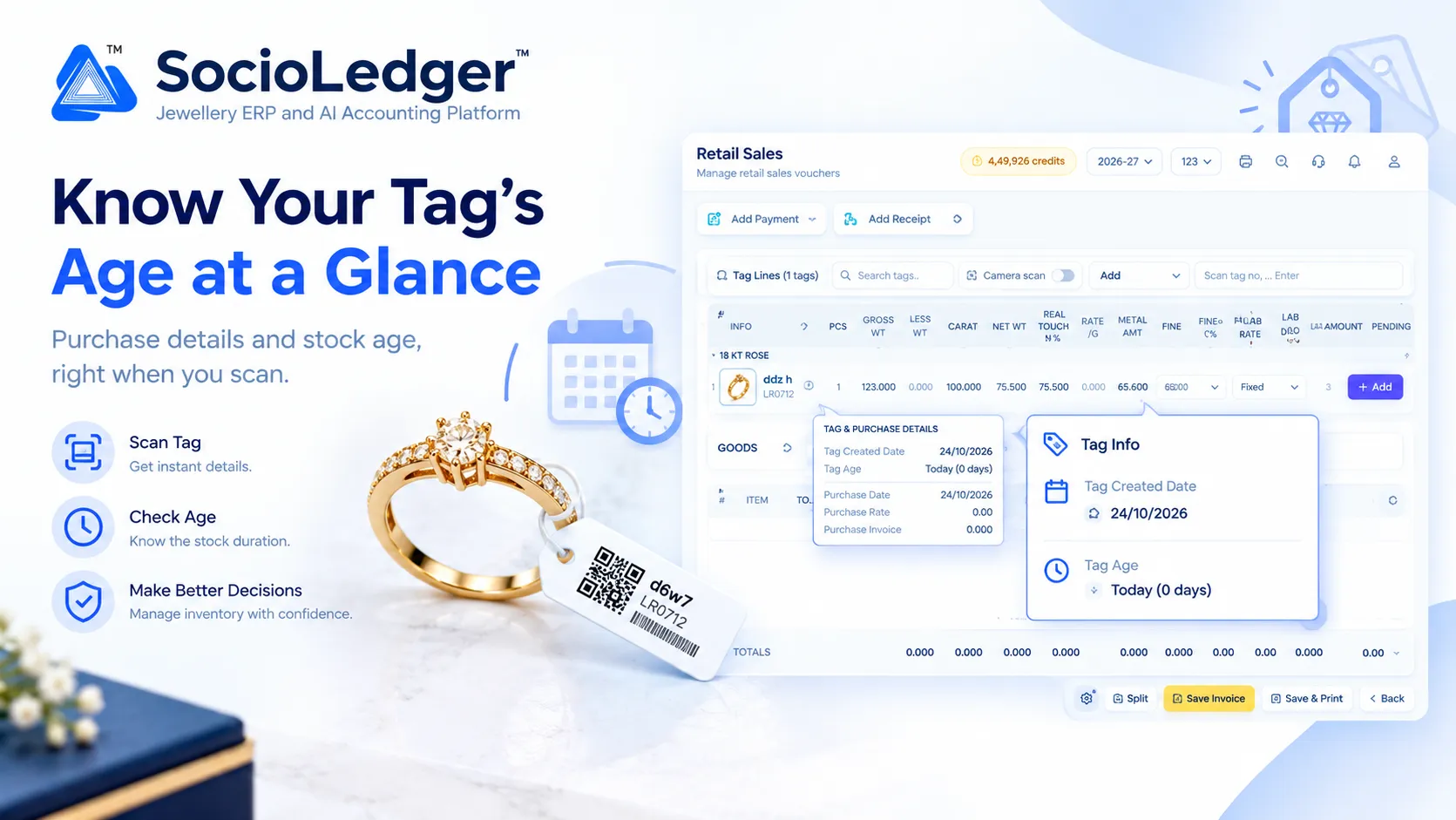
Table of contents
Open Table of contents
- The counter dilemma: Pricing without cost and aging context
- The hidden commercial costs of disconnected tag data
- What’s new: Tag Created Date and Tag Age in days on scan
- Universal availability across all retail and movement vouchers
- Why this matters for jewelry business owners
- How it works: Step-by-step counter workflow
- Traditional counter quoting vs. SocioLedger instant tag aging
- Connected jewelry inventory intelligence in SocioLedger
- Every tag tells its own story
The counter dilemma: Pricing without cost and aging context
In busy jewelry retail showrooms across hubs like Zaveri Bazaar in Mumbai, Karol Bagh in Delhi, Rajkot, and Surat, counter conversations move fast. Whether presenting fine 22 KT bridal sets during Dhanteras and wedding seasons or quoting custom lightweight ornaments on an ordinary weekday, sales executives constantly field negotiation requests.
Customers routinely ask for rounded-off totals, fee concessions, or competitive price matches. In traditional jewelry store workflows, answering those requests puts counter staff in a difficult position:
- Unknown cost floors: While the tag displays the selling rate and gross weight, the original purchase rate, purchase basis, and supplier wastage remain buried in back-office accounting registers. Sales executives do not know their bottom floor without asking a senior supervisor.
- Hidden inventory age: A necklace crafted and tagged three days ago represents fresh design capital that commands premium margins. A piece sitting in the tray for nine months ties up liquidity and gold capital, calling for an entirely different sales strategy. Knowing when the tag was created dictates how aggressively you should push or discount the piece.
- Disruptive voucher exits: In conventional jewelry software, uncovering these details forces operators to pause the transaction, minimize or exit the sales voucher, open an inventory query or tag register, search the tag number, inspect the purchase voucher, and return to the counter screen.
- Awkward counter delays: Leaving the active billing screen while a customer waits across the glass showcase breaks sales momentum and dampens customer trust.
Software should empower counter staff with instant commercial context, not force them on a detour through back-office menus.
+-----------------------------------------------------------------------------+
|              Traditional Voucher-Digging Workflow (Before)                  |
+-----------------------------------------------------------------------------+
|                                                                             |
|   Customer Inquires About Quotation or Counter Discount                     |
|            │                                                                |
|            ├──► Scan Tag ──► Selling Rate & Weight Loaded                   |
|            ├──► What Did This Piece Cost Us? ──► Unknown at Counter         |
|            ├──► How Long Has It Been on Display? ──► Unknown at Counter     |
|            ├──► Leave Active Voucher ──► Navigate to Tag or Purchase Module |
|            ├──► Search Tag Number ──► Check Vendor Invoice, Rate & Date     |
|            └──► Return to Voucher ──► Customer Waits, Sales Momentum Lost   |
|                                                                             |
|   Result: 3–5 minutes lost, awkward counter delays, blind negotiations      |
+-----------------------------------------------------------------------------+
|              SocioLedger Instant Tag Aging & Cost Popup (Now)               |
+-----------------------------------------------------------------------------+
|                                                                             |
|   Customer Inquires About Quotation or Counter Discount                     |
|            │                                                                |
|            ├──► Scan Tag ──► Line Added Instantly                           |
|            └──► Click [ ⓘ ] Info Icon Beside Tag Number                     |
|                 │                                                           |
|                 ├── Tag Created Date: e.g. 24/10/2026                        |
|                 ├── Tag Age: Today (0 days) or exact days in stock          |
|                 ├── Purchase Date: Supplier acquisition date                |
|                 ├── Purchase Rate: Actual unit cost paid                    |
|                 └── Purchase Wastage: Agreed supplier wastage %             |
|                                                                             |
|   Result: Zero screen switching, confident margin control, instant closure  |
+-----------------------------------------------------------------------------+
The hidden commercial costs of disconnected tag data
Operating counter vouchers without immediate access to tag creation history and purchase economics introduces subtle friction that quietly drains retail profitability.
1. Inflexible or eroded gross margins
When counter salespeople do not know the actual purchase cost of an ornament, they either reject reasonable customer offers out of excessive caution or grant discounts that inadvertently erase their net profit. With the true purchase rate and supplier wastage visible right beside the tag, staff know the exact floor price and can negotiate with complete financial certainty.
2. Slow-moving stock goes unnoticed
Aging inventory is one of the highest silent expenses in a jewelry retail showroom. Gold and diamond ornaments that linger in display trays for months accumulate carrying costs, lock up working capital, and take up prime showcase space. When tag age is invisible on scan, older stock blends in with new arrivals, missing golden opportunities for timely promotional discounts or tray rotations.
3. Slower sales throughput during peak festive hours
During peak shopping windows such as Diwali, Dhanteras, or Akshaya Tritiya, showroom floors are packed. Billing desks and quotation counters cannot afford multi-screen investigations. Forcing counter executives to look up vendor details or ask department managers about a tag’s background stalls billing queues and frustrates shoppers.
4. Fragmented visibility between wholesale and retail teams
Jewelry businesses that manage both wholesale distribution and retail outlets often transfer inventory between locations. When showroom teams cannot immediately see when a piece was tagged or under what terms it was sourced, inter-branch coordination suffers and accountability weakens.
Presenting complete tag lineage right at the point of scan transforms retail counters into informed decision centers.
+-------------------------------------------------------------------------------------------------------+
|  Retail Sales > Manage retail sales vouchers                           [ 4,49,926 credits ] [2026-27] |
+-------------------------------------------------------------------------------------------------------+
|  [ + Add Payment ]  [ + Add Receipt ]                                                                 |
|                                                                                                       |
|  Tag Lines (1 tags)  [ Search tags..     ]  Camera scan [ON]   Add [Tag ▼]  [ Scan tag no, ... Enter] |
|                                                                                                       |
|  ┌─────────────────────────────────────────────────────────────────────────────────────────────────┐  |
|  │ INFO   TAG       PCS  GROSS WT  LESS WT  CARAT    NET WT   REAL TOUCH%  RATE/G  METAL AMT  FINE   │  |
|  ├─────────────────────────────────────────────────────────────────────────────────────────────────┤  |
|  │  ⓘ    ddz h      1    123.000   0.000    100.000  75.500   75.500%      0.000   65.600     68.000 │  |
|  │  │    LR0712                                                                                    │  |
|  └──┼──────────────────────────────────────────────────────────────────────────────────────────────┘  |
|     │                                                                                                 |
|     ▼ (Click opens instant popup)                                                                     |
|  ┌───────────────────────────────────────────┐   ┌──────────────────────────────────────────────┐     |
|  │  TAG & PURCHASE DETAILS                   │   │ 🏷️  Tag Info                                  │     |
|  ├───────────────────────────────────────────┤   ├──────────────────────────────────────────────┤     |
|  │  Tag Created Date:    24/10/2026          │   │ 📅 Tag Created Date:  24/10/2026             │     |
|  │  Tag Age:             Today (0 days)      │   │                                              │     |
|  │  Purchase Date:       24/10/2026          │   │ 🕒 Tag Age:           Today (0 days)         │     |
|  │  Purchase Rate:       0.00                │   └──────────────────────────────────────────────┘     |
|  │  Purchase Invoice:    0.000               │                                                        |
|  │  Purchase Wastage:    0.00%               │                                                        |
|  └───────────────────────────────────────────┘                                                        |
+-------------------------------------------------------------------------------------------------------+
What’s new: Tag Created Date and Tag Age in days on scan
SocioLedger resolves this counter challenge by expanding the Tag & Purchase Details popup across retail vouchers.
Whenever you scan or type a tag number into a voucher’s tag lines, a small info icon (ⓘ) appears in the dedicated Info column, positioned right beside the tag thumbnail and tag number.
Clicking this icon opens the Tag & Purchase Details modal directly over your active voucher, showing:
- Tag Created Date — The exact calendar date the tag was generated in your system (for example,
24/10/2026). - Tag Age — The total number of elapsed days since tag creation. Items tagged on the current date display clearly as
Today (0 days), while older pieces show the exact duration (e.g.,45 daysor180 days). - Purchase Date — The date the physical piece or raw material was purchased or received from a vendor.
- Purchase Rate — The baseline purchase cost or metal acquisition rate applied to the ornament.
- Purchase Wastage — The agreed supplier wastage percentage associated with the item’s purchase.
- Purchase Invoice — The reference number linking the piece back to its source inward voucher.
Because this popup is lightweight and non-intrusive, counter staff can inspect an item’s complete financial profile in a single click, assess how long it has been in stock, and proceed with billing without losing their place.
Universal availability across all retail and movement vouchers
A key strength of this update is its universal consistency. Rather than limiting tag age visibility to standard retail sales, SocioLedger embeds the identical Tag & Purchase Details popup across every voucher workflow where jewelry tags are scanned:
| Voucher Module | Operational Context & Why Tag Age Matters |
|---|---|
| Sale | Confirm purchase cost and shelf duration to close counter sales with healthy margins. |
| Wholesale Sale | Price high-volume batches with full visibility over supplier acquisition terms. |
| Sale Return | Verify original issue date and purchase terms when handling customer returns. |
| Purchase Return | Ensure vendor return claims match original purchase date and inward wastage figures. |
| Estimate | Quote accurate prices to walk-in shoppers with your floor margin in plain sight. |
| Quotation | Draft formal corporate or bridal quotations backed by live acquisition data. |
| Jobwork | Track the turnaround time and age of pieces assigned for workshop setting or polishing. |
| Jobwork Estimate | Calculate labor and material estimates while reviewing initial creation dates. |
| Karigar Issue | Monitor how long sample pieces or raw mountings have been in circulation. |
| Outward | Inspect tag ages when sending jewelry out on memo, exhibition display, or appraisal. |
| Stock Adjustment Out | Identify whether stock write-offs or corrections involve fresh or aged inventory. |
Because the popup behaves identically in every module, your sales executives, billing clerks, and inventory controllers enjoy a unified, predictable experience throughout the showroom.
Why this matters for jewelry business owners
Displaying tag age and purchase metrics directly on scan produces practical, compounding advantages for showroom operations:
- Quote and sell with clear margins: With the actual purchase rate, purchase basis, and supplier wastage in front of you, you can quote or sell knowing exactly what each piece cost.
- Know a piece’s age instantly: See how long an ornament has occupied shelf space without having to open an inquiry screen or call the stockroom.
- Smarter counter conversations: Knowing whether a jewel arrived last week or has sat on display for months gives sales executives the confidence to pitch fresh designs at full value or negotiate flexibly on older pieces.
- Spot aging stock during routine workflows: Older inventory becomes immediately apparent during daily scanning routines rather than remaining hidden until annual audits.
- Purchase details alongside stock duration: Tag age sits directly beside purchase rates and wastage, providing an end-to-end commercial summary in one unified popup.
- Frictionless workflow: The details open straight from the tag line you are already working on — no menus, no re-typing, and no screen hopping.
- Standardized across all departments: Whether processing a retail sale, issuing an outward memo, or preparing an estimate, the interface works the same way everywhere.
How it works: Step-by-step counter workflow
Checking tag age and purchase details requires zero setup and fits seamlessly into your daily sales routine:
- Open your retail voucher — Navigate to Sale, Estimate, Quotation, or any voucher module where tags are processed.
- Scan or type the tag number — Use a barcode scanner, camera scan, or manual entry to add the tag to your voucher lines. The item specifications, weights, and selling prices populate automatically.
- Click the info icon (
ⓘ) — Locate the small info icon in the Info column right beside the tag number. - Review Tag & Purchase Details — Inspect the popup to see the Tag Created Date, Tag Age in days, Purchase Date, and Purchase Rate.
- Continue your transaction — Close the popup with a click or tap outside, finalize your pricing, and proceed with invoice printing or saving as usual.
The entire check takes less than two seconds, keeping your counter moving smoothly while keeping your margins fully protected.
Traditional counter quoting vs. SocioLedger instant tag aging
Here is how counter decision-making transforms when tag age and purchase economics are available on scan:
| Decision Dimension | Traditional Counter Process | SocioLedger Instant Tag Aging Popup |
|---|---|---|
| Access to Cost Data | Requires exiting voucher or consulting manager | 1-click popup directly inside the active voucher |
| Stock Age Discovery | Discovered only during periodic manual audits | Visible the exact second a tag is scanned |
| Margin Control | Blind negotiations with risk of eroding profit | Confident negotiations backed by real purchase floors |
| Workflow Continuity | Interrupted by screen switching and record lookups | Continuous, uninterrupted counter data flow |
| Old Stock Clearance | Older pieces easily overlooked in display trays | Instant identification of slow-moving inventory |
| Department Consistency | Different lookup tools across wholesale and retail | 100% unified popup across all 11+ voucher types |
Eliminating informational blind spots gives your showroom floor the agility of a boutique and the precision of an enterprise.
Connected jewelry inventory intelligence in SocioLedger
Instant tag age visibility connects directly into SocioLedger’s wider ecosystem for jewelry inventory control:
- Rapid Barcode Scanning: Pair instant age popups with camera scan tag barcode workflows to audit and bill pieces directly from mobile devices or webcams.
- One-Click Tag Creation: Generate new inventory tags effortlessly using the streamlined save and create tag button.
- Complete Deduction Valuation: Inspect stone values and component markups alongside metal weights through tag history less weight purchase sale totals.
- Daily Physical Audits: Keep your showroom trays reconciled and identify stale inventory batches with stock tally daily verification.
- Multi-Branch Transfers: Move slow-moving tags to higher-velocity retail showrooms using branch transfer tags between branches.
Every operational upgrade in SocioLedger reinforces your inventory control from initial intake to final sale.
Every tag tells its own story
A jewelry tag represents far more than gross weight and an asking price. It carries the complete narrative of an ornament: when it was created, how long it has awaited a buyer, and what you invested to bring it into your showroom. With purchase metrics, creation dates, and elapsed age just one click away during a quotation or sale, jewelers can price with confidence, protect their margins, and run a smarter retail floor.
Want another detail shown when you scan a tag? Tell us — contact our team and let us know what features would make your counter workflows even faster.