
Locking a set of transactions protects them from being edited or deleted, but a lock also leaves an operational record of its own: who locked it, for which dates, for what amount, and why. Not every jewelry business wants every user to see those administrative details. SocioLedger’s new Ledger Lock Entries setting gives showroom owners and accountants the choice to control whether locked entries and lock summary panels are shown in the Ledger Report, keeping sensitive audit metadata strictly within authorized hands.
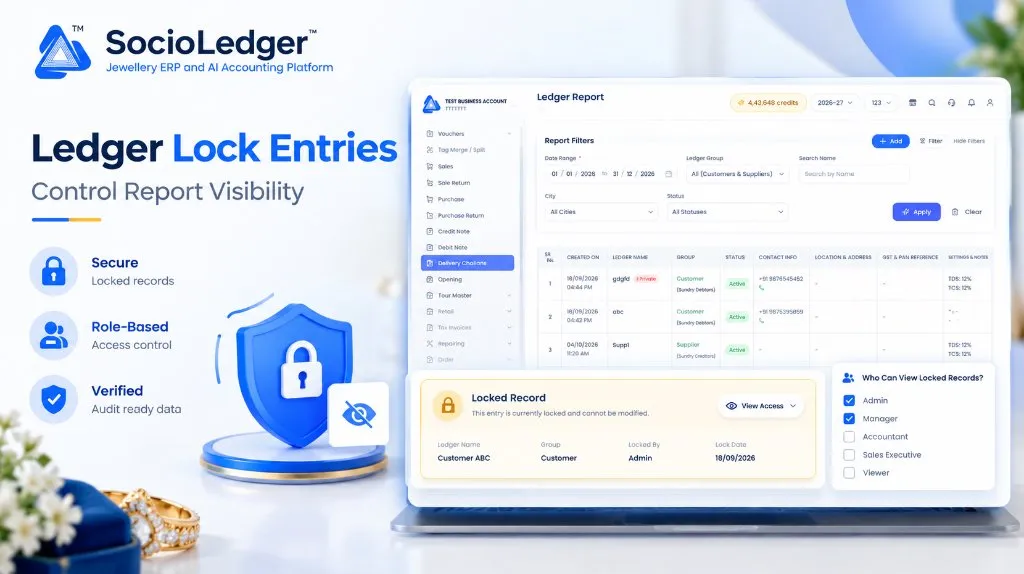
Table of contents
Open Table of contents
- Verified data, cleared whenever you are ready
- The dilemma: Protecting transactions vs. exposing lock metadata
- What’s new: The Ledger Lock Entries setting
- What authorized users see when lock entries are visible
- Visualizing the Ledger Lock Entries workflow
- Granular control through role-based access permissions
- Why this matters for your jewelry business
- Comparison: Traditional accounting locks vs. SocioLedger Ledger Lock Entries
- How it works: Step-by-step setup guide
- Where to find the Ledger Lock Entries setting
- Part of SocioLedger’s integrated jewelry management suite
- The right people see the right details
Verified data, cleared whenever you are ready
Locking is how you mark ledger data as verified. Once a specific period’s transactions have been audited, matched against physical gold or bank slips, and locked, that portion of the ledger is settled.
In traditional accounting setups, businesses feel forced to wait until financial year-end on March 31 to close books and carry forward balances. SocioLedger removes that restriction. You can clear your verified data any time you choose, turning closing balances into opening balances whenever you are ready.
This means a busy month, a festive quarter like Diwali or Akshaya Tritiya, or any verified trading period can be closed out on your schedule:
- Settled checkpoints: Checked transactions are permanently secured so historical balances never drift.
- Fresh, clean ledgers: Archiving verified historical clutter keeps daily ledger views fast, responsive, and easy to read.
- Confirmed opening figures: The balances you carry forward into active trade are numbers you personally verified, rather than unvetted estimates.
Reconciling accounts in high-volume trading centers like Zaveri Bazaar in Mumbai, Surat’s bullion exchange, Rajkot, or Karol Bagh requires fast verification. Settling verified intervals as you go gives you peace of mind that past vouchers are safe from unauthorized changes.
The dilemma: Protecting transactions vs. exposing lock metadata
While locking historical vouchers is essential for fraud prevention and clean audits, lock entries generate metadata that not everyone needs to see:
- Audit details: Who placed the lock, the precise date and time stamp, and the internal accounting remark.
- Sensitive totals: Aggregate lock figures, including total rupee value, fine gold weight, and silver weight.
- Counter clutter: For counter sales executives, billing clerks, or inventory handlers, large lock summary panels take up visual space and cause confusion during quick customer lookups.
- Internal notes exposure: An accountant’s remark explaining why a supplier account was frozen or which bank ledger it was reconciled against should not be visible to staff with standard viewing access.
Jewelry business owners need the protection of locked vouchers without broadcasting internal audit records across every workstation screen. The Ledger Lock Entries setting provides that exact separation.
What’s new: The Ledger Lock Entries setting
Located in Settings, the new Ledger Lock Entries toggle governs whether lock entries and summary panels appear within the Ledger Report:
- Turned on: Users can see lock entries and the lock summary panel in the Ledger Report, provided their assigned user role holds the explicit permission to view them.
- Turned off: Lock entries and summary panels are suppressed entirely from the Ledger Report, presenting a clean, uninterrupted statement of accounts.
Most importantly, locked transactions stay 100% protected either way. Toggling the setting off does not weaken, remove, or bypass the underlying voucher freeze. It strictly controls report presentation, ensuring your books stay sealed while displaying only what is relevant to the viewer.
What authorized users see when lock entries are visible
When Ledger Lock Entries is turned on and an authorized user views the Ledger Report, a dedicated lock panel appears directly beneath the locked transaction rows.
+---------------------------------------------------------------------------------------+
|  [!] Locked Record                                                                    |
|      This entry is currently locked and cannot be modified.       [ View Access v ]   |
|                                                                                       |
|  Ledger Name: Customer ABC    Group: Customer       Locked By: Admin                  |
|  Lock Date: 18/09/2026        Confirmed With: SBI   Remark: Quarterly Audit Settled   |
|  Total Amount: Rs 4,85,200    Fine Gold: 54.210 g   Silver Weight: 1,250.000 g        |
|                                                                                       |
|                                                       [ Unlock Period ]               |
+---------------------------------------------------------------------------------------+
Complete audit trail on the lock panel
The lock panel communicates every critical parameter of the sealed period with crystal clarity:
- Record Locked By: The specific team member or administrator who authorized the freeze.
- Date Range: The exact start and end dates covered by the lock.
- Total Amount, Fine Weight, and Silver Weight: The frozen monetary value, fine gold weight, and silver weight locked within that timeframe.
- Created At: The exact date and timestamp when the lock took effect.
- Confirmed With: The corresponding bank statement, party ledger, or counter register the entries were verified against.
- Remark: The explanation or audit reference noted during the locking workflow.
On-demand period unlocking
For situations where an audit adjustment or genuine data correction is necessary, an Unlock button is positioned right on the panel. Only authorized roles with administrative privileges can execute an unlock, ensuring that settled periods are never opened without deliberate intent.
Visualizing the Ledger Lock Entries workflow
The following diagram illustrates how SocioLedger checks both the system setting and individual role permissions before deciding what to display on the Ledger Report:
+-----------------------------------------------------------------------------+
|                  Voucher Records Checked & Locked in Ledger                 |
+-----------------------------------------------------------------------------+
                                      │
                                      ▼
               ┌──────────────────────────────────────────────┐
               │   Check Setting: Ledger Lock Entries Toggle  │
               └──────────────────────┬───────────────────────┘
                                      │
                 ┌────────────────────┴────────────────────┐
                 │                                         │
                 ▼                                         ▼
         [ Toggle is OFF ]                         [ Toggle is ON ]
                 │                                         │
                 ▼                                         ▼
     ┌───────────────────────┐             ┌───────────────────────────────┐
     │  Clean Ledger Report  │             │   Evaluate User Role Access   │
     │  • Rows Stay Locked   │             └───────────────┬───────────────┘
     │  • Lock Panel Hidden  │                             │
     │  • Zero Visual Noise  │              ┌──────────────┴──────────────┐
     └───────────────────────┘              │                             │
                                            ▼                             ▼
                                    [ Role Permitted ]          [ Role Not Permitted ]
                                   (Admin / Manager / CA)        (Billing / Sales / Counter)
                                            │                             │
                                            ▼                             ▼
                                ┌───────────────────────┐     ┌───────────────────────┐
                                │ Full Audit Lock Panel │     │  Clean Ledger Report  │
                                │ • Weights & Balances  │     │  • Protected Vouchers │
                                │ • User & Timestamp    │     │  • Lock Panel Hidden  │
                                │ • Remark & Unlock CTA │     │  • Restricted Details │
                                └───────────────────────┘     └───────────────────────┘
Granular control through role-based access permissions
Visibility follows your role structure. Even when the Ledger Lock Entries toggle is active across your organization, only users whose assigned role contains the viewing permission will see lock entries.
This multi-tiered security model allows you to tailor visibility precisely:
- Owners and Partners: Retain full visibility across all locked periods, audit remarks, and unlock controls.
- Chartered Accountants and Senior Auditors: Review lock panels, verified metal weights, and reconciliation notes during periodic audits.
- Store Managers: Verify whether a customer or supplier ledger has been frozen without exposing confidential financial remarks.
- Counter Staff and Sales Executives: Generate day-to-day customer statements and receipts without seeing backend lock entries or administrative tags.
By pairing the general toggle with role-based permissions, you prevent information leakage across your team while keeping the audit trail fully accessible to decision-makers.
Why this matters for your jewelry business
Configuring lock entry visibility solves real operational and administrative challenges:
- Close out verified data any time: Settle verified periods and bring closing balances forward as openings whenever you choose, without waiting for the annual financial year-end.
- You decide what is visible: Turn lock details on or off based on showroom layout, terminal placement, or branch operational policy.
- Role-based security: Enforce strict separation between administrative audit trails and daily counter reporting.
- Clarity where it is needed: Accountants, auditors, and showroom partners can immediately inspect what was locked, who authorized it, and the underlying verification remarks.
- Protection stays in place: Suppressing lock panels never compromises voucher safety — locked entries cannot be edited, tampered with, or deleted.
- Transparent accountability: Every lock preserves a permanent history of the responsible user, date range, and audit notes.
- Less confusion for your team: Counter staff view clean, straightforward balances without distracting system banners or questions about locked periods.
Comparison: Traditional accounting locks vs. SocioLedger Ledger Lock Entries
| Feature / Capability | Traditional Accounting Software | SocioLedger Ledger Lock Entries |
|---|---|---|
| Settling Verified Data | Rigid year-end March 31 close required | Settle any verified week, month, or quarter on demand |
| Voucher Protection | Either everything is open or entire software is frozen | Granular voucher-level locking directly in the report |
| Lock Metadata Display | Fixed display; cannot hide administrative entries | Toggle on or off via platform settings |
| Role-Based Visibility | All users see the same report layout | Only permitted roles can view lock panels and remarks |
| Audit Metadata Tracking | Generic system logs detached from ledger view | Inline panel with user, timestamp, remark, and weights |
| Precious Metal Tracking | Currency balances only | Fine gold, silver weight, and rupee totals locked side-by-side |
| On-Demand Unlock | Requires IT database scripts or full period reset | Secure, single-click unlock button for authorized admins |
How it works: Step-by-step setup guide
Activating and configuring the Ledger Lock Entries setting in SocioLedger is simple:
- Lock your transactions: In the Ledger Report, select the verified vouchers you wish to seal, choose your date range, and record your lock remark.
- Access Settings: Open Settings from the main navigation menu.
- Configure Ledger Lock Entries: Locate the Ledger Lock Entries setting and toggle it on or off according to your preference.
- Assign role permissions: Navigate to Roles & Permissions and check the view permission for the roles (such as Admin, Partner, or Accountant) authorized to see lock entries.
- Review the Ledger Report: Open the Ledger Report. Permitted team members will see the lock panel beneath locked vouchers, while other staff see a clean report with records safely secured.
Where to find the Ledger Lock Entries setting
The configuration is straightforward to find inside SocioLedger:
- To manage the setting: Go to Settings → Ledger Lock Entries.
- To configure permissions: Go to Settings → Team & Permissions → Roles.
- To view locked entries: Open Reports → Ledger Report.
Authorized users will immediately notice the lock summary panel below locked voucher groups, while restricted profiles will see standard transaction rows without administrative panels.
Part of SocioLedger’s integrated jewelry management suite
The Ledger Lock Entries setting works alongside SocioLedger’s comprehensive suite of accounting and security controls designed specifically for jewelry retail, wholesale, and bullion trade:
- Freeze verified vouchers: Lock specific voucher ranges against accidental edits using Lock Ledger Period.
- Automated edit timeouts: Prevent backdated invoice tampering after set hours with Retroactive Lock.
- Quick party lookups: Access consolidated customer and supplier directories with the Customer Detail Report.
- Pinpoint specific entries: Locate individual vouchers or voucher types instantly using the Ledger Search Field-Wise Filter.
- Track balance evolutions: Inspect historical account balance trajectories using the Ledger History Panel.
The right people see the right details
Locked records need to be clear to the people who manage them and quiet for everyone else. When an auditor or partner opens a ledger, seeing who locked the period, the verified fine gold weight, and the reconciliation remark provides total confidence. But when a counter sales executive prints an account statement for a customer, those administrative audit details only create confusion.
With the Ledger Lock Entries setting and role-based access permissions, jewelry showroom owners and accountants decide exactly who sees the lock details in the Ledger Report — keeping records tamper-proof, reports clean, and sensitive audit details private.
Want more control over what your team can see? Tell us — contact our team and discover how SocioLedger helps you protect your data and streamline your showroom workflow.