
SocioLedger’s Wholesale module now allows jewelry businesses to add fine items, such as Fine 999, directly into Sale, Sale Return, Purchase, Purchase Return, Credit Note, Debit Note, and Receipt Note vouchers. Wholesale business runs on metal: alongside finished ornaments, wholesalers regularly buy, sell, return, and settle pure bullion. By making fine items accessible across all wholesale voucher screens, SocioLedger eliminates awkward multi-voucher workarounds and lets trading desks record every pure metal movement cleanly in the exact document where it happens.
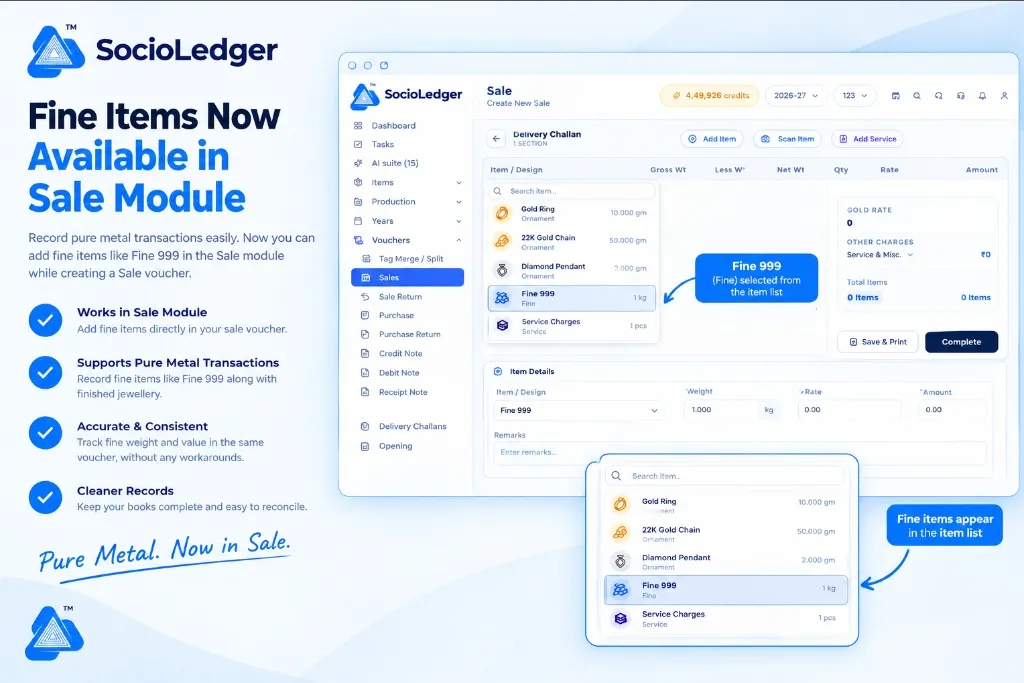
Table of contents
Open Table of contents
- Why pure metal tracking across wholesale vouchers matters
- What’s new: Fine items available across all wholesale vouchers
- Key operational benefits for wholesale jewelry teams
- How it works: Step-by-step counter workflow
- Where to find fine items in SocioLedger
- Comparison: Fragmented voucher workarounds vs. SocioLedger Wholesale vouchers
- Part of SocioLedger’s integrated metal management suite
- Pure metal, recorded wherever it moves
Why pure metal tracking across wholesale vouchers matters
In fast-paced jewelry wholesale hubs like Zaveri Bazaar in Mumbai, Karol Bagh in Delhi, and Manek Chowk in Ahmedabad, transactions rarely involve only finished jewelry. Wholesalers routinely supply pure 24K bullion bars or 999 fine silver along with finished bangles and necklaces, accept melting scrap from retailers, or settle wholesale balance accounts directly in pure metal.
When accounting software restricts fine items to only a subset of entry screens, daily operations grind against unnecessary administrative hurdles:
- Forced multi-voucher splits: If a wholesale client purchases both finished jewelry and pure gold granules in a single deal, operators previously had to split the transaction across separate voucher types, issuing two different slips for one transaction.
- Awkward return handling: When a retailer returns pure metal alongside finished ornaments, counter staff could not process the return in a standard Sale Return voucher, forcing messy manual credit adjustments.
- Imprecise notes and adjustments: If a purity settlement or weight discrepancy required a Credit Note or Debit Note, the lack of fine item support meant operators had to adjust rupee values rather than tracking the actual fine metal grams.
- Fragmented audit trails: Splitting transactions across different voucher categories muddles ledger history, making it harder for accountants to verify physical metal stocks against recorded entries.
Wholesale jewelry desks need a unified system where pure metal moves as freely and naturally through every voucher as finished ornaments.
+-----------------------------------------------------------------------------+
|               Traditional Restricted Wholesale Entry Workflow              |
+-----------------------------------------------------------------------------+
|                                                                             |
|   Client Transaction: Finished Ornaments + 500g Fine 999 Gold               |
|            │                                                                |
|            ├──► Wholesale Sale Voucher (Finished Ornaments Only)            |
|            │    └─ Cannot select Fine 999                                   |
|            │                                                                |
|            └──► Separate Bullion / Journal Slip (Fine Metal Workaround)     |
|                 └─ Disconnected voucher, double entry, split customer bill  |
|                                                                             |
|   Result: Fragmented records, double paperwork, painful metal audits       |
+-----------------------------------------------------------------------------+
|               SocioLedger Unified Wholesale Voucher Workflow                |
+-----------------------------------------------------------------------------+
|                                                                             |
|   Client Transaction: Finished Ornaments + 500g Fine 999 Gold               |
|            │                                                                |
|            └──► Unified Wholesale Sale Voucher                              |
|                 ├── Gold Ring (Ornament)                                    |
|                 ├── 22K Gold Chain (Ornament)                               |
|                 └── Fine 999 (Fine Item - 500g)                             |
|                                                                             |
|   Result: One unified invoice, zero workarounds, 100% accurate metal tally  |
+-----------------------------------------------------------------------------+
What’s new: Fine items available across all wholesale vouchers
With this update, fine items are fully enabled across the entire suite of vouchers in SocioLedger’s Wholesale module. Whenever you open the item search list inside a voucher, your pre-configured fine items appear alongside regular ornaments, services, and miscellaneous charges.
+-------------------------------------------------------------------------------------------------------+
|  Wholesale > Sale > Create New Sale                                                                   |
+-------------------------------------------------------------------------------------------------------+
|                                                                                                       |
|  [ Add Item ]   [ Scan Item ]   [ Add Service ]                                                       |
|  ───────────────────────────────────────────────────────────────────────────────────────────────────  |
|  ┌──────────────────────────────────────────────────────────────────┐                                 |
|  │ 🔍 Search item...                                                │                                 |
|  ├──────────────────────────────────────────────────────────────────┤                                 |
|  │  💍 Gold Ring              Ornament                    10.000 gm │                                 |
|  │  🪙 22K Gold Chain          Ornament                    50.000 gm │                                 |
|  │  💎 Diamond Pendant         Ornament                     2.000 gm │                                 |
|  │  🧱 Fine 999                Fine                             1 kg │ ◄── [ Fine 999 Selected ]       |
|  │  📦 Service Charges         Service                         1 pcs │                                 |
|  └──────────────────────────────────────────────────────────────────┘                                 |
|                                                                                                       |
|  Item / Design: [ Fine 999 ▼ ]      Weight: [ 1.000 kg ]      Rate: [ 7,450.00 ]                      |
|                                                                                                       |
|                                        [ Save & Print ]   [ Save & New ]   [ Complete ]               |
+-------------------------------------------------------------------------------------------------------+
You can now select and process fine items across all seven key wholesale vouchers:
1. Sale vouchers
Wholesale orders frequently package finished jewelry alongside pure metal biscuits or casting grains. You can now add fine items like Fine 999 directly into a wholesale Sale voucher, combining ornaments and pure metal on a single bill.
2. Sale Return vouchers
When customers or retail partners return unworked pure metal or bullion delivered on approval, you can record the intake directly through a standard Sale Return voucher without adjusting unrelated invoices.
3. Purchase vouchers
Wholesalers procure raw metal from bullion dealers, refiners, and secondary markets daily. With fine items supported in Purchase vouchers, you can record pure metal acquisitions alongside finished jewelry lots from manufacturing partners.
4. Purchase Return vouchers
If a metal delivery from a supplier fails purity testing or exceeds your required inventory threshold, you can return fine metal directly using a Purchase Return voucher, maintaining a clean supplier ledger.
5. Credit Note vouchers
Price settlements, purity corrections, and quality allowances often require crediting a client in metal rather than cash. Credit Notes now accept fine items, ensuring corrections match the exact metal grade of the original trade.
6. Debit Note vouchers
When suppliers deliver metal at an agreed lower purity or when weight differences arise during hallmarking verification, you can issue a Debit Note carrying fine items directly against their account.
7. Receipt Note vouchers
Receipt notes handle metal intake against pending contracts, job-work deliveries, or advance settlements. Recording pure metal directly as a fine item on a Receipt Note provides immediate visibility over physical metal received at your counter.
Key operational benefits for wholesale jewelry teams
Bringing fine items across all wholesale vouchers delivers tangible improvements to counter speed, inventory integrity, and financial reporting:
- One consistent flow: Your staff no longer needs to remember which voucher allows pure metal and which blocks it. The item selector behaves consistently everywhere.
- Both trading directions covered: Inbound and outbound transactions — purchases, sales, and their respective returns — all handle pure metal in a single, standardized flow.
- Properly formatted adjustments: Credit and debit notes carry the exact fine metal weight, ensuring balance corrections preserve metal purity rather than muddying rupee accounts.
- Direct metal intake via Receipt Notes: Pure metal received against pending orders or customer deposits gets logged instantly, eliminating temporary offline notes.
- Fewer workarounds and split bills: No more dividing a single client delivery across multiple voucher screens just to accommodate pure metal items.
- Pristine accounting and audit logs: Fine weight is tracked directly in the specific voucher where the physical transfer happened, simplifying reconciliation for your tax consultant.
How it works: Step-by-step counter workflow
Recording a fine item in any wholesale voucher takes only a few seconds:
- Open the Wholesale module: Select the voucher you want to create, such as Sale, Purchase, Credit Note, or Receipt Note.
- Open the item list: Click Add Item to launch the item selector. Use the search bar to locate your item instantly.
- Select your fine item: Choose your pure metal item, such as
Fine 999orFine 995. - Enter transaction details: Input the weight, applicable gold rate, and any relevant charges or remarks as you normally do.
- Save the voucher: Click Save, Save & New, or Save & Print to finalize your entry and print your documentation.
Where to find fine items in SocioLedger
Fine items appear directly in the standard item selection dropdown of each voucher in the Wholesale module. In SocioLedger, fine items are configured as a dedicated item type under your inventory settings.
Because they belong to your central item master, they are indexed right alongside finished ornaments, casting services, and miscellaneous charges. Whenever an operator clicks Add Item, the search filter returns fine items instantly based on name or code, ready for one-click selection.
Comparison: Fragmented voucher workarounds vs. SocioLedger Wholesale vouchers
| Operational Metric | Fragmented Voucher Workarounds | SocioLedger Wholesale Vouchers |
|---|---|---|
| Voucher Coverage | Fine items restricted to specific screens | Available across all 7 wholesale vouchers |
| Transaction Entry | Split into multiple separate bills | Single unified voucher for ornaments and metal |
| Return Handling | Indirect manual credit or cash adjustments | Direct Sale Return and Purchase Return vouchers |
| Adjustment Notes | Currency-only adjustments for metal disputes | Fine items tracked directly on Credit and Debit Notes |
| Counter Speed | Slowed by menu navigation and split entries | Rapid selection from standard item search |
| Audit Clarity | Fractured paper trails across multiple modules | 100% traceable fine weight per transaction |
Part of SocioLedger’s integrated metal management suite
The availability of fine items across all wholesale vouchers builds upon SocioLedger’s comprehensive ecosystem for jewelry businesses:
- Automated Ledger Defaults: Set default metal purities for frequent trading partners using the Ledger Wise Fine Item setting.
- Speedy Bhav Settlements: Seamlessly link counter receipts and bookings with the Payment Receipt to Rate Cut shortcut.
- Delivery Adjustments: Make fast, balanced round-offs at dispatch using Round Off Discount in Delivery Challan.
- Audit Protection: Safeguard historical wholesale transactions from unauthorized revisions using Retroactive Lock settings.
- Physical Verification: Reconcile wholesale tray inventory and loose bullion daily with Stock Tally verification.
Pure metal, recorded wherever it moves
Pure metal flows through a wholesale jewelry business from every angle — bought from bullion suppliers, sold to retail jewelers, returned from approvals, adjusted for purity differences, and received against running accounts.
With fine items now supported across all wholesale vouchers, wholesalers can record every pure metal transaction in the right place, in the exact same way, every time.
Missing a voucher where your business needs fine items? Tell us — contact our team and we will look into it.