
SocioLedger’s Touch & Colors module now features a dedicated Update Rate button that lets jewelry businesses add and update the sale and purchase rate for every gold and silver touch from a single screen. Metal rates move throughout the day, and a fast-moving jewelry business has to keep up. When you manage a full list of touches such as 14 KT, 18 KT, 22 KT, 24 KT, and fine metal, updating the sale and purchase rate of each one by opening and editing each record separately takes time — and that administrative drag quickly adds up on a busy trading day. The new Update Rate shortcut in SocioLedger is built for exactly this job.
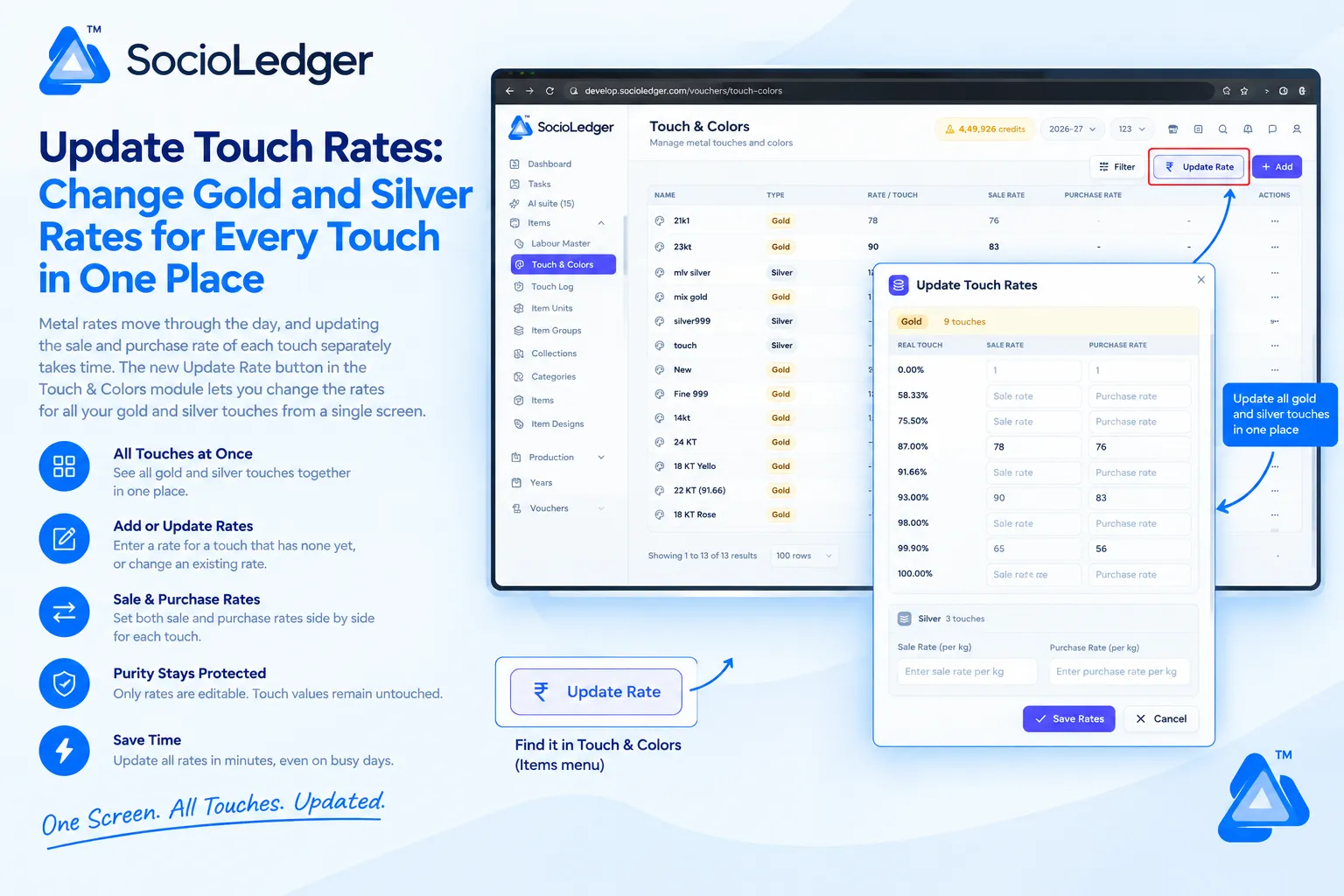
Table of contents
Open Table of contents
- Why updating touch rates one by one slows down jewelry businesses
- What’s new in the Touch & Colors module
- Only rates change, never purity
- Why this matters for jewelry businesses
- Comparison: Individual touch editing vs. unified Update Rate
- How it works: Step-by-step rate update
- Where to find the Update Rate button
- Part of SocioLedger’s integrated metal management suite
- Rates that keep up with the jewelry market
Why updating touch rates one by one slows down jewelry businesses
In active jewelry manufacturing and retail centers like Zaveri Bazaar in Mumbai, Surat, Rajkot, and Karol Bagh in Delhi, bullion spot rates fluctuate constantly. When MCX prices shift or local bullion associations announce midday adjustments, showrooms and wholesale counters must promptly reflect new rates across their pricing sheets.
However, jewelry operations rarely deal with a single flat gold or silver rate. Showrooms and workshops calculate transactions against an array of purity benchmarks:
- Gold purity touches: 14 KT (58.33%), 18 KT (75.00%), 22 KT (91.66%), 24 KT (99.90%), and pure Fine 999.
- Silver purity touches: Fine 999 bullion, 92.5 sterling silver, and daily wholesale casting touches.
- Dual pricing tiers: Distinct sale rates and purchase (buy-back) rates for every individual touch.
When an ERP requires operators to update each touch individually, daily management becomes tedious:
- Repetitive clicks across multiple screens: Opening 10 to 15 different touch records just to adjust day rates eats up 15 to 20 minutes of counter staff time.
- Delayed market response: When bullion spikes suddenly, sales teams quoting prices from unadjusted records risk misquoting walk-in customers or wholesale buyers.
- Inconsistent pricing spreads: Adjusting touches one by one increases the chance of entering mismatched sale or buy-back margins across adjacent karats.
- Interrupted counter focus: Staff get pulled away from attending to clients and closing sales to perform repetitive data entry.
Your jewelry software should make adjusting daily metal rates effortless, taking seconds instead of minutes.
+-----------------------------------------------------------------------------+
|               Traditional Touch Rate Editing Workflow                       |
+-----------------------------------------------------------------------------+
|                                                                             |
|   Bullion Rate Shifts During the Day                                        |
|            │                                                                |
|            ├──► Open 18 KT Touch ──► Edit Sale & Purchase Rate ──► Save     |
|            ├──► Open 22 KT Touch ──► Edit Sale & Purchase Rate ──► Save     |
|            ├──► Open 24 KT Touch ──► Edit Sale & Purchase Rate ──► Save     |
|            ├──► Open Fine 999    ──► Edit Sale & Purchase Rate ──► Save     |
|            └──► Open Silver Touch ─► Edit Per-Kg Rates         ──► Save     |
|                                                                             |
|   Result: 10-15 separate screen navigations, high risk of delayed updates   |
+-----------------------------------------------------------------------------+
|               SocioLedger Unified Update Rate Workflow                      |
+-----------------------------------------------------------------------------+
|                                                                             |
|   Bullion Rate Shifts During the Day                                        |
|            │                                                                |
|            └──► Click [ ₹ Update Rate ] in Touch & Colors                   |
|                 │                                                           |
|                 ├── Update Gold Touches (Sale & Purchase rates side by side)|
|                 └── Set Silver Rates (Per-kg base & silver touch rates)     |
|                 │                                                           |
|                 └──► Click [ Save Rates ]                                   |
|                                                                             |
|   Result: Every gold and silver touch refreshed in under 60 seconds         |
+-----------------------------------------------------------------------------+
What’s new in the Touch & Colors module
In the Touch & Colors module, you will now see an Update Rate button prominently positioned at the top right of the page, directly alongside the Filter and + Add buttons.
Clicking this button opens the Update Touch Rates window, presenting all your active metal touches in a clean, unified modal grouped by metal:
- Gold section: Every gold touch is displayed with its configured real touch percentage, accompanied by side-by-side input fields for the Sale Rate and Purchase Rate.
- Silver section: Silver features its own dedicated section where you can set the baseline sale rate and purchase rate per kilogram, with individual silver touches organized directly below.
You can modify existing rates, enter rates for touches that had none, or leave untouched records exactly as they are. Once you enter your new figures, click Save Rates — every updated rate is instantly applied across your system.
+-------------------------------------------------------------------------------------------------------+
|  Items > Touch & Colors                                               [ Filter ]  [ ₹ Update Rate ]  [ + Add ] |
+-------------------------------------------------------------------------------------------------------+
|                                                                                   │                   |
|  ┌─────────────────────────────────────────────────────────────────────────────┐   │                   |
|  │  NAME                 TYPE         RATE / TOUCH    SALE RATE   PURCHASE RATE│   │ (Click opens modal)
|  │  21k1                 Gold         78.00%          78          76           │   ▼                   |
|  │  22 KT (91.66)        Gold         91.66%          -           -            │                       |
|  │  24 KT                Gold         100.00%         -           -            │                       |
|  │  silver999            Silver       99.90%          -           -            │                       |
|  └─────────────────────────────────────────────────────────────────────────────┘                       |
|                                                                                                       |
|  ┌─────────────────────────────────────────────────────────────────────────────────────────────────┐  |
|  │ 🗂️  Update Touch Rates                                                                       [✕] │  |
|  ├─────────────────────────────────────────────────────────────────────────────────────────────────┤  |
|  │  [ Gold  (9 touches) ]   [ Silver (3 touches) ]                                                 │  |
|  │                                                                                                 │  |
|  │  REAL TOUCH         SALE RATE                    PURCHASE RATE                                  │  |
|  │  ─────────────────────────────────────────────────────────────────────────────────────────────  │  |
|  │  58.33% (14 KT)     [ Enter sale rate        ]   [ Enter purchase rate    ]                     │  |
|  │  75.50% (18 KT)     [ Enter sale rate        ]   [ Enter purchase rate    ]                     │  |
|  │  87.00%             [ 78                     ]   [ 76                     ]                     │  |
|  │  91.66% (22 KT)     [ Enter sale rate        ]   [ Enter purchase rate    ]                     │  |
|  │  93.00%             [ 90                     ]   [ 83                     ]                     │  |
|  │  99.90% (Fine)      [ 65                     ]   [ 56                     ]                     │  |
|  │                                                                                                 │  |
|  │  Silver Rates:                                                                                  │  |
|  │  Sale Rate (per kg):     [ Enter sale rate per kg     ]                                         │  |
|  │  Purchase Rate (per kg): [ Enter purchase rate per kg ]                                         │  |
|  │                                                                                                 │  |
|  │                                                      [ ✓ Save Rates ]     [ ✕ Cancel ]          │  |
|  └─────────────────────────────────────────────────────────────────────────────────────────────────┘  |
+-------------------------------------------------------------------------------------------------------+
Only rates change, never purity
A major concern for jewelry showroom owners and factory managers when delegating software tasks is data safety. Touch percentages directly govern fine weight calculations, karigar issue-receipt balances, and hallmarking standards.
The Update Touch Rates window is engineered strictly for pricing:
- Purity values remain locked: Real touch percentages (such as 91.66% for 22 KT or 75.00% for 18 KT) are displayed for reference only and cannot be edited in this window.
- Zero risk to core accounting records: Because purity formulas cannot be altered here, updating day rates carries zero risk to inventory valuations or past voucher calculations.
- Safe delegation to billing staff: Store owners can confidently assign daily rate entry to counter executives or billing operators without granting permission to alter underlying touch masters.
You can safely update sale and purchase rates as frequently as bullion prices fluctuate, knowing that your foundational purity definitions remain completely protected.
Why this matters for jewelry businesses
Bringing all touch rates into a single window delivers immediate operational advantages to both retail showrooms and wholesale trading desks.
1. One screen for every touch
Instead of opening, editing, and closing a dozen distinct forms, you see all your gold and silver touches laid out together. You get immediate visibility over the entire karat spectrum at a glance.
2. Add or update rates flexibly
You do not need to fill in every single touch. If only 22 KT and 24 KT moved during an afternoon shift, you can update those specific rows and leave the rest untouched. You can also assign rates to touches that previously had no rate configured.
3. Sale and purchase rates side by side
Setting customer sale rates and buy-back purchase rates next to each other ensures proper margin management. You can review and verify your price spread across every touch before saving.
4. Gold and silver in one place
Showrooms handling both yellow metal and silverware no longer need to jump between separate metal sections. Both gold touches and silver per-kg rates are managed from the same dialog.
5. Purity stays strictly protected
By isolating rate entry from purity configuration, your master formulas remain tamper-proof. Staff get the speed they need without compromising database integrity.
6. Quick turnaround on busy trading days
During high-volume festival seasons like Dhanteras, Diwali, and Akshaya Tritiya, rates often change multiple times a day. Updating rates in sixty seconds keeps your billing counters running smoothly without interruptions.
Comparison: Individual touch editing vs. unified Update Rate
| Operational Dimension | Individual Touch Editing | SocioLedger Unified Update Rate |
|---|---|---|
| Update Speed | 10–15 minutes across separate screens | Under 60 seconds from a single screen |
| Screen Navigation | Open, edit, and save each touch record one by one | Single modal displaying all touches together |
| Multi-Metal Coverage | Switch manually between metal categories | Gold and silver managed in one unified window |
| Margin Visibility | Difficult to compare sale vs. purchase spreads | Sale and purchase rates displayed side by side |
| Purity Protection | Risk of accidental touch percentage edits | Touch percentages locked and read-only |
| Counter Productivity | Distracts staff during peak showroom traffic | Rapid update without slowing sales counters |
How it works: Step-by-step rate update
Updating your daily touch rates in SocioLedger is straightforward:
- Open Touch & Colors: Navigate to Items in the left sidebar menu and select Touch & Colors.
- Click Update Rate: Select the Update Rate button located at the top right of the page next to Filter and + Add.
- Enter gold rates: In the Gold section, review the real touch percentages and enter the updated Sale Rate and Purchase Rate for each karat grade you wish to adjust.
- Enter silver rates: For silver, set the updated sale rate and purchase rate per kg, and adjust any specific silver touches displayed below.
- Save your changes: Click Save Rates to apply the new rates across all updated touches immediately, or click Cancel to discard your changes without saving.
You only need to update the touches that have changed. Any field left blank or unmodified preserves its existing value.
Where to find the Update Rate button
The Update Rate button is located directly inside the Items → Touch & Colors module, positioned on the header bar next to the Filter and + Add buttons.
Because it lives right inside your existing metal touch directory, your team can access it without learning a new module or changing daily navigation routines.
Part of SocioLedger’s integrated metal management suite
The Update Rate feature fits seamlessly into SocioLedger’s broader tooling for modern jewelry businesses:
- Wholesale pure metal workflows: Handle bullion and pure metal movements across all wholesale vouchers with Fine items in wholesale vouchers.
- Making charge management: Configure diverse labor models across fixed, per-gram, and percentage rules with Labour Master rate types.
- Instant rate cut settlements: Lock bullion rates directly during payment receipt entry with the Payment Receipt to Rate Cut shortcut.
- Default partner purities: Pre-assign preferred metal purities to regular client accounts with the Ledger Wise Fine Item setting.
- Dispatch round-offs: Apply balanced, transparent adjustments at delivery using Round Off Discount in Delivery Challan.
Rates that keep up with the jewelry market
Metal rates change often, and updating them shouldn’t slow your team down. With the new Update Rate button, jewelry businesses can refresh the sale and purchase rate of every gold and silver touch from a single window in seconds, without ever risking underlying purity values.
Want a faster way to manage rates somewhere else? Tell us — contact our team and we’ll look into it.