
When a customer brings old gold to your showroom counter for an exchange or buyback, numbers record only part of the story. Gross weight, purity touch, and stone deductions go into the voucher, but the physical piece itself — its shape, condition, visible stamps, and stone setting — is captured far better in a photograph than in lines of text. SocioLedger’s Retail module now features a dedicated Photo field inside URD Purchase and URD Estimate, letting you capture a live image with your device camera or upload an existing file in a single step.
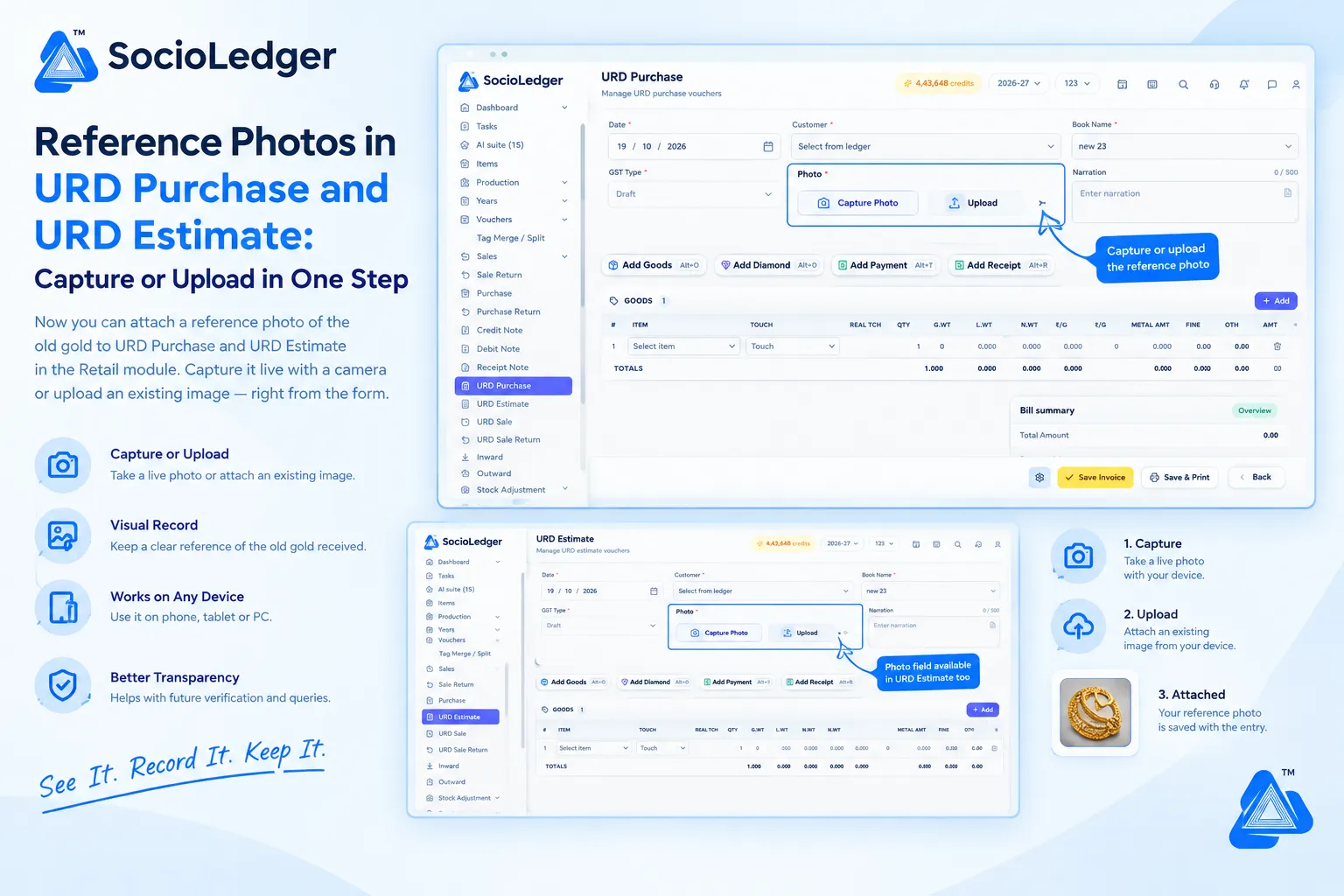
Table of contents
Open Table of contents
- Why old gold intake needs more than weight and touch numbers
- What’s new in URD Purchase and URD Estimate
- Why attaching photos matters for retail jewelry businesses
- Paper notes vs. SocioLedger reference photo entry
- How it works: Step-by-step photo attachment
- Where to find the Photo field
- Part of SocioLedger’s complete jewelry retail suite
- A picture to go with every entry
Why old gold intake needs more than weight and touch numbers
In busy jewelry centers across India — from Zaveri Bazaar in Mumbai and Karol Bagh in Delhi to Manek Chowk in Ahmedabad and the jewelry quarters of Surat and Rajkot — buying old gold from retail customers is a daily transaction. Walk-in clients bring in ancestral ornaments, damaged chains, antique kundan pieces, or plain gold bangles to trade in against fresh purchases or redeem for cash.
Traditionally, counter staff record these purchases through manual data fields:
- Gross weight and net weight: Weighed on certified balance scales at the counter.
- Estimated touch or melt purity: Tested via touchstone, acid test, or XRF spectrometer.
- Deductions: Rough estimates for lac, wax, enamel, colored stones, or dirt.
- Narration: A quick note scribbled into the voucher description field.
While this numerical data satisfies basic ledger accounting, it leaves out crucial visual context:
- Disputes after dismantling or melting: Once old jewelry is sent to the furnace or given to a karigar for refining, the original ornament ceases to exist. If a customer returns claiming their piece had higher-grade stones or questions the weight breakdown, paper notes cannot prove what the original item looked like.
- Unclear stone and enamel settings: Notes like “bangle with red stones” do not distinguish between synthetic stones, glass filling, or valuable natural gems.
- Estimate discrepancies across visits: Customers frequently request an estimate on old gold, visit multiple showrooms to compare valuations, and return days later. Without a visual reference tied to the estimate, verifying whether they brought back the exact same piece or a lighter variant requires re-evaluating the piece from scratch.
- GST and audit documentation: Purchases from unregistered dealers (URD) require stringent compliance. Maintaining an image alongside the tax voucher provides a tamper-evident audit record of the physical scrap received.
Having a clear reference photo linked directly to the transaction eliminates doubt, safeguards your showroom against disputes, and builds trust with clients.
+-----------------------------------------------------------------------------+
|              Traditional Old Gold Intake (Text & Numbers Only)              |
+-----------------------------------------------------------------------------+
|                                                                             |
|   Customer Brings Old Gold ──► Counter Weight & Purity Test                 |
|                                       │                                     |
|                                       ▼                                     |
|                        Text Voucher Entry (Gross Wt, Touch)                 |
|                                       │                                     |
|                                       ▼                                     |
|                      Old Gold Sent for Scrap / Melting                      |
|                                       │                                     |
|                                       ▼                                     |
|   Customer Questions Valuation / Piece Condition Days Later                 |
|   Result: No visual proof, disputed deductions, awkward counter friction   |
|                                                                             |
+-----------------------------------------------------------------------------+
|          SocioLedger Visual Old Gold Workflow (Capture or Upload)           |
+-----------------------------------------------------------------------------+
|                                                                             |
|   Customer Brings Old Gold ──► Counter Weight & Purity Test                 |
|                                       │                                     |
|                                       ▼                                     |
|              ┌───────────────────────────────────────────────┐              |
|              │ Attach Reference Photo Directly to Entry:     │              |
|              │ [ 📷 Capture Photo ]  OR  [ 📤 Upload Image ] │              |
|              └───────────────────────┬───────────────────────┘              |
|                                      │                                      |
|                                      ▼                                      |
|            URD Purchase / URD Estimate Saved with Embedded Photo            |
|                                      │                                      |
|                                      ▼                                      |
|   Result: Permanent visual record, zero ambiguity, audit-ready confidence   |
|                                                                             |
+-----------------------------------------------------------------------------+
What’s new in URD Purchase and URD Estimate
In both URD Purchase and URD Estimate, the top header section of the form now contains an interactive Photo field. This lets counter executives attach a high-resolution reference photo directly to the voucher while creating the entry.
The photo field provides two direct capture methods:
- Capture Photo: Activates your device camera directly within the browser window. Counter staff can position the piece under counter lighting or a desktop macro camera and snap the photo instantly without switching applications.
- Upload: Lets you select and attach an image already saved on your local device or gallery.
Both options are fully responsive and work seamlessly across desktop PCs, point-of-sale terminals, iPads, Android tablets, and mobile smartphones. Whether your team is weighing scrap at the main counter, conducting a private consultation in a VIP lounge, or evaluating jewelry at an exhibition booth, the workflow remains identical.
+-------------------------------------------------------------------------------------------------------+
|  Retail > URD Purchase                                                               [ 4,43,648 credits ]
+-------------------------------------------------------------------------------------------------------+
|  Manage URD purchase vouchers                                                                         |
|                                                                                                       |
|  Date *             Customer *                  Book Name *                                           |
|  [ 19 / 10 / 2026 ] [ Select from ledger     ]  [ new 23         ]                                    |
|                                                                                                       |
|  GST Type *         Photo *                                                 Narration                 |
|  [ Draft       ▼ ]  ┌──────────────────────────────────────────────────┐    ┌──────────────────────┐  |
|                     │ [ 📷 Capture Photo ]     [ 📤 Upload ]           │    │ Enter narration      │  |
|                     └──────────────────────────────┬───────────────────┘    │ (0 / 500)            │  |
|                                                    │                        └──────────────────────┘  |
|                                                    ▼                                                  |
|                                          (Click to snap live or                                       |
|                                           attach saved image)                                         |
|                                                                                                       |
|  [ + Add Goods Alt+D ]  [ + Add Diamond Alt+D ]  [ + Add Payment Alt+T ]  [ + Add Receipt Alt+R ]      |
|                                                                                                       |
|  GOODS (1)                                                                                            |
|  ┌───┬─────────────┬─────────────┬──────────┬─────┬────────┬────────┬────────┬─────────┬────────┬────┐  |
|  │ # │ ITEM        │ TOUCH       │ REAL TCH │ QTY │ G.WT   │ L.WT   │ N.WT   │ METAL AMT│ FINE   │DEL │  |
|  ├───┼─────────────┼─────────────┼──────────┼─────┼────────┼────────┼────────┼─────────┼────────┼────┤  |
|  │ 1 │ Select Item │ Touch       │ -        │ 1   │ 0.000  │ 0.000  │ 0.000  │ 0.000   │ 0.000  │ 🗑 │  |
|  └───┴─────────────┴─────────────┴──────────┴─────┴────────┴────────┴────────┴─────────┴────────┴────┘  |
|                                                                                                       |
|                                                         [ ✓ Save Invoice ]  [ 🖨️ Save & Print ] [ Back ]|
+-------------------------------------------------------------------------------------------------------+
Why attaching photos matters for retail jewelry businesses
Adding a visual dimension to your purchase and estimate vouchers delivers immediate practical advantages for everyday showroom operations.
1. A permanent visual record of every piece
Every piece of old gold has individual characteristics — whether it is a stamped karat hallmark, a worn clasp, enamel chipping, or specific stone settings. Attaching a photo ensures you have an exact visual record preserved permanently alongside the financial voucher.
2. Photograph it on the spot without leaving the form
You do not need to take a picture on your personal phone, send it over WhatsApp, download it to a PC, and then look for where to store it. With Capture Photo, your counter team clicks one button, snaps the image directly in the form while the customer is standing right across the counter, and completes the entry in seconds.
3. Use an existing image when convenient
If your showroom takes professional macro shots under a specialized lightbox or if a customer sent a photo beforehand via message, you can choose Upload to attach that existing image file directly.
4. Works on any device across your showroom
Showroom operations happen across diverse devices:
- Desktop computers and POS terminals: Use a connected USB webcam or counter camera.
- Tablets and iPads: Staff moving across the sales floor can tap Capture Photo to use the tablet’s built-in camera.
- Mobile phones: Ideal for exhibition stalls, trunk shows, or home visits where you evaluate old gold on the go.
5. Essential for URD Estimates before purchase
Customers frequently ask for an exchange quote and want to think it over before finalizing. When you create a URD Estimate, attaching the photo locks the visual identity of the jewelry to that quote. When the customer returns days later to complete the transaction, your billing team can immediately cross-reference the piece against the estimate photo to confirm it is the exact same ornament.
6. Smoother coordination with refining karigars
When scrap gold moves from the retail counter to the workshop for bar casting or acid refining, having an attached image clarifies what materials were received, reducing internal finger-pointing between showroom managers and factory supervisors.
Paper notes vs. SocioLedger reference photo entry
| Evaluation Aspect | Traditional Weight & Text Entry | SocioLedger Reference Photo Entry |
|---|---|---|
| Physical Appearance | Vague one-line narration (e.g., “broken chain”) | Clear, high-resolution visual record |
| Stone & Enamel Proof | Weight deductions frequently disputed later | Visual evidence of stone types, settings, and wear |
| Customer Verification | Relies on customer memory vs. store records | Photo attached to voucher for indisputable verification |
| Capture Speed | Manual scribbles or external photo transfers | One-click device camera capture or file upload |
| Estimate Linking | Difficult to verify if returned item matches estimate | Direct visual match between estimate and final purchase |
| Device Flexibility | Disconnected steps across phones and computers | Works natively on mobile, tablet, and desktop |
| Audit Readiness | Basic invoice with minimal physical proof | Comprehensive record meeting modern GST transparency |
How it works: Step-by-step photo attachment
Adding a reference photo to your old gold vouchers is straightforward and intuitive:
- Open the voucher: In SocioLedger’s left sidebar, go to Retail (or Vouchers) and select URD Purchase or URD Estimate.
- Enter voucher headers: Select the transaction date, customer ledger name, and book name as usual.
- Locate the Photo field: Look at the top section of the form, directly between GST Type and Narration.
- Choose your attachment method:
- Click Capture Photo to take a live photo using your connected device camera.
- Click Upload to browse and select a photo saved on your computer or phone.
- Add items and weights: Click + Add Goods to enter the item name, purity touch, gross weight, less weight, and net weight.
- Save the voucher: Click Save Invoice or Save & Print. The reference image is saved permanently with the voucher.
Because the Photo field is completely optional, your staff can use it whenever a piece warrants visual documentation while keeping routine bullion or plain coin purchases fast and flexible.
Where to find the Photo field
The Photo field is built natively into both URD Purchase and URD Estimate forms in the Retail module.
It is positioned prominently in the primary header block alongside:
- Date: The voucher recording date.
- Customer: The customer ledger account.
- Book Name: The designated voucher series.
- GST Type: The applicable tax treatment (such as Draft or Registered).
- Narration: Notes and internal comments.
Because it sits right at the top of the form, staff can capture or upload the photo before or after keying in metal lines without having to navigate to secondary tabs or nested windows.
Part of SocioLedger’s complete jewelry retail suite
The reference photo feature connects directly with SocioLedger’s broader suite of tools for modern jewelry retailers:
- Accurate daily bullion pricing: Keep purchase and exchange rates aligned with real-time bullion spot rates using Update Touch Rates.
- Tax-compliant invoicing: Generate flawless invoices for retail and wholesale transactions with GST billing for jewelry businesses.
- Fixed-price counter goods: Manage fast-selling retail ornaments with zero calculation delays via Goods Fix Rate item type for retailers.
- Pure metal transfers: Settle bullion and fine gold movements across wholesale channels with Fine items in wholesale vouchers.
- Preferred client purities: Automate customer-specific karat defaults with the Ledger Wise Fine Item setting.
A picture to go with every entry
Some details are simply better seen than described. With reference photos in URD Purchase and URD Estimate, jewelry businesses can maintain a clear, indisputable visual record of every piece of old gold they receive — captured or uploaded in a single step.
Want photo attachments in another voucher? Tell us — contact our team and we will look into it.